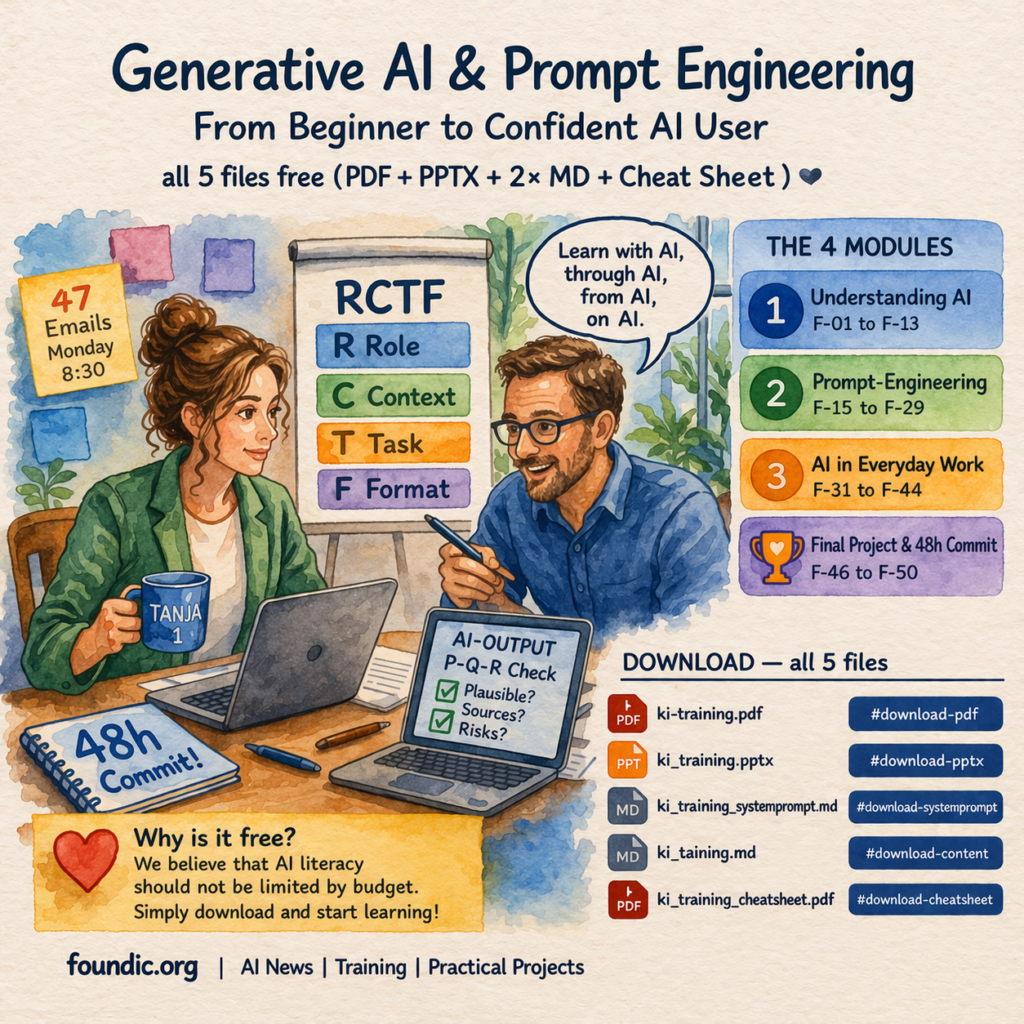
Generative AI is no longer a technology of the future, yet most people are still using it at a fraction of its potential. Prompts that are too vague, the wrong tools, no real system: the result is frustration instead of time saved. This training changes that – in one to three hours, from zero to confident.
With this article, foundic.org publishes its first complete AI training course: Generative AI & Prompt Engineering – From Beginner to Confident AI User. All materials are free and available for download.
What if your trainer is the AI itself?
Other trainings explain AI. This one can be moderated by an LLM (e.g. ChatGPT) acting as a slide-anchored trainer. The slides remain the visual anchor – the language model handles explanations, quiz sessions, and prompt feedback. You don’t just learn about AI; you learn with AI and through AI. A free account with Claude or ChatGPT is all you need.
| Traditional AI Training | This Training |
|---|---|
| 💸 €500–2,000 per person | ✅ Completely free |
| 📅 Fixed schedule, group format | ✅ Any time, 1-on-1 coaching |
| 👨🏫 Human trainer explains AI | ✅ LLM (e.g. ChatGPT) moderates the training |
| 🔄 Exercises in a separate tool | ✅ Learn and practice in the same chat |
| 📋 Generic content for everyone | ✅ Your real tasks from minute one |
| 📬 Materials sent by email afterwards | ✅ All files available for immediate download |
Who is this AI training for?
No technical background required. This training is designed for:
- Beginners with no AI experience – those who tried ChatGPT, gave up after two weeks because results weren’t convincing
- Knowledge workers in communications, finance, HR, marketing, executive assistance, and project management
- Internal multipliers and trainers looking for a ready-to-use introductory course for their team
- Organisations that want to build AI competency without expensive external training
Those who already work with AI daily will still find structuring value in the RCTF framework and the P-Q-R quality check.
What will you learn in this training?
The training is a 4-hour individual coaching session, structured into three modules plus a closing section. No lectures, no slide-reading – you start prompting live on your own tasks from minute one.
🔷 Module 1 – Understanding AI (Slides F-01 to F-15)
The difference between generative and invisible AI, which of the five major tools (ChatGPT, Claude, Perplexity, Copilot) fits which situation, why AI sometimes hallucinates and how to spot it. Three widespread AI myths are examined and debunked. The module closes with a six-question knowledge check.
🔷 Module 2 – Prompt Engineering (Slides F-16 to F-31)
The core of the training. You learn the RCTF framework four building blocks (Role, Context, Task, Format) that turn any vague prompt into a precise instruction. Also covered: re-prompting as a professional method, making AI-generated text sound authentic, a data privacy traffic light for public chatbots, the EU AI Act in brief and the P-Q-R quality check for systematically reviewing any AI output for plausibility, sources, and risk.
🔷 Module 3 – AI in Daily Work (Slides F-32 to F-46)
Three use cases with live exercises: writing (emails, reports, social media), research & analysis (a two-stage Perplexity–Claude workflow), brainstorming (20 ideas in 5 minutes, perspective shifts, action plans). Plus a mini case study with Bernd’s complete AI workflow, a reference card on common mistakes, and the full loop: RCTF → Execute → Re-Prompt → P-Q-R.
🔷 Closing (Slides F-47 to F-51)
Your personal 48h commitment: which task, which tool, which QA level — specific and binding. Five take-aways for home. A look ahead at AI trends 2026: agents, multimodality, personalised AI.
What you’ll be able to do after the training
- Write a complete RCTF prompt – for any task, in under 3 minutes
- Systematically review AI outputs using P-Q-R before using them
- Choose the right tool for the right task
- Protect sensitive company data – without giving up AI
- Use re-prompting as a professional method, not a workaround
- Recreate Tanja’s Monday: meeting summary in 3 minutes, proposal in 5, research in 20
The red thread: Tanja and Bernd
Two fictional characters accompany you through all 54 slides: Tanja, communications manager at Nordlicht AG, facing 47 unread emails on a Monday morning and Bernd from finance, who almost presented a hallucinated revenue figure in a board meeting. Their stories make every abstract AI concept immediately tangible.
How to start the AI-guided training
What’s included in the download?
📊 1. The Slides as PDF
All training content is presented and visualized across 54 slides. The PDF serves as your visual guide during the AI-led training session: You view the slides while the AI trainer guides you through the material.
🤖 2. The System Prompt (ki_schulung_systemprompt.md)
Instructs the LLM (e.g. ChatGPT) to act as a slide-anchored trainer. Contains behavioural rules: strict slide order, limited response length when drifting, and a requirement to always return to the current slide. Note: this file contains no training content – only the LLM’s behavioural instructions.
📚 3. The Training Content (ki_schulung_inhalt.md)
All 54 slides as a structured LLM (e.g. ChatGPT) reference: slide objective, core message, example or question, key takeaway, plus a “Do not drift” block with typical digression risks per slide. Upload this together with the system prompt into the same chat.
📄 4. The Cheat Sheet as PDF
A single A4 page for after the training: RCTF at a glance, P-Q-R as a checklist, five common mistakes with solutions, tool matrix, data privacy traffic light. Print-ready or digital.
Quick start: launching an LLM-guided session
For self-study with slides only, the PDF slides are sufficient. For the LLM-guided version, you also need the two Markdown files. The PDF works well as a parallel reference on a second screen.
- Open Claude (claude.ai) or ChatGPT (chatgpt.com) in a new chat, in text mode (no audio yet).
✅ ChatGPT (chatgpt.com) — Well suited, audio mode available
⚠️ Microsoft Copilot — Limited: may sometimes ignore training content.
Instead of just typing “start”, write “Please follow the Markdown file strictly”
❌ Google Gemini — Not suitable: reads training files too unreliably
- Upload both Markdown files – first
_systemprompt.md, then_content.md. - Type “Start”, the LLM takes over and begins with slide F-01.
- Open the slides PDF alongside.
- Keep the cheat sheet handy for your first week of practice.
Note: A free account is generally sufficient to get started. Upload behaviour and daily limits may vary by platform and model version.
Usage and Licence
- ✅ Personal use – free and unrestricted
- ✅ Internal, non-commercial training – free, attribution to foundic.org appreciated
- ✅ Redistribution – permitted with attribution to foundic.org
- ✅ Adaptation and customisation – permitted for internal purposes with attribution
- ⚠️ Commercial use – requires prior approval from foundic.org
🎓 Free download — all files, no registration required
We believe AI competency should not be a question of budget. This training is and will remain free – no registration, no newsletter sign-up, no strings attached.
| File | Format | Download |
|---|---|---|
| Slides – Participant Version 54 slides |
⬇ Download | |
| System Prompt (LLM Trainer) Behavioural rules for the AI system |
.md | ⬇ Download |
| Training Content (54 Slides) Internal reference for the LLM |
.md | ⬇ Download |
| Cheat Sheet Single A4 reference page, print-ready |
⬇ Download |
Your Feedback Matters
This training is version 1.0 – and we want it to keep improving. We welcome all feedback:
- 💬 How was your experience? Did the LLM moderation work well?
- 🔧 What could be improved? Content, structure, slides, pacing?
- 💡 What training would you like to see next? AI in Finance? AI for HR? Advanced Prompt Engineering? Automation with AI agents?
Leave a comment below, every piece of feedback feeds directly into the next version. And if this training helped you: share it with colleagues who haven’t yet dared to try AI. That’s exactly who we built it for.
And if you’d like to support our work:  Treat us to a coffee
Frequently Asked Questions (FAQ)
What exactly is Prompt Engineering?
Prompt engineering is the skill of crafting instructions (prompts) so that an AI language model produces optimal results. The better the prompt, the more precise, creative, and useful the response — and this training teaches you exactly how to do it.
Which AI tools are used in the training?
The training is tool-agnostic and works with all major large language models: ChatGPT, Claude, Copilot, and others. You can use whichever tool you already have access to or prefer.
How long does the training take?
The core course can be completed in 1–3 hours. The content is modular — you can go deep on specific chapters or use the full training as a structured introduction to generative AI.
Is the download really free?
Yes — completely free, no registration, no hidden costs. foundic.org provides this training as a contribution to AI literacy. The only ask: if you share it, please credit foundic.org as the source.
The background on the tools you work with in this course is covered in GPTs, Skills, Plugins, Agents – Who Offers What, and What’s Actually Worth It?.