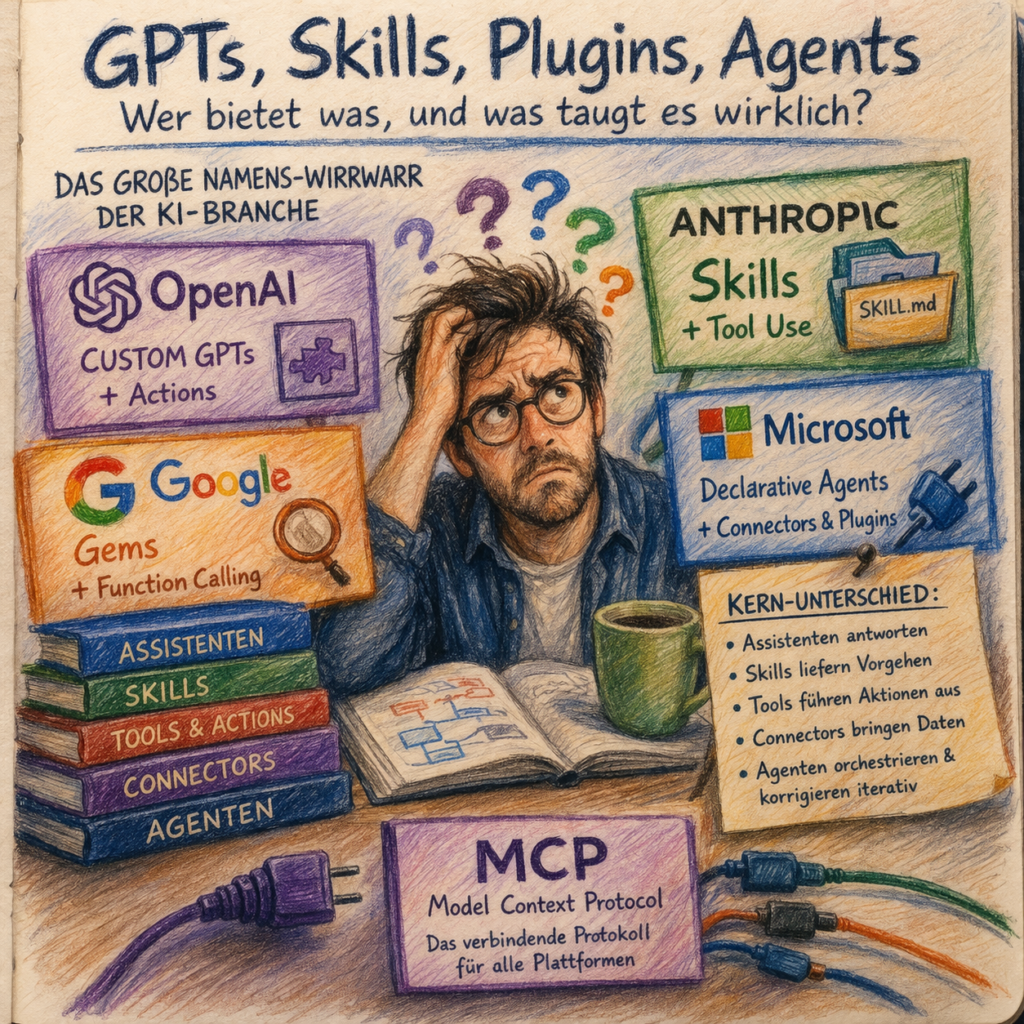
The Great Naming Confusion in the AI Industry
Anyone reading technical articles about AI integration these days needs strong nerves and a good memory. A Microsoft blog post explains why Connectors are the key to enterprise AI. An Anthropic post promotes Skills. An OpenAI developer tutorial revolves around Actions. And a Google whitepaper covers Function Calling. At first glance, this sounds like the same concept wrapped in four different packages. Look closer, and a different picture emerges: these terms operate on fundamentally different levels. Anthropic Skills are reusable capability building blocks that can be created with a single file. OpenAI Actions and Google’s Function Calling describe executable interfaces to external systems. Microsoft Connectors handle data and content connectivity. The irony holds, but the differences are real.
Welcome to the nomenclature hell of AI platforms in 2026.
Anyone wanting to make an informed decision about how to embed AI into their workflows faces a problem that has nothing to do with technology: they first have to figure out whether what vendor A calls a “Plugin” is the same as what vendor B calls an “Extension.” Most of the time, it isn’t. Sometimes, though, it is.
This article doesn’t assign overall grades, the differences between providers are too context-dependent for that. What it does instead: break down the individual dimensions in which platforms genuinely differ. If you’d first like to understand why AI systems made the leap from text generators to autonomous automation in the first place, we recommend our background article “From Text Generator to Digital Employee” as a starting point. Here, we go one step further: what exactly do the platforms offer, and where do the real differences lie?
Five Categories That Actually Matter
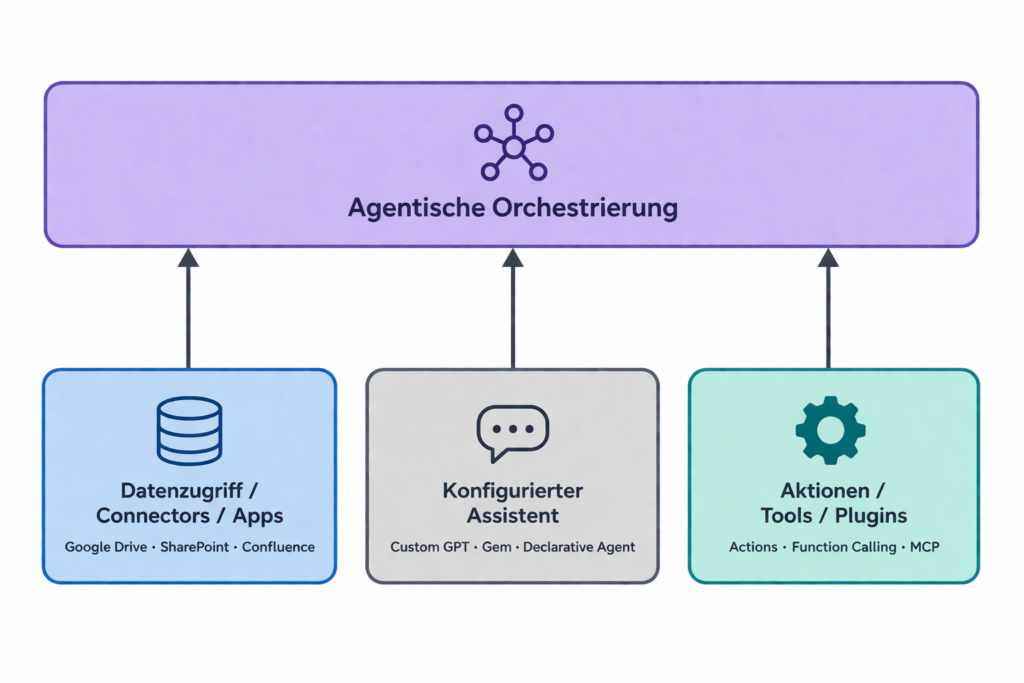
Before we put the vendors under the microscope, we need a common language. Without shared definitions, you end up comparing apples to toolboxes. The following framework isn’t based on marketing brochures but on the actual architecture of the systems, less a strict hierarchy, more an orientation guide:
Configured Assistants are pre-configured layers on top of an existing base model. No proprietary AI, no custom training, just a tailored interface with its own name, tone, knowledge base, and behavior. OpenAI calls them Custom GPTs, Google calls them Gems, Microsoft calls them Declarative Agents.
Skills are reusable capability or workflow building blocks, condensed work logic that can be called upon repeatedly. Anthropic defined this term first and developed it closest to a concrete product. OpenAI and Google have since followed and now ship Skills as a product of their own, in both cases as folders of instruction files. What began as an Anthropic peculiarity has become the first real point of convergence in this landscape.
Tools, Actions, and Plugins refer to executable interfaces: the model calls an external function, an API (an interface to another system), a database, or a service. OpenAI calls them Actions, Anthropic calls them Tool Use, Google uses Function Calling, Microsoft uses Plugins.
Connectors, Extensions, and Apps are connections to data sources and external services, they give the system access to information. Conceptually, tools and connectors sit side by side rather than in a hierarchy: tools act, connectors provide context. This is where naming confusion runs deepest: what OpenAI used to call a Connector is now called an App; Anthropic uses MCP Bundles (.mcpb, formerly Desktop Extensions/.dxt); Microsoft has Connectors as a standalone product category.
Agents orchestrate all of the above, but with one crucial distinction from everything mentioned so far: a configured assistant responds once to a prompt. An agent plans, executes, checks the result, and self-corrects iteratively, across multiple steps, until the goal is reached. This isn’t a marketing repackaging of “chatbot with better labeling”, it’s a fundamental architectural leap.
The Vendors Compared: What’s Really Behind Them
OpenAI: Product Momentum at the Cost of Consistency
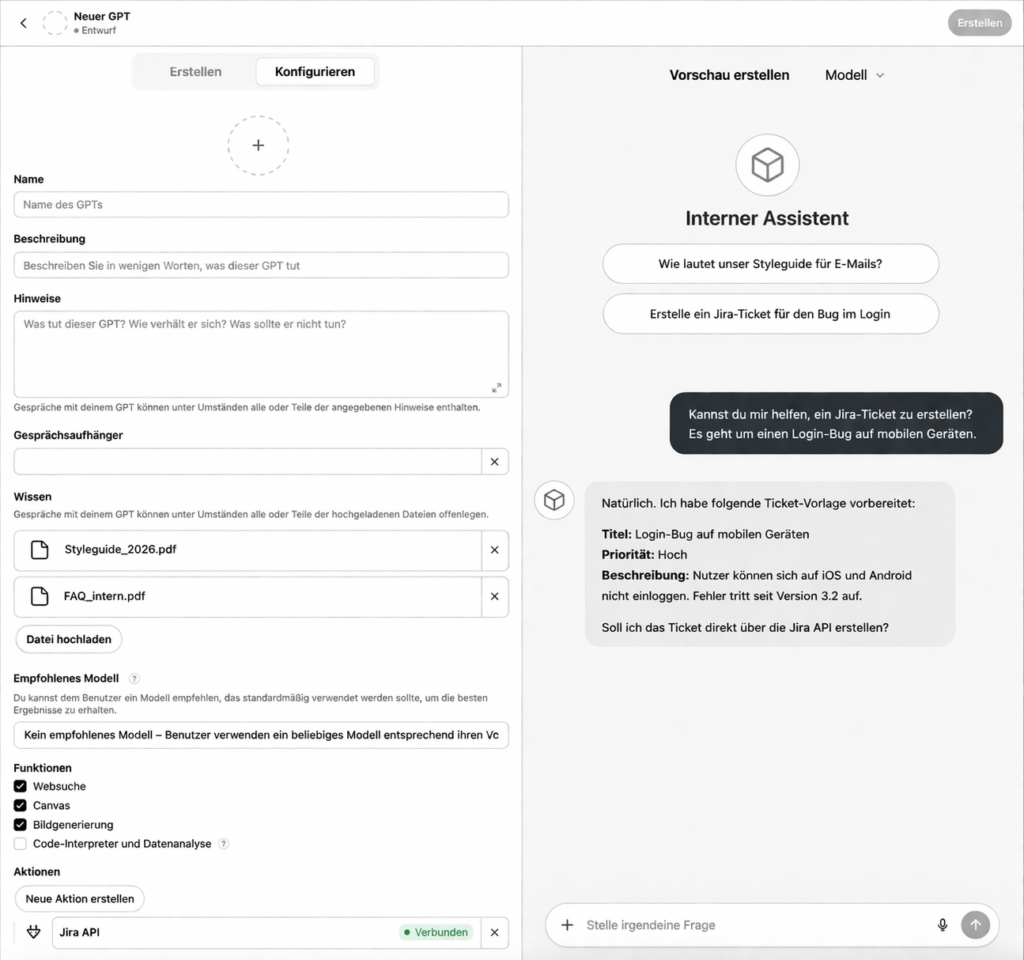
OpenAI defined the market for configured assistants with Custom GPTs and remains to this day the most widely used platform for fast, lightweight AI customization. Integration into ChatGPT means a massive user base, a low barrier to entry, and a vibrant developer community.
What works well: Custom GPTs can be configured in minutes without any coding knowledge. For internal style guide bots, FAQ assistants, or onboarding helpers, this is hard to beat. The Actions feature enables real API integrations, creating tickets, querying external services, writing calendar entries.
Where OpenAI falls short: terminology changes fast. What was called a Connector yesterday is called an App today. Anyone planning a medium- to long-term system architecture needs to expect regular shifts in product names, feature boundaries, and plan tiers. And this product dynamism has real consequences: according to OpenAI documentation, a GPT can use either Apps or Actions, but not both simultaneously. That’s not a documentation error; it’s a genuine product constraint that affects architectural decisions. Anyone unaware of this is planning against reality. Add to that: OpenAI once positioned Plugins as a central future concept, then quietly discontinued them, which simply meant extra work for everyone who had built integrations on that foundation. The term is back by now: OpenAI uses Plugins again as an umbrella, and according to its help documentation a plugin can contain skills, apps or both. Anyone who lived through that cycle has seen the same product name carry three different meanings.
Anthropic / Claude: The Clearest Stack, the Steepest Learning Curve
Anyone reading Anthropic’s documentation is immediately struck by the conceptual precision. While other vendors use terminology loosely, Anthropic has developed a clear architecture in which every layer has a distinct function.
Skills at Anthropic are not a buzzword, they’re a concrete artifact. Anthropic explicitly describes them as a “simple folder”: a directory with a SKILL.md file at its core, which explains to an AI how to approach a specific task in a structured way. Skills can either be used automatically by the system or called directly. This is fundamentally different from classic plugin mechanics that require external API calls: a Skill can be entirely text-based, without touching a single interface. This dramatically lowers the barrier to encoding work logic.
Tool Use, Anthropic’s term for Function Calling, supports both client-side and server-side tools and is cleanly documented. The Agent SDK, available for Python and TypeScript, is Anthropic’s answer to the question of how to build fully agentic systems: with an agent loop, context management, and tool integration. The outward-facing connector is increasingly MCP (Model Context Protocol), more on that in the next section.
What works well: the architecture is modular, consistent, and well documented. For anyone seriously building agentic systems, Anthropic offers the clearest conceptual foundation.
Where Anthropic falls short: the user interface for non-developers is considerably weaker than OpenAI’s or Microsoft’s. Those who don’t want to write code have limited room to maneuver. And for a long time the term “Skills” was defined so specifically to Anthropic that it regularly caused misunderstandings in cross-platform conversations. That is now easing, because OpenAI and Google have adopted the same term for the same concept.
Google / Gemini: Clearest Separation, Strongest Built-In Tools
Google has something other vendors don’t: a clear organizational separation between what end users configure and what developers build.
Gems, Google’s configured assistants, are the equivalent of Custom GPTs. They’re easy to set up, integrable with Google Workspace, and a natural entry point for many business users. Important: a Gem is not a developer tool. Anyone equating Gems with the Gemini API is comparing products from fundamentally different layers.
At the developer level, Google offers Function Calling as its primary integration tool, the bridge between natural language and real system actions. Particularly noteworthy: Built-in Tools, including Code Execution, File Search, and Grounding with Google Search. What’s technically remarkable: Google now explicitly documents that certain Gemini models can combine Built-in Tools with Custom Function Calling, native and external simultaneously. This positions Google more firmly as an agent platform than it might appear at first glance, and signals that Google is catching up meaningfully in this dimension. Grounding with Google Search remains a genuine differentiator: Gemini models can natively access current web content without requiring a separate connector to be configured.
What works well: integration with Google Workspace is nearly seamless for teams already using Drive, Docs, and Gmail. The Built-in Tools for web search and file processing are immediately usable, without any external API configuration.
Where Google falls short: tool availability varies by model. What works on one Gemini model may not be available on another, which makes systematic architectural decisions more complicated than they need to be. And for Agent SDKs, Anthropic is still the more mature choice, though the gap is narrowing.
Microsoft: Cleanest Taxonomy, but an Ecosystem That’s a Maze
In this comparison, Microsoft is the star pupil, at least when it comes to conceptual precision. The official Microsoft 365 Copilot documentation distinguishes between Declarative Agents, Custom Engine Agents, Plugins and Connectors with such clarity that it could serve as a reference for any vendor comparison.
What Microsoft Offers
Declarative Agents are Microsoft’s equivalent of Custom GPTs: configured assistants on top of the Copilot base model, with their own instruction set and knowledge base. Custom Engine Agents go a step further: here, the underlying model itself is swapped out or supplemented, which provides more control for specific requirements, but also considerably more effort.
Plugins, yes, Microsoft still actively uses this term, can work with MCP or OpenAPI/REST and enable real actions in external systems. Connectors handle knowledge and data integration, with both synchronized and federated patterns, meaning data stays where it is but is retrieved on demand.
What the Documentation Doesn’t Show
And here the real problem begins: the clarity of the documentation is undercut by the sheer volume of portals and development environments. Building AI systems with Microsoft means navigating between Microsoft Foundry (formerly Azure AI Studio, then Azure AI Foundry), Copilot Studio and the Power Platform, three surfaces that partially overlap, are partially exclusive, and target different audiences. The first of those surfaces alone has changed its name twice in two years, which involuntarily proves this article’s point. What’s cleanly separated in the documentation is often, in practice, a matter of: “Which portal was that in again?” That’s not an attack on the technology, but an honest heads-up for anyone considering the plunge.
What works well: anyone working in a Microsoft 365 environment has a nearly ready-made integrated ecosystem. Teams, SharePoint, Outlook, Word, everything is connected without having to build integrations from scratch. The governance tools for admins are more mature than most competitors.
Where Microsoft falls short: anyone working outside the Microsoft ecosystem has little reason to buy in. And the overall system’s complexity can be overwhelming for smaller teams, the documentation is solid, but the landscape behind it sometimes isn’t.
Comparison Table: Who Offers What?
| OpenAI / ChatGPT | Anthropic / Claude | Google / Gemini | Microsoft Copilot | |
|---|---|---|---|---|
| Configured Assistant | Custom GPTs | no direct equivalent | Gems | Declarative Agents |
| Skills / Workflow Building Blocks | Skills (Business/Enterprise/Edu/Healthcare) | Skills (SKILL.md) | Agent Skills (skills.sh) | via Microsoft Foundry |
| Tool Integration | Actions (OpenAPI) | Tool Use (client/server) | Function Calling | Plugins (MCP/REST) |
| Data Connectivity | Apps (formerly Connectors) | MCP Bundles (.mcpb), MCP | File Search, Grounding | Connectors (sync/federated) |
| Agent Platform | Agents API | Agent SDK (Python/TS) | Agents (Gemini API) | Custom Engine Agents |
| MCP Support | Yes (growing) | Yes (origin) | Yes (remote MCP in the Interactions API) | Yes (in Plugins) |
| Ecosystem Integration | Broad but fragmented | Developer-focused | Google Workspace | Microsoft 365 |
The table deliberately avoids point scores. The three dimensions you would otherwise express in stars are in the text: getting started without code is fastest with OpenAI and Google and hardest with Anthropic. The clearest architecture belongs to Anthropic and Microsoft, although Microsoft loses on the ground what it wins on paper through the sheer number of portals. And on terminology stability OpenAI comes last, as the path from Plugin to Connector to App and back to Plugin shows.
MCP: The Connector Everyone Needs
Behind the product variety, a consolidation trend is emerging in 2026 that many are underestimating: the Model Context Protocol (MCP). Originally developed by Anthropic and released as an open standard, MCP defines how AI models communicate with external tools and data sources: across vendors, machine-readable, standardized.
What this means in practice: instead of building separate integrations for each vendor, a single MCP-compatible connector can theoretically be used by Claude, Copilot, and others. Microsoft has integrated MCP into its Plugin architecture. OpenAI is increasingly adopting it for business integrations. Anthropic is building its entire extension stack on top of it.
Important caveat: MCP standardizes the connection, not the security. Anyone running MCP servers must independently address permissions, data boundaries, and access rights. The protocol is a shared language, not a security concept.
Security and Economics: What Decision-Makers Need to Know
When AI systems stop merely answering and start acting, the risk landscape changes fundamentally. The old debate of “Is the model training on my data?” has become secondary to the real questions:
What is the system permitted to do? Write actions such as creating tickets, scheduling calendar entries or sending emails cannot be undone. Without clearly defined permission frameworks, you’re building in systemic risk.
Which data flows where? Connectors and Extensions give models access to internal data sources. This means the access rights of the AI system and those of the requesting user must be clearly separated.
Are system prompts protected? Configured assistants often contain instructions with confidential information about internal processes. Instruction Leakage, the unintended seeping of these instructions into model responses, is a real, documented problem that cannot be solved by product selection alone.
There’s also an economic dimension that is increasingly landing on CTOs’ desks in 2026: agent efficiency as a cost driver. A configured assistant adds almost no cost over a standard subscription. A full agent with iterative planning loops, one that plans, executes, checks, and corrects, consumes many times more tokens (the computational unit by which AI APIs are billed) per run. Anyone planning agentic systems at enterprise scale must factor in the Total Cost of Ownership (TCO) of these loops. “How much does an agent cost per task?” is no longer an academic question in 2026, it’s a business one.
Who Needs What? An Honest Guide
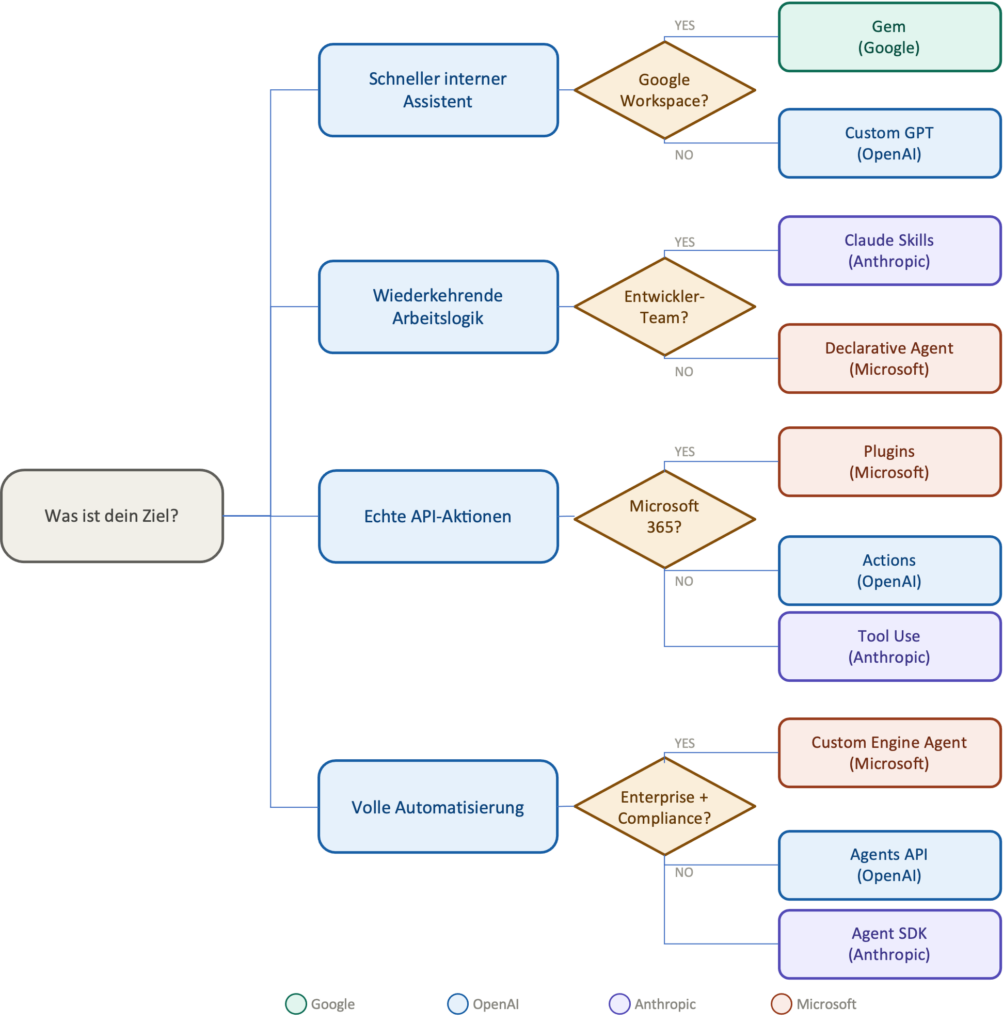
The following overview ignores marketing and focuses on actual use cases:
Quick internal assistant (style guide bot, FAQ, onboarding): Custom GPT (OpenAI) or Gem (Google). No code required, ready to deploy in an hour. Those living in the Google Workspace world will find Gems particularly smooth.
Reusable work logic (code review standards, triage schemas, release checklists): Anthropic Claude Code with Skills, if you’re willing to maintain a SKILL.md. Alternative: Microsoft Declarative Agents with a knowledge base, more accessible for non-developers.
Real API actions (creating tickets, querying CRMs, syncing data): OpenAI Actions or Anthropic Tool Use for developer teams. Microsoft Plugins for teams in the 365 ecosystem. Technical know-how is non-negotiable here.
Knowledge connectivity and data access (internal documents, Confluence, SharePoint): Microsoft Connectors for 365 environments, clearly leading in maturity and governance. Google File Search and Grounding for Google Workspace teams.
Full agentic automation (multi-step workflows, autonomous processes with self-correction): Anthropic Agent SDK or OpenAI Agents API for developer teams. Microsoft Custom Engine Agents for enterprise environments with compliance requirements. And here especially: don’t forget the TCO factor.
What the Next Two Years Will and Won’t Bring
There’s one prediction that can be made in 2026 with reasonable confidence: the competition between AI platforms will increasingly center less on model quality and more on integration ecosystems, governance tools, and standardization. The models will improve, that’s almost certain. But the real bottleneck lies elsewhere: in the question of how reliably, securely, and maintainably integrations into real workflows can be built.
MCP will play a central role in this development. Not because it’s perfect, but because it’s the first serious offer for cross-vendor interoperability. Whether it establishes itself as the standard or gets displaced by a hyperscaler is an open question, but the direction is clear.
What won’t go away, however, is the complexity. Anyone seriously building AI systems that do more than answer will not be able to avoid thinking through governance concepts, permission models, monitoring infrastructure, and cost models. The real question is no longer “Which AI model is the smartest?”, it’s: which system do I give how much room to act, under what conditions, and at what cost?
That’s a question that goes far beyond product documentation. And one that no vendor has a complete answer to yet.
📥 Tip: Download our free Prompt Engineering AI Training
FOUNDIC.org is ad-free and has no paywall. If you got something out of this article:  Treat us to a coffee