
16 sources, a good 100,000 words of raw material per week, 2,800 words of result. Step by step: 32 nodes, every click sequence, every code node complete and ready to copy.
There is a moment that everyone knows who tries to follow a subject area. You have built yourself a news stream, a few newsletters, feeds, perhaps an automated press review, and on Friday you realize: you have seen three hundred items and still do not know what actually happened this week.
That is not down to the volume. It is down to the fact that news items are available in abundance and context is not. You can get news items anywhere. What is missing is the connection: that several events in the same week belong to the same topic. That someone assesses a development quite differently from everyone else. That something which looked small on Monday had grown large by Friday.
And context simply lives in different places than news items do. It sits in podcasts, in long YouTube videos, and on websites such as The Batch, Artificial Analysis or Epoch AI, everywhere someone has taken an hour of their time.
The catch is always the same: this is precisely the material that is hardest to get hold of automatically. A podcast is an audio file. A video is an audio file with pictures. And the most productive websites often have no feed at all; you have to piece their posts together from the sitemap and fetch the text from the page itself.
That is exactly why such sources appear in hardly any automated news stream. Not because they are unimportant, but because they are inconvenient.
This guide describes how to get at them anyway. At the end there is a system that collects every day, transcribes audio tracks, condenses every find into a few sentences, and on Sunday at six in the morning writes a weekly summary of around 2,800 words that organizes the week instead of listing it.
What it costs: zero euros for speech recognition, a few cents a month for condensing.
To make this guide easier to follow, three people accompany you:
The typical office characters: the competent IT colleague, the self-appointed expert, and the honest beginner. These three perspectives help you spot the usual pitfalls and really understand n8n.
Tanja is the IT expert. She knows how n8n works, explains patiently and in a structured way – and does not let bad advice throw her off. If you have a question, Tanja has the answer.
Bernd is the self-appointed “expert” who knows everything better – and is usually wrong. His shortcuts and half-knowledge regularly lead to problems. He stands for all the dangerous myths and bad practices you should avoid.
Ulf is the learner, just like you. He asks the questions buzzing around in your head and sometimes needs an everyday comparison to understand IT. If Ulf does not understand something, that is perfectly fine – that is what Tanja is there for.
“And… action!”
Friday afternoon, 16:20. Ulf half closes his laptop and pushes it away from him.
Ulf: “I must have read three hundred items this week. And if you ask me now what happened this week, I’ll tell you: no idea.”
Tanja: “Because you read items. Items are the raw material. What you are missing is someone who lays them side by side at the end of the week.”
Bernd: “I have a folder of bookmarks for that. I go through it on Sundays.”
Ulf: “And do you go through it?”
Bernd: “Sundays are always busy for me.”
Tanja: “Which is exactly why we are now building it so that it happens by itself on Sunday at six. And from the sources nobody else fetches automatically.”
Where the material comes from: three routes, four kinds of source
Sixteen sources in the example setup, and not one of them is a news ticker. They fall into four groups, and the most technically demanding one is also the most productive in terms of content.
Websites we read out ourselves
This is the part that hardly exists anywhere else. These sites publish analyses, benchmarks, and studies, but they have no usable feed. Anyone who wants to read them automatically has to piece their posts together from the sitemap (the machine-readable table of contents at /sitemap.xml) and then fetch the text from the page itself. That is exactly what phase 5 builds.
| Site | What you find there | Route | Frequency |
|---|---|---|---|
| The Batch(deeplearning.ai) | weekly context from Andrew Ng’s team | sitemap.xml with lastmod | 26 posts in 30 days |
| Artificial Analysis | model benchmarks and comparative analyses | sitemap.xml, posts under /articles/ | several times a week |
| Epoch AI | research notes and data analyses | sitemap without lastmod, date from the overview page | irregular |
| AppliedAI Institute | studies and position papers in German | sitemap.xml, 176 addresses | 17 in 30 days |
| KI-Buzzer | German-language blog posts | sitemap.xml | 3 in 30 days |
| KI-Beratung | practical posts in German | feed available, but only a 249-character teaser → full text from the page | 28 in 30 days |
Ulf: “Sitemap. Is that some kind of map?”
Tanja: “Almost. It is the table of contents a website makes available for search engines. All the addresses, often with the date of the last change. If I can read it, I do not have to click through the site; I know immediately what is new.”
The last entry in the table is the special case that describes the group well: KI-Beratung does have a feed. It just delivers a teaser of 249 characters, and you cannot put anything into context with 249 characters. The strand therefore serves both cases: sites with no feed at all, and feeds without text.
And a warning up front, because it struck twice while building: some servers answer every unknown path with HTTP 200 and their home page. On one domain we checked, seven different feed addresses all returned “200”, every time byte-identical HTML. A status code alone proves nothing about a feed. The content has to be looked at.
Bernd: “If 200 comes back, everything is fine. 200 means okay. It says so everywhere.”
Tanja: “200 means: the server sent you something. What it sent you is not stated there. On one domain we tried seven different feed addresses. All seven answered with 200 and sent the same home page every time.”
Ulf: “So like a mailbox that always spits out the same advertising leaflet, no matter what you throw in.”
Tanja: “Exactly like that. That is why later on we do not check the status code but whether <item> or <entry> actually appears in the text.”
Podcasts
Three shows in the example setup: Der KI-Podcast (ARD), KI-Update (heise) and KI verstehen (Deutschlandfunk). Their feeds contain the address of the audio file; speech recognition has to do the rest. A 49-minute episode yields around 9,000 words. Together that is a good five hours of audio per week.
YouTube channels
Six channels. Each has a channel feed that supplies title and description. The actual material is the automatic subtitles, which we get at with a small service of our own. A 30-minute video yields around 5,000 words. Four videos from four channels produced 29,323 words in the test.
Blogs with a full-text feed
The simplest group: some blogs include the complete text in the feed. Then the work is already done; it only has to be collected.
What adds up here is the actual point: around five hours of audio, a dozen videos, and the posts from six websites. And that every week.
Work the volume out once with the numbers from this guide, because the order of magnitude is surprising. A 49-minute episode produced 9,078 words, that is around 185 words per minute of audio. The measured 302.5 minutes of audio per week are therefore about 56,000 words from the podcasts alone. A dozen videos at an average of 3,400 words are another 41,000. The websites come on top of that. So it is a good 100,000 words of raw material per week, out of which a text of 2,800 words is made on Sunday, a ratio of around 1 to 35.
Requirements
The basis: an empty, working n8n installation
This guide starts with an empty n8n that is running and has a PostgreSQL database next to it. So you do not need to have built anything yet, but n8n and Postgres have to be in place.
n8n is a construction kit for processes: you drag boxes onto a canvas, connect them with arrows, and each box does one thing: fetch a web page, write to a database, send an email. Such a process is called a workflow. “Self-hosted” means: n8n runs on your own hardware, not at a provider.
Anyone who does not have that yet will find the complete setup on the Synology DiskStation in this article. It covers n8n, PostgreSQL, and Docker, that is, the technology that packs a program together with everything it needs into a sealed-off parcel called a container:
My Digital AI Newsroom on the Synology NAS, section 3.1 there contains the complete database setup, and it in turn refers to a pure installation guide for the DiskStation DS1621+ with PostgreSQL.
The relationship between the two texts in one sentence: The newsroom article builds a news desk that processes items every day. This guide builds something else, a system that collects context. The two only share the foundation. You can build this one without having read the other.
The hardware
A server that runs all the time. In the setup described, that is a Synology DiskStation (a network storage device, colloquially a NAS: a small box with hard drives that sits on the home network and is on around the clock). It works just as well with a mini PC or a Raspberry Pi of a more recent generation, with one decisive limitation, right below.
On Synology, the Docker management interface is called Container Manager. We need it once, to create an additional container.
The credentials
Five of them, and only two of them cost anything at all:
| Credential | Type in n8n | What for | Cost |
|---|---|---|---|
| Postgres | postgres | all database nodes | free |
| Groq | groqApi | transcribing podcast episodes | €0 on the free plan |
| OpenAI | openAiApi | condensing with gpt-4o-mini | fractions of a cent per find |
| Anthropic | anthropicApi | planning and writing the blocks | one run per week |
| SMTP | smtp | sending the mail | free |
An API key (API: the interface through which two programs talk to each other; the key is the access credential for it) is, with all three, a character string that you generate in the provider’s account and store in n8n.
Always enter keys and passwords yourself. No occasion justifies dictating them to anyone else, not even to a helpful chatbot.
Bernd: “I always quickly send my keys over when someone is helping with the setup. It’s faster.”
Tanja: “An API key is your credit card. Whoever has it can work at your expense, for as long as it takes you to notice. You enter it yourself. Always.”
And the one limitation that decides everything
The installation should reach the internet over a private connection, not through a data center.
That sounds like a side issue and is the most important line of this guide. YouTube heavily restricts requests from data centers. Same software, same video, but from a rented server what comes back instead of a transcript is the message “Sign in to confirm you’re not a bot”. From a home DSL or cable connection, the transcript comes back.
That is not an assumption but a measurement: the same video that was refused in a cloud environment delivered 2,160 words from the DiskStation. In the test, the private connection was therefore considerably more reliable.
That does not leave a rented server without a chance. But it needs additional measures that this guide does not cover, such as PO tokens, cookies, or a different client setting in yt-dlp. And because YouTube keeps changing things there, this is not something you set up once and then forget. Podcasts, blogs, and websites run unchanged on a rented server.
Bernd: “For something like this I always take a VPS. Five euros a month, always running, much faster than a NAS like that.”
Tanja: “Then you get ‘Sign in to confirm you’re not a bot’ with every YouTube video. We measured that: same video, same software. Refused from the data center, 2,160 words from the DiskStation.”
Ulf: “And there’s nothing you can do about it?”
Tanja: “Not with the means from this guide. There are ways, PO tokens, cookies, different client settings in yt-dlp. It’s just that YouTube keeps changing things there, and then you’re sitting on it every other week. That is why this is right at the top here and not in the appendix.”
Ulf: “And the rest?”
Tanja: “Podcasts, blogs, and websites run unchanged on a rented server. It really is only about YouTube.”
The blueprint from a bird’s-eye view
Two workflows, different rhythms.
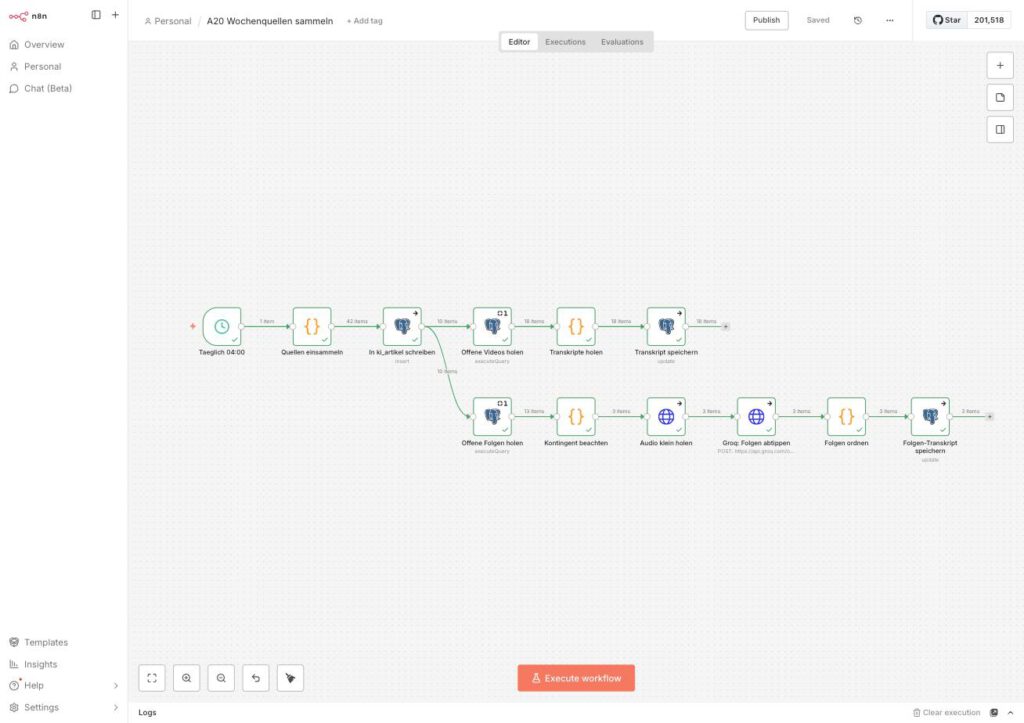
A20 Wochenquellen sammeln runs daily at 04:00. Four strands hang off the same schedule node:
Täglich 04:00 ─┬→ Quellen einsammeln → In ki_artikel schreiben ─┬→ YouTube transcripts
               │                                                ├→ Podcast transcripts
               │                                                └→ Verdichten
               └→ Webseiten einsammeln → fetch page texts
A21 Wochenzusammenfassung schreiben runs on Sundays at 06:00, a straight chain: fetch material → prepare → plan blocks → write each block individually → set the frame → assemble → send.
Ulf: “Why two workflows? Doing everything once on Sunday would be simpler.”
Tanja: “Do the math: five podcast episodes and eight videos in a single Sunday run is twenty minutes of runtime. And if something goes wrong in minute eighteen, everything before it is gone too.”
Ulf: “And daily?”
Tanja: “Daily it is one to three pieces. And if a source happens to be unreachable on Sunday, it is missing from the summary. Collected daily, it has long been sitting in the database.”
Bernd: “I’d still put it in one workflow. Less clicking.”
Tanja: “Less clicking while building, more trouble in operation. That is almost always a bad trade.”
The order of building is not arbitrary: A20 first and in full, A21 after that. A21 processes only rows for which a usable zusammenfassung already exists. If it does not exist yet, it writes a summary about nothing.
Phase 0: everything goes into one table
The first decision is made before a single node exists.
Bernd: “Four kinds of source, four tables. Cleanly separated. That’s how it’s done.”
Tanja: “And when you want to know on Sunday what came in this week altogether, you query four times and glue the results together?”
Bernd: “…”
Tanja: “One table. One column that says where the row came from. Done.”
Four different kinds of source, namely videos, podcasts, blogs, and websites, tempt you into creating four tables. Do not do it. The reason is simple: later you want to be able to run one search across the entire stock, not join four queries together. And the thing all four have in common – it is text, it has an address, a date, and a source – is bigger than what separates them.
So: one table, one column source_type to tell them apart. The transcript of a video ends up in the same content column as the text of a web page.
Step 0.1: establish the connection to the database
If you have not yet set up a Postgres credential in n8n:
Click sequence: Log in to n8n → Create new workflow → Add first step → “+” → search for Postgres → choose Execute a SQL query → at Credential to connect with click Create a new Credential.
You will find the values in the Synology Container Manager under Container → your Postgres container → Details:
| Field | Value |
|---|---|
| Host | IP address of the NAS, or the container name if both are on the same Docker network |
| Database | usually postgres or n8n_db, whatever was set as POSTGRES_DB during installation |
| User | the name you assigned, often postgres |
| Password | the password you set |
Expected result: After saving, a green field appears at the top with “Connection tested successfully”.
Ulf: “And if no green field appears?”
Tanja: “Then one of the four values is wrong, and in nine cases out of ten it is the host. If n8n and Postgres are on the same Docker network, the container name belongs there, not the IP address of the NAS.”
Step 0.2: create the table
Close the credential window; you are back in the Postgres node. Delete the content of the Query field and insert:
CREATE TABLE ki_artikel (
  id              SERIAL PRIMARY KEY,
  url             VARCHAR(500) UNIQUE NOT NULL,
  url_normalized  TEXT UNIQUE,          -- without UNIQUE, "Skip on Conflict" has no effect
  title           TEXT NOT NULL,
  description     TEXT,
  content         TEXT,                 -- transcript or page text
  source          VARCHAR(200) NOT NULL,
  source_type     TEXT,                 -- 'youtube' | 'podcast' | 'blog'
  status          VARCHAR(50),
  published_date  TIMESTAMP,
  first_seen_at   TIMESTAMPTZ NOT NULL DEFAULT now(),
  subkategorie    VARCHAR(80) DEFAULT NULL,
  zusammenfassung TEXT,                 -- the condensed 3-5 sentences
  dauer_sekunden  INTEGER               -- length of podcast episode or video
);

CREATE INDEX idx_ki_artikel_status ON ki_artikel(status, published_date DESC);
Click Execute step.
Expected result: The node runs through green. SELECT count(*) FROM ki_artikel answers with 0, without complaining.
If you have already built the AI Newsroom,
ki_artikelalready exists. In that case you do not create a new table but add the three missing columns:ALTER TABLE ki_artikel ADD COLUMN IF NOT EXISTS zusammenfassung TEXT; ALTER TABLE ki_artikel ADD COLUMN IF NOT EXISTS dauer_sekunden INTEGER; ALTER TABLE ki_artikel ADD COLUMN IF NOT EXISTS url_normalized TEXT UNIQUE;And a trap within it:
ADD COLUMN IF NOT EXISTSonly creates the unique constraint along with it if the column really is newly created. Ifurl_normalizedalready exists but withoutUNIQUE, nothing at all happens, and it happens silently. Check, and if the constraint is missing, add it:ALTER TABLE ki_artikel ADD CONSTRAINT ki_artikel_url_normalized_key UNIQUE (url_normalized);
Why the UNIQUE is not a nicety
All insert nodes will later run with the setting Skip on Conflict, meaning “if it already exists, skip it”. This setting needs a unique constraint in the database, otherwise it does not take effect.
Here two constraints work side by side, and they do different things. The one on url catches the letter-identical address, that is, the same post appearing twice in the same feed. The one on url_normalized catches the variants of the same address, and that is the case that occurs in practice: once with www., once without, once with ?utm_source=newsletter appended.
To you that is one post. To a database without this second constraint it is three. It then grows quietly and steadily by such variants, without anything turning red anywhere, and you only notice when the summary mentions the same podcast episode three times.
Bernd: “You can throw duplicates out afterwards. One click.”
Tanja: “You can. Only you will not recognize them as duplicates. It is not the same address twice, it is once with www., once without, and once with ?utm_source=newsletter on the end.”
Ulf: “And the constraint on url does not catch that?”
Tanja: “That one only catches the letter-identical address. For the variants you need the second constraint, on the tidied-up address. One word when creating the table, and the topic is settled forever.”
The status sequence
Every row runs through a fixed chain. Knowing it saves a lot of guesswork later:
GESAMMELT ──┬─ (YouTube, Podcast) ─→ TRANSKRIBIERT ─→ VERDICHTET
            │                     └→ OHNE_TRANSKRIPT   (dead end)
            └─ (Blog, web page)   ─→ VERDICHTET
                                  └→ OHNE_INHALT       (text unusable)
A21, however, does not select its material via this status but via the zusammenfassung column. It takes every row for which a usable condensation exists. That is more robust: it fetches exactly what has actually been condensed, regardless of which path the row took through the chain.
The status still remains useful. It shows you, at a glance into the database, where something is stuck. Anything set to OHNE_TRANSKRIPT is never touched again; that is deliberate and will matter again in phase 4.
Ulf: “If the status does not decide anything, what is it there for?”
Tanja: “For looking at. The status is the scoreboard. If twenty rows are piling up on OHNE_TRANSKRIPT in the morning, you know in one second which source is broken. Selection still happens via the column that holds the finished text. Displaying and selecting are two different jobs.”
Phase 1: the service without which nothing works
This is where the centerpiece is created: a small service of your own on the NAS that can do two things. It fetches YouTube subtitles, and it shrinks podcast audio files.
Ulf: “Your own service? Can n8n not do that itself?”
Tanja: “No, and the reason for that is instructive. Both routes are blocked without help.”
Why a service of your own? Because otherwise both routes are blocked.
The official YouTube interface does not help. Fetching subtitles there requires the express permission of the video’s owner. The obvious detour via the video page fails as well: YouTube delivers a subtitle address there with the parameter exp=xpe, and that is the marker for “PO token required”. A PO token (proof of origin) is not a cookie but is generated at runtime by the JavaScript machinery of the YouTube player. A pure server request cannot have one. The result is particularly treacherous: not an error, but HTTP 200 with zero bytes of content. Everything looks fine, only nothing arrives.
Bernd: “I built something like that myself once. Pull the subtitle address out of the page, fetch it, done. Ran for a week.”
Tanja: “And after that nothing arrived any more, but there was no error either.”
Bernd: “How do you know that?”
Tanja: “Because that is the normal case. You get HTTP 200 and zero bytes. The request counts as successful, the file is empty. That is the most unpleasant kind of error, because it disguises itself as success.”
What does work is yt-dlp, a widely used tool that fetches YouTube content. It gets around the problem by presenting itself to YouTube as a different client; the log contains the telltale line “Downloading android vr player API JSON”. This client does not require a token for subtitles.
Step 1.1: find out the network name
This is the step you must not skip. The new container has to go onto the same Docker network as n8n, otherwise the two will not find each other.
The obvious name is wrong. With a project called n8n, the Docker default name would be n8n_default. In reality, on a Synology the network is almost always called something else.
Bernd: “The project is called n8n, so the network is called n8n_default. No need to look it up, that’s the default.”
Tanja: “Look it up anyway. It takes ten seconds, and on a Synology it is almost never called that.”
Click sequence: Open Container Manager → left-hand bar Netzwerk → expand the entry whose row lists your n8n container under Verbundene Container.
Expected result: You see the real network name, the subnet, and the connected containers. In the example: n8n_n8n-network, subnet 172.21.0.0/16, containing n8n-app, n8n-postgres and metabase.
Write this name down. It comes up in a moment.
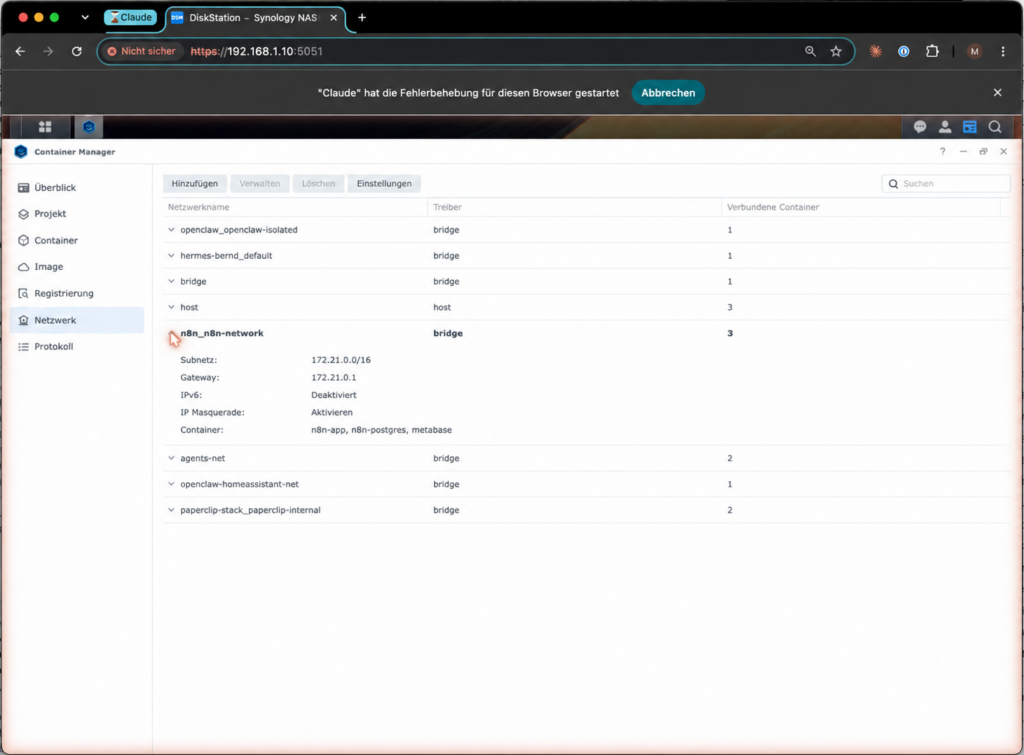
n8n_n8n-network, not n8n_defaultStep 1.2: create the two files
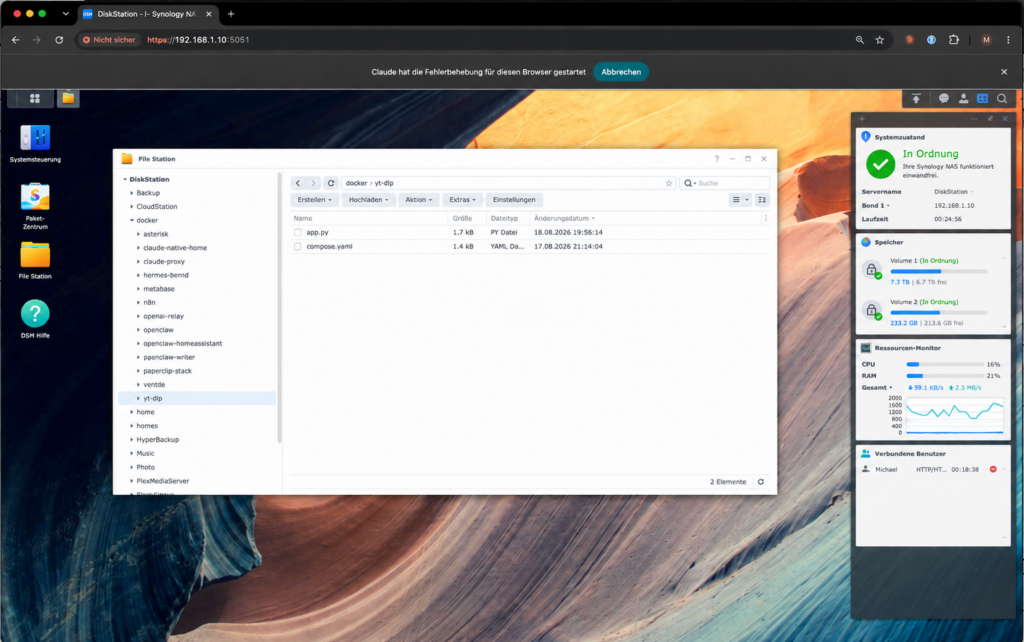
Click sequence: Open File Station → switch to the docker folder → Erstellen → Neuer Ordner → name yt-dlp.
Watch the spelling. The folder name has to appear character for character in the compose file later. A missing hyphen means the container does start but cannot find its program and immediately shuts down again, a symptom that looks like “Docker is broken” and is not.
Ulf: “A missing hyphen. And then it looks as if Docker were broken?”
Tanja: “Exactly. The container starts, looks for its program, does not find it, and shuts down. All you see is that it is off again immediately. The cause is stated nowhere. So: compare the folder name and the volumes: line character by character before you look for anything else.”
Place two files in this folder.
File 1: compose.yaml, the blueprint of the container. The line with name: at the very bottom carries the network name from step 1.1; the line under volumes: carries your folder name.
services:
  ytdlp:
    # Slim Python base image. yt-dlp and ffmpeg are fetched at startup:
    # yt-dlp because YouTube often changes something; ffmpeg to bring podcast audio
    # under the 25 MB limit of the speech recognition (measured: up to 45 MB an episode).
    image: python:3.12-slim
    container_name: ytdlp-transkript
    restart: unless-stopped

    working_dir: /app
    volumes:
      # ATTENTION: YOUR folder name has to go here.
      - /volume2/docker/yt-dlp/app.py:/app/app.py:ro

    environment:
      PORT: "8080"
      ZEITLIMIT_SEKUNDEN: "120"
      AUDIO_ZEITLIMIT_SEKUNDEN: "600"

    # No "ports:" - the service is deliberately reachable ONLY on the Docker
    # network, not from the home network and not from outside.
    networks:
      - ki

    command: >
      sh -c "apt-get update -qq &&
             apt-get install -y --no-install-recommends -qq ffmpeg &&
             rm -rf /var/lib/apt/lists/* &&
             pip install --no-cache-dir --quiet --upgrade yt-dlp &&
             exec python /app/app.py"

    healthcheck:
      test: ["CMD", "python", "-c", "import urllib.request;urllib.request.urlopen('http://127.0.0.1:8080/gesund',timeout=10)"]
      interval: 60s
      timeout: 15s
      retries: 3
      # The first start takes longer because ffmpeg is installed.
      start_period: 300s

    security_opt:
      - no-new-privileges:true
    mem_limit: 1g
    pids_limit: 256

networks:
  ki:
    # YOUR network name from step 1.1 belongs in here.
    external: true
    name: n8n_n8n-network
Three things about this file deserve a look, because they are deliberate:
No ports: section. The service publishes no port to the outside. It is reachable exclusively inside the Docker network, neither from the home network nor from the internet. Only n8n can get to it.
No Docker socket. You occasionally read guides that give n8n access to the Docker control interface. That would amount to administrator rights over the whole NAS. That does not happen here.
yt-dlp is fetched afresh on every start. That costs one to two minutes on startup and saves half the maintenance: when YouTube changes something, a restart of the container is usually enough.
Bernd: “For something like this I always hang the Docker socket in. Then n8n can control everything itself, super practical.”
Tanja: “Whoever has the Docker socket is administrator of the whole NAS. Every mistake in a workflow is then a mistake with full access. We leave it out, and the service does not even get a port into the home network.”
Ulf: “And how does n8n get to it then?”
Tanja: “Over the shared Docker network. Reachable inside the network, not from outside. Exactly as much access as necessary.”
File 2: app.py, the actual service, around 170 lines, standard library only, no third-party packages. It provides three addresses:
GET /transkript?v=<VIDEO_ID>&lang=de   → YouTube subtitles as running text (JSON)
GET /audio?url=<AUDIO_URL>&kbps=32     → podcast audio scaled down (MP3)
GET /gesund                            → self-report with version numbers
The file is given here in full. It contains the HTTP server, the routing for all three addresses, the checking of the parameters, and the error handling. Copy it unchanged into app.py; there is nothing to adjust.app.py, complete code ready to copy (169 lines)
#!/usr/bin/env python3
"""
Service for the weekly review (work item no. 47, workflow A20).

Two endpoints:
  GET /transkript?v=<VIDEO_ID>&lang=de   YouTube subtitles as running text (JSON)
  GET /audio?url=<AUDIO_URL>&kbps=32     podcast audio scaled down (MP3, binary)

Why /audio: the speech recognition accepts at most 25 MB per file. Measured on
2026-08-18, six out of ten podcast episodes are above that (up to 45 MB). ffmpeg
scales them down to mono, 16 kHz and a low bitrate - 46 minutes become around 11 MB.

Never downloads a video. No port to the outside, reachable only on the Docker network.
"""

import json
import os
import re
import subprocess
import tempfile
from http.server import BaseHTTPRequestHandler, ThreadingHTTPServer
from urllib.parse import urlparse, parse_qs, unquote

PORT = int(os.environ.get("PORT", "8080"))
ZEITLIMIT = int(os.environ.get("ZEITLIMIT_SEKUNDEN", "120"))
AUDIO_ZEITLIMIT = int(os.environ.get("AUDIO_ZEITLIMIT_SEKUNDEN", "600"))
VIDEO_MUSTER = re.compile(r"^[A-Za-z0-9_-]{11}$")


def hole_untertitel(video_id: str, sprache: str):
    """Calls yt-dlp and returns (text, language found)."""
    with tempfile.TemporaryDirectory() as ordner:
        befehl = [
            "yt-dlp",
            "--write-auto-subs",
            "--write-subs",
            "--skip-download",
            "--sub-langs", f"{sprache}.*",
            "--sub-format", "json3",
            "--no-warnings",
            "--quiet",
            "-o", os.path.join(ordner, "%(id)s.%(ext)s"),
            f"https://www.youtube.com/watch?v={video_id}",
        ]
        lauf = subprocess.run(befehl, capture_output=True, text=True, timeout=ZEITLIMIT)

        dateien = sorted(f for f in os.listdir(ordner) if f.endswith(".json3"))
        if not dateien:
            fehler = (lauf.stderr or lauf.stdout or "").strip()[:300]
            raise RuntimeError(fehler or "no subtitle track found")

        bevorzugt = [f for f in dateien if "-orig" not in f] or dateien
        pfad = os.path.join(ordner, bevorzugt[0])
        gefunden = bevorzugt[0].split(".")[-2]

        with open(pfad, encoding="utf-8") as fh:
            daten = json.load(fh)

    stuecke = []
    for ereignis in daten.get("events", []):
        for segment in ereignis.get("segs", []) or []:
            stuecke.append(segment.get("utf8", ""))
    text = " ".join("".join(stuecke).split())
    return text, gefunden


def hole_audio(quelle: str, kbps: int) -> bytes:
    """Downloads the audio file and scales it down. Returns MP3 bytes."""
    befehl = [
        "ffmpeg", "-hide_banner", "-loglevel", "error",
        "-i", quelle,
        "-vn",                 # no video
        "-ac", "1",            # mono
        "-ar", "16000",        # 16 kHz, speech recognition needs no more
        "-b:a", f"{kbps}k",
        "-f", "mp3", "pipe:1",
    ]
    lauf = subprocess.run(befehl, capture_output=True, timeout=AUDIO_ZEITLIMIT)
    if lauf.returncode != 0 or not lauf.stdout:
        fehler = (lauf.stderr or b"").decode("utf-8", "ignore").strip()[:300]
        raise RuntimeError(fehler or "ffmpeg returned nothing")
    return lauf.stdout


class Handler(BaseHTTPRequestHandler):
    def _json(self, code, nutzlast):
        koerper = json.dumps(nutzlast, ensure_ascii=False).encode("utf-8")
        self.send_response(code)
        self.send_header("Content-Type", "application/json; charset=utf-8")
        self.send_header("Content-Length", str(len(koerper)))
        self.end_headers()
        self.wfile.write(koerper)

    def _binaer(self, daten: bytes, typ: str, name: str):
        self.send_response(200)
        self.send_header("Content-Type", typ)
        self.send_header("Content-Length", str(len(daten)))
        self.send_header("Content-Disposition", f'attachment; filename="{name}"')
        self.end_headers()
        self.wfile.write(daten)

    def _gesund(self):
        def fassung(befehl):
            try:
                lauf = subprocess.run(befehl, capture_output=True, text=True, timeout=20)
                return (lauf.stdout or lauf.stderr or "").strip().splitlines()[0][:60]
            except Exception as fehler:  # noqa: BLE001
                return f"missing ({fehler})"
        return self._json(200, {
            "ok": True,
            "dienst": "ytdlp-transkript",
            "yt_dlp": fassung(["yt-dlp", "--version"]),
            "ffmpeg": fassung(["ffmpeg", "-version"]),
        })

    def _transkript(self, frage):
        video = (frage.get("v") or [""])[0].strip()
        sprache = (frage.get("lang") or ["de"])[0].strip()
        if not VIDEO_MUSTER.match(video):
            return self._json(400, {"ok": False, "fehler": "invalid video ID"})
        if not re.match(r"^[a-zA-Z-]{2,10}$", sprache):
            return self._json(400, {"ok": False, "fehler": "invalid language"})
        try:
            text, gefunden = hole_untertitel(video, sprache)
        except subprocess.TimeoutExpired:
            return self._json(504, {"ok": False, "video": video, "fehler": "time limit"})
        except Exception as fehler:  # noqa: BLE001
            return self._json(200, {"ok": False, "video": video, "fehler": str(fehler)[:300]})
        return self._json(200, {
            "ok": True, "video": video, "sprache": gefunden,
            "woerter": len(text.split()) if text else 0,
            "zeichen": len(text), "text": text,
        })

    def _audio(self, frage):
        quelle = unquote((frage.get("url") or [""])[0]).strip()
        try:
            kbps = max(8, min(64, int((frage.get("kbps") or ["32"])[0])))
        except ValueError:
            kbps = 32
        zerlegt = urlparse(quelle)
        if zerlegt.scheme not in ("http", "https") or not zerlegt.netloc:
            return self._json(400, {"ok": False, "fehler": "http(s) addresses only"})
        try:
            daten = hole_audio(quelle, kbps)
        except subprocess.TimeoutExpired:
            return self._json(504, {"ok": False, "fehler": "time limit while converting"})
        except Exception as fehler:  # noqa: BLE001
            return self._json(200, {"ok": False, "fehler": str(fehler)[:300]})
        return self._binaer(daten, "audio/mpeg", "folge.mp3")

    def do_GET(self):
        zerlegt = urlparse(self.path)
        frage = parse_qs(zerlegt.query)
        if zerlegt.path in ("/", "/gesund"):
            return self._gesund()
        if zerlegt.path == "/transkript":
            return self._transkript(frage)
        if zerlegt.path == "/audio":
            return self._audio(frage)
        return self._json(404, {"ok": False, "fehler": "unknown path"})

    def log_message(self, format, *args):  # noqa: A002
        print("%s - %s" % (self.address_string(), format % args), flush=True)


if __name__ == "__main__":
    print(f"ytdlp-transkript listening on port {PORT}", flush=True)
    ThreadingHTTPServer(("0.0.0.0", PORT), Handler).serve_forever()
Two places are worth a look. hole_untertitel() calls yt-dlp with --skip-download. So the video is never downloaded, only the subtitle track. And hole_audio() sends the podcast file through ffmpeg to mono and 16 kHz; why that is necessary is explained in phase 4.
Two safeguards are built in and should stay that way: the video ID is checked against a pattern (^[A-Za-z0-9_-]{11}$), and subprocess runs without a shell. That makes it impossible to smuggle in a command through the address line.
Ulf: “What does ‘without a shell’ mean?”
Tanja: “When you start a command through the command line, all sorts of things may be written in there, semicolons, pipes, further commands. Without a shell you hand over the program and its arguments separately. Then a semicolon is simply a semicolon and not a second command.”
Bernd: “Only a video ID goes in there anyway.”
Tanja: “What goes in there is whatever somebody writes into the address line. That is why the check for eleven permitted characters sits above it. Two lines, and the topic is settled.”
Step 1.3: create the project
Click sequence: Container Manager → left-hand bar Projekt → button Erstellen → Projektname yt-dlp → choose the folder /volume2/docker/yt-dlp as the path → set source to vorhandene docker-compose.yml verwenden → Weiter → Fertig.
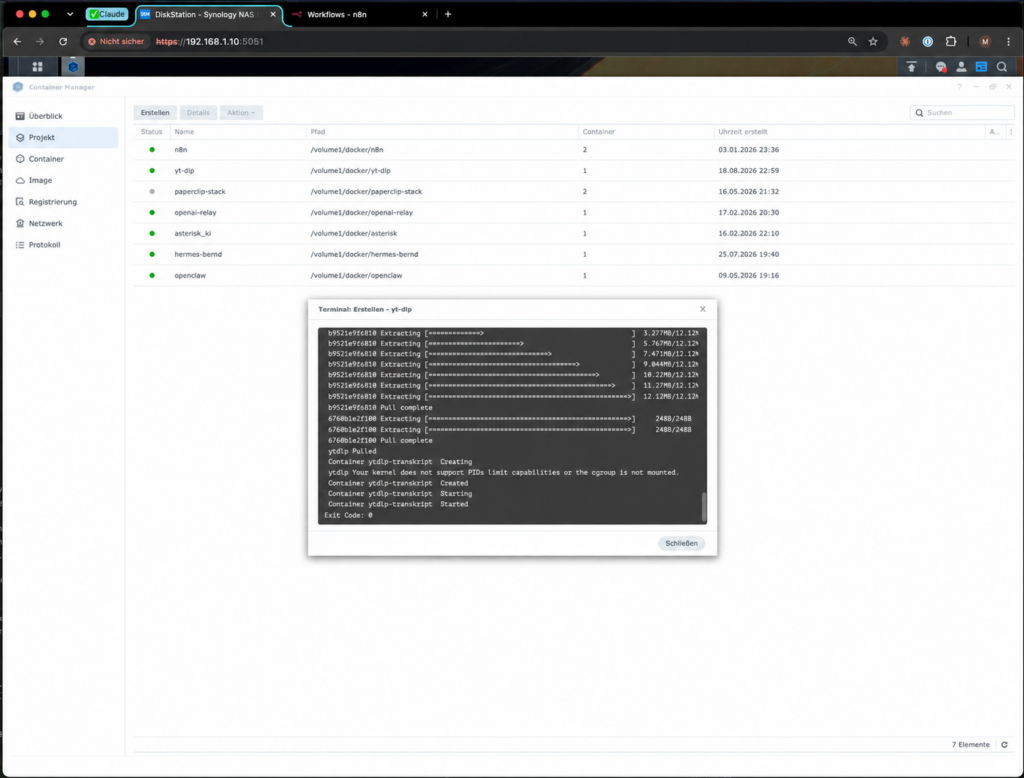
Expected result: A terminal window shows the base image being loaded. After one to two minutes it says:
Container ytdlp-transkript  Created
Container ytdlp-transkript  Starting
Container ytdlp-transkript  Started
Exit Code: 0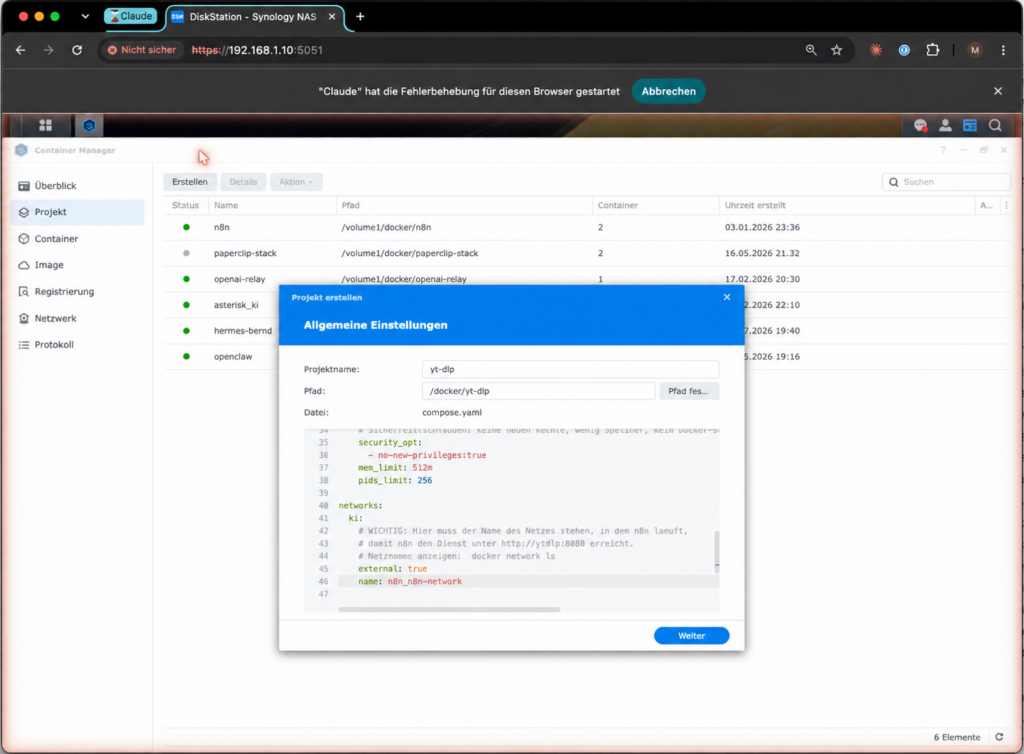
If this appears instead:
network n8n_default declared as external, but could not be foundThen your compose.yaml still contains the guessed network name instead of the real one. Back to step 1.1.
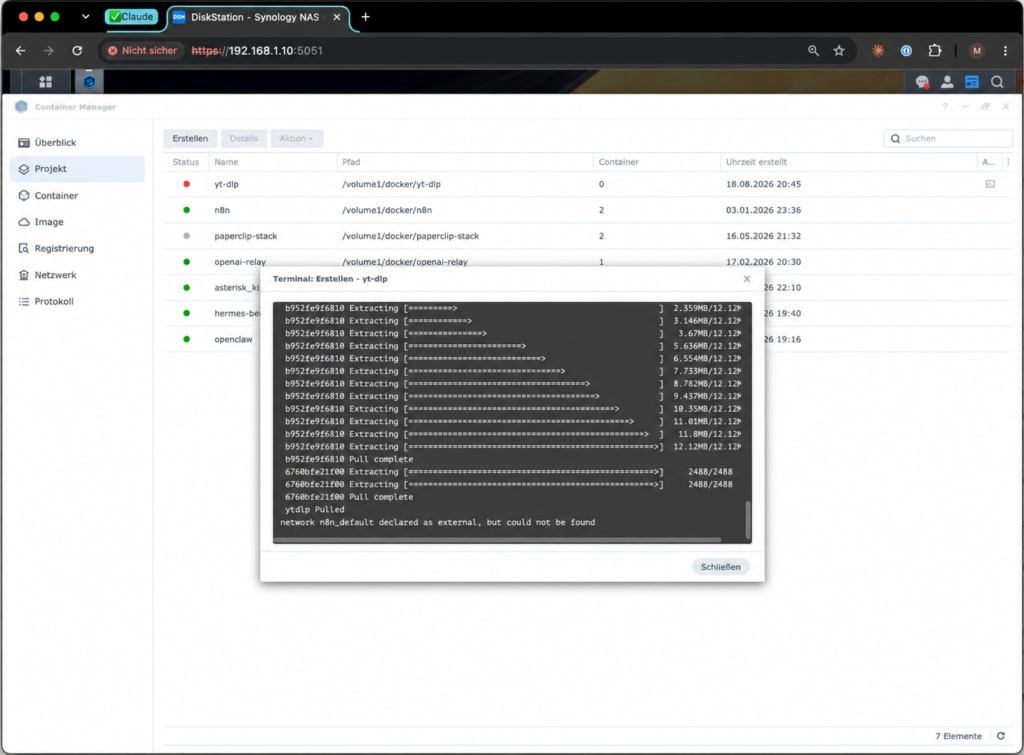
One message that turns up regularly on Synology and is harmless:
Your kernel does not support PIDs limit capabilities or the cgroup is not mounted.
PIDs limit discarded
The DiskStation’s kernel does not support the process limit. The container runs anyway. The line pids_limit: 256 simply has no effect on this system. Good to know if you take it for a security measure.
Ulf: “There’s a warning. Do I have to fix it?”
Tanja: “No. The DiskStation’s kernel does not know this process limit, so it throws it away. The container runs. All that matters is that you know: pids_limit is not a protective measure on this system but a line without effect.”
Step 1.4: the health check
Now the first measurement, from within n8n, because the service is only reachable from there at all.
Click sequence: Create a throwaway workflow in n8n → Manual Trigger → attach an HTTP Request node to it → URL http://ytdlp:8080/gesund → Execute workflow.
Expected result:
{
  "ok": true,
  "dienst": "ytdlp-transkript",
  "yt_dlp": "2026.07.04",
  "ffmpeg": "ffmpeg version 7.1.5-0+deb13u1"
}
If /gesund reports both versions, the service is up.
Step 1.5: the real check, with four videos from four channels
Now it is decided whether your connection is let through. Take four videos from four different channels and call, one after another:
http://ytdlp:8080/transkript?v=<VIDEO_ID>&lang=deThe video ID is the eleven-character string after watch?v= in the YouTube address.
Expected result, one response of this kind per video:
{ "ok": true, "video": "h0KKp3YX7hQ", "sprache": "de",
  "woerter": 23053, "zeichen": 146311, "text": "..." }
In the example setup, four out of four channels delivered, together 29,323 words in 27 seconds, without a single failure.
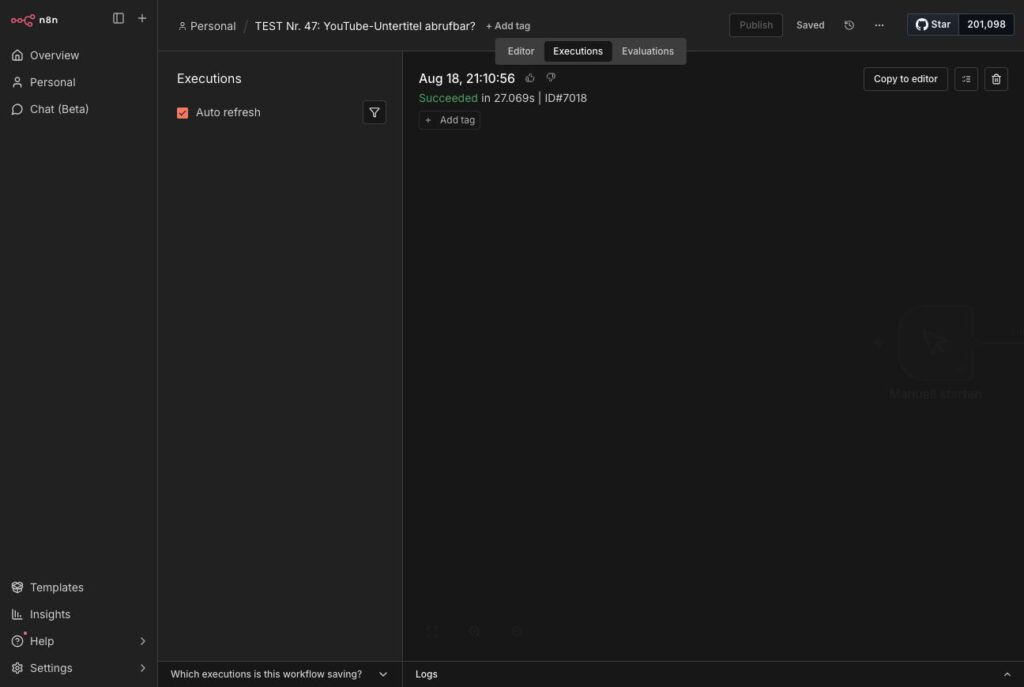
If instead every video returns “Sign in to confirm you’re not a bot”, your installation reaches the network through a data center. The YouTube part will then not work, and no setting changes that.
Bernd: “One video is enough for testing. If one works, they all work.”
Tanja: “No. That is exactly what happened to us. Video one delivered 5,184 words. Videos two and three were refused. The block does not take effect on the first request but afterwards.”
Ulf: “So you test with four videos from four channels so you do not fall for the first hit.”
Tanja: “Exactly. A single success is no proof if the block only strikes on the second attempt.”
Why four videos and not one? Because one gets through even when the block only takes effect after the first request. That is exactly what happened while building: video one delivered 5,184 words, videos two and three were refused.
Phase 2: the first strand, the collecting
Now A20 is created.
Step 2.1: schedule
Click sequence: New workflow, name A20 Wochenquellen sammeln → Add First Step → Schedule Trigger → Trigger Interval: Days, Trigger at Hour 4, Trigger at Minute 0.
In what follows, the node is called Täglich 04:00.
Step 2.2: the code node Quellen einsammeln
A single code node reads all the feeds. That is the decisive design decision of this workflow: adding a new source is thereby one line of code, not a new node, not a new workflow.
Bernd: “Sixteen sources, sixteen nodes. Then you can see at a glance what is running.”
Tanja: “And for the seventeenth you drag another node onto the canvas, connect it, and hope you have not forgotten anything. With one code node holding three lists, a new source is one line.”
Ulf: “But can you still see which source is stuck?”
Tanja: “Good question. Yes, that is what we build a log for in a moment, one that says per source whether it answered. That is clearer than sixteen boxes.”
The three lists at the beginning are what you adjust:
const YT = [
  ['Christoph Magnussen','UCDx6L69jmKBJbNu5GnkCilg'],
  ['Digitale Profis','UCv90NdTyTp7ZPPRvvSZaS5w'],
  ['Everlast AI','UC8T5gQ4U4GbI2h8kYCkEcvg'],
  ['Felicia Simon','UCM2u6Uvi5XBBlh5GDv4otsg'],
  ['Niklas Steenfatt','UCzsfkUFa1_4F4cZeSLv5dFQ'],
  ['Sascha Hoffmann','UCp4UhJ7LbBphg5d4tBvyF7A'],
];

const PODCASTS = [
  ['Der KI-Podcast (ARD)', ['https://feeds.br.de/der-ki-podcast/feed.xml',
                            'https://www.ardaudiothek.de/sendung/der-ki-podcast/65505255/feed']],
  ['KI-Update (heise)',    ['https://kiupdate.podigee.io/feed/mp3',
                            'https://www.heise.de/rss/heise-Ki-Update.rdf']],
  ['KI verstehen (DLF)',   ['https://www.deutschlandfunk.de/ki-verstehen-102.xml',
                            'https://podcast-mp3.dradio.de/podcast/ki_verstehen.xml']],
];

const BLOGS = [
  ['One Useful Thing','https://www.oneusefulthing.org/feed'],
  ['KI-Beratung','https://www.kiberatung.de/blog/rss.xml'],
];
The channel feed is available for every YouTube channel at https://www.youtube.com/feeds/videos.xml?channel_id=<ID>. The channel ID begins with UC and can be found in the source code of the channel page.
For the podcasts there is a list of candidates per show. The code tries them one after another and stops at the first feed that contains <item> entries. That is not a blemish but the pragmatic answer to a real problem: podcast feed addresses are often undocumented, and two attempts are cheaper than an hour of searching.
Two remarks on KI-Beratung, because the source is only half served here. First, its feed is declared nowhere and does not sit at the domain root. /blog/rss.xml can only be found if you go looking for it. Second, it delivers a mere 249-character teaser; the full text is fetched later by the fourth strand from phase 5. So the source is collected here and read there.
A stumbling block that is easy to miss: The <link> elements in this feed point to the Webflow staging address kiberatung.webflow.io instead of the live domain. Anyone who takes them over unchanged saves addresses that nobody can open later – rewrite them on reading.
Four building blocks in the code are worth mentioning:
The time filter takes 14 days instead of seven. That is deliberate: if a nightly run fails, the next one closes the gap by itself.
The URL normalization throws away tracking parameters (utm_*, fbclid, gclid and relatives) and unifies www. and capitalization. It produces the value for url_normalized, on which the deduplication hangs.
Ulf: “Why is the address not enough as it is?”
Tanja: “Because the same page is reachable under many addresses. Once with www., once without, once with ?utm_source=newsletter on the end. To you that is one article, to the database it is three. The normalization cuts away the ballast, and what is left is the value on which the deduplication hangs.”
The feed check. These four lines are the implementation of the warning from right at the top:
if (roh.indexOf('<entry') < 0) {
  protokoll.push({ quelle: name, art: 'youtube', ok: false, im_feed: 0,
                   fehler: 'response is not an Atom feed (no <entry>)' });
  continue;
}
Without them the log would look like “feed fine, nothing new”, although in truth a home page had answered.
The visible log. The node attaches a field _protokoll to the first result, stating per source whether it answered and how many hits it delivered:
return eindeutig.map((g, i) => ({
  json: i === 0 ? Object.assign({}, g, { _protokoll: protokoll }) : g
}));
That sounds like a trifle and is not. On the first run the blog delivered zero rows, and nobody could say whether the feed had not answered or whether there was simply nothing new, because the log was only written to the system log. What you need for troubleshooting belongs visibly in the data stream. With the visible log, the question was answered in three seconds on the next run: “ok, 0 hits”. The feed was alive, there was just nothing.
Bernd: “There are logs for that sort of thing. I write everything out with console.log.”
Tanja: “And then you search the container’s system log for the run from the day before yesterday. We attach the log to the first result. Then it is in the run itself, right next to the data it refers to.”
In addition, the node measures the file sizes of the podcast episodes with a HEAD request and writes them into the log. What for, coming up in phase 4.Quellen einsammeln, complete code ready to copy (211 lines)
// A20 Stufe 1: Feeds einsammeln.
// Writes to ki_artikel with source_type podcast|youtube|blog and status GESAMMELT.
const helfer = this.helpers;
const TAGE = 14;
const grenze = Date.now() - TAGE * 24 * 3600 * 1000;
const UA = 'Mozilla/5.0 (compatible; mein-newsroom/1.0)';
const hole = async (url) => String(await helfer.httpRequest({
method: 'GET', url, headers: { 'User-Agent': UA }, timeout: 25000,
}));
// URL-Normalisierung: Tracking-Parameter weg, Host vereinheitlichen.
const normalisiere = (roh) => {
// without new URL: URL is not available in the n8n Code node
const m = String(roh || '').trim().match(/^(?:https?:)?\/\/([^\/?#]+)([^?#]*)(\?[^#]*)?/i);
if (!m) return roh;
const weg = new Set(['fbclid','gclid','dclid','msclkid','igshid','mc_cid','mc_eid','mkt_tok','yclid','cmpid']);
const host = m[1].replace(/^www\./i, '').toLowerCase();
const rest = (m[3] || '').slice(1).split('&').filter(p => {
const s = p.split('=')[0].toLowerCase();
return p && !(s.startsWith('utm_') || weg.has(s));
});
return 'https://' + host + (m[2] || '/') + (rest.length ? '?' + rest.join('&') : '');
};
const entkerne = (s) => String(s || '')
.replace(/<!\[CDATA\[([\s\S]*?)\]\]>/g, '$1')
.replace(/<[^>]+>/g, ' ')
.replace(/&/g, '&').replace(/</g, '<').replace(/>/g, '>')
.replace(/"/g, '"').replace(/'/g, "'").replace(/ /g, ' ')
.replace(/\s+/g, ' ').trim();
const feld = (block, tag) => {
const m = block.match(new RegExp('<' + tag + '[^>]*>([\\s\\S]*?)<\\/' + tag + '>'));
return m ? entkerne(m[1]) : '';
};
const gefunden = [];
const protokoll = [];
// ---------- YouTube ----------
const YT = [
['Christoph Magnussen','UCDx6L69jmKBJbNu5GnkCilg'],
['Digitale Profis','UCv90NdTyTp7ZPPRvvSZaS5w'],
['Everlast AI','UC8T5gQ4U4GbI2h8kYCkEcvg'],
['Felicia Simon','UCM2u6Uvi5XBBlh5GDv4otsg'],
['Niklas Steenfatt','UCzsfkUFa1_4F4cZeSLv5dFQ'],
['Sascha Hoffmann','UCp4UhJ7LbBphg5d4tBvyF7A'],
];
for (const paar of YT) {
const name = paar[0], kid = paar[1];
try {
const roh = await hole('https://www.youtube.com/feeds/videos.xml?channel_id=' + kid);
// HTTP 200 does not mean feed. If an error page or a bot defense comes
// back, the log would otherwise look like "feed fine, nothing new".
if (roh.indexOf('<entry') < 0) {
protokoll.push({ quelle: name, art: 'youtube', ok: false, im_feed: 0,
fehler: 'response is not an Atom feed (no <entry>)' });
continue;
}
const teile = roh.split('<entry>').slice(1);
let neu = 0;
for (const t of teile) {
const id = feld(t, 'yt:videoId');
const datum = feld(t, 'published');
if (!id || !datum) continue;
if (new Date(datum).getTime() < grenze) continue;
const url = 'https://www.youtube.com/watch?v=' + id;
gefunden.push({
title: feld(t, 'media:title') || feld(t, 'title'),
url, url_normalized: normalisiere(url),
source: name, source_type: 'youtube', status: 'GESAMMELT',
description: feld(t, 'media:description').slice(0, 4000),
published_date: new Date(datum).toISOString(),
dauer_sekunden: null,
});
neu++;
}
protokoll.push({ quelle: name, art: 'youtube', ok: true, treffer: neu, im_feed: teile.length });
} catch (e) {
protokoll.push({ quelle: name, art: 'youtube', ok: false, fehler: String(e.message || e).slice(0, 100) });
}
}
// ---------- Podcasts: try the candidates one after another ----------
const PODCASTS = [
['Der KI-Podcast (ARD)', ['https://feeds.br.de/der-ki-podcast/feed.xml',
'https://www.ardaudiothek.de/sendung/der-ki-podcast/65505255/feed']],
['KI-Update (heise)', ['https://kiupdate.podigee.io/feed/mp3',
'https://www.heise.de/rss/heise-Ki-Update.rdf']],
['KI verstehen (DLF)', ['https://www.deutschlandfunk.de/ki-verstehen-102.xml',
'https://podcast-mp3.dradio.de/podcast/ki_verstehen.xml']],
];
for (const paar of PODCASTS) {
const name = paar[0], kandidaten = paar[1];
let erfolg = false;
for (const adresse of kandidaten) {
let roh;
try { roh = await hole(adresse); }
catch (e) {
protokoll.push({ quelle: name, art: 'podcast', kandidat: adresse, ok: false,
fehler: String(e.message || e).slice(0, 80) });
continue;
}
if (roh.indexOf('<item') < 0) {
protokoll.push({ quelle: name, art: 'podcast', kandidat: adresse, ok: false, fehler: 'no RSS with <item>' });
continue;
}
const teile = roh.split('<item').slice(1);
let neu = 0;
for (const t of teile) {
const link = (t.match(/<link[^>]*>([\s\S]*?)<\/link>/) || [])[1];
const datum = feld(t, 'pubDate');
if (!link || !datum) continue;
if (new Date(datum).getTime() < grenze) continue;
const audio = (t.match(/<enclosure[^>]*url="([^"]+)"/) || [])[1] || '';
const dauer = feld(t, 'itunes:duration');
let sek = null;
if (/^\d+$/.test(dauer)) sek = Number(dauer);
else if (/:/.test(dauer)) {
const p = dauer.split(':').map(Number);
sek = p.length === 3 ? p[0]*3600 + p[1]*60 + p[2] : p[0]*60 + p[1];
}
const sauber = entkerne(link);
gefunden.push({
title: feld(t, 'title'),
url: sauber, url_normalized: normalisiere(sauber),
source: name, source_type: 'podcast', status: 'GESAMMELT',
// The audio address goes into the description - stage 2b reads it back out there.
description: (feld(t, 'description') + (audio ? ' | AUDIO: ' + audio : '')).slice(0, 4000),
published_date: new Date(datum).toISOString(),
dauer_sekunden: sek,
});
neu++;
}
protokoll.push({ quelle: name, art: 'podcast', kandidat: adresse, ok: true, treffer: neu, im_feed: teile.length });
erfolg = true;
break;
}
if (!erfolg) protokoll.push({ quelle: name, art: 'podcast', ok: false, fehler: 'no candidate delivered a feed' });
}
// ---------- Blogs ----------
const BLOGS = [
['One Useful Thing','https://www.oneusefulthing.org/feed'],
['KI-Beratung','https://www.kiberatung.de/blog/rss.xml'],
];
for (const paar of BLOGS) {
const name = paar[0], adresse = paar[1];
try {
const roh = await hole(adresse);
if (roh.indexOf('<item') < 0) {
protokoll.push({ quelle: name, art: 'blog', ok: false, im_feed: 0,
fehler: 'response is not RSS with <item>' });
continue;
}
const teile = roh.split('<item').slice(1);
let neu = 0;
for (const t of teile) {
let link = entkerne((t.match(/<link[^>]*>([\s\S]*?)<\/link>/) || [])[1] || '');
const datum = feld(t, 'pubDate');
if (!link || !datum) continue;
if (new Date(datum).getTime() < grenze) continue;
// KI-Beratung: the <link> elements point to the Webflow staging address.
link = link.replace('kiberatung.webflow.io', 'www.kiberatung.de');
gefunden.push({
title: feld(t, 'title'),
url: link, url_normalized: normalisiere(link),
source: name, source_type: 'blog', status: 'GESAMMELT',
description: feld(t, 'description').slice(0, 4000),
published_date: new Date(datum).toISOString(),
dauer_sekunden: null,
});
neu++;
}
protokoll.push({ quelle: name, art: 'blog', ok: true, treffer: neu, im_feed: teile.length });
} catch (e) {
protokoll.push({ quelle: name, art: 'blog', ok: false, fehler: String(e.message || e).slice(0, 100) });
}
}
// Measure audio sizes: the speech recognition accepts at most 25 MB.
for (const g of gefunden) {
if (g.source_type !== 'podcast') continue;
const m = String(g.description).match(/AUDIO: (\S+)/);
if (!m) continue;
try {
const a = await helfer.httpRequest({ method:'HEAD', url:m[1], timeout:20000,
returnFullResponse:true, ignoreHttpStatusErrors:true, headers:{'User-Agent':UA} });
const len = a.headers && (a.headers['content-length'] || a.headers['Content-Length']);
if (len) protokoll.push({ quelle:g.source, art:'audiogroesse',
mb: Math.round(Number(len)/1048576*10)/10,
minuten: g.dauer_sekunden ? Math.round(g.dauer_sekunden/60) : null });
} catch (e) {
protokoll.push({ quelle:g.source, art:'audiogroesse', fehler:String(e.message||e).slice(0,60) });
}
}
// Innerhalb des Laufs entdoppeln
const gesehen = new Set();
const eindeutig = gefunden.filter(g => {
if (gesehen.has(g.url_normalized)) return false;
gesehen.add(g.url_normalized);
return true;
});
// Log visible in the data stream instead of only in the log.
return eindeutig.map((g, i) => ({ json: i === 0 ? Object.assign({}, g, { _protokoll: protokoll }) : g }));The only things to adjust are the three lists YT, PODCASTS and BLOGS plus the identifier in UA. Everything else runs unchanged.
Step 2.3: the insert node
Click sequence: Attach a Postgres node → operation Insert → schema public → table ki_artikel → Mapping Column Mode: Map Each Column Manually → assign the columns (title, url, url_normalized, source, source_type, status, description, published_date, dauer_sekunden) → under Options switch on Skip on Conflict, matching on url_normalized.
In addition, under Settings: On Error → Continue (using regular output).
The manual mapping is mandatory, not a matter of taste. With automatic mapping, the extra field _protokoll would count as a column name and take the insert apart.
Bernd: “Automatic mapping. Saves you nine clicks.”
Tanja: “And costs you the whole node. We have just attached a field _protokoll. With automatic mapping, Postgres looks for a column with that name, does not find one, and aborts. You make those nine clicks once.”
Expected result on the first run: In the example setup, 46 finds collected, 46 written, runtime 1.775 seconds. Check in the database:
SELECT source_type, count(*) FROM ki_artikel GROUP BY 1; youtube and podcast should appear, all with status GESAMMELT.
Phase 3: the second strand, transcribing YouTube
Three nodes, attached to the insert node (not one after another onto the previous strand; why, in a moment).
Node Offene Videos holen, a Postgres node:
SELECT id, url
FROM ki_artikel
WHERE status = 'GESAMMELT'
  AND source_type = 'youtube'
  AND (content IS NULL OR content = '')
  AND (published_date IS NULL OR published_date > now() - interval '21 days')
ORDER BY published_date DESC
LIMIT 25
Important: Set the node to Execute Once under Settings. If it is set to “run per input row” and the insert node delivers ten rows, the query runs ten times, and every video is transcribed ten times.
Ulf: “The same video ten times? How can that happen?”
Tanja: “Because an n8n node runs once per input row by default. If ten rows arrive from the insert, the query runs ten times, and each time it fetches the same open videos. The switch is called Execute Once and means: once for all inputs, no matter how many arrive.”
Node Transkripte holen, a code node that fetches three videos at a time:
const GLEICHZEITIG = 3;
const alle = $input.all().filter(i => i.json && i.json.id);
if (!alle.length) return [];

// Burden of proof reversed: OHNE_TRANSKRIPT is set ONLY when a reason is positively
// identified as permanent. Everything else, including an unknown error, stays on
// GESAMMELT and comes round again tomorrow. Trying a video several times costs
// seconds. Writing one off wrongly costs the content forever, and
// nobody notices.
const DAUERHAFT = /no video ID|no subtitle track found|too short or empty|no subtitles|subtitles are not available|video unavailable|private video|this video is private|has been removed|been terminated|members-only|join this channel|age-restricted|confirm your age/i;

// YouTube’s bot check depends on the address and the request frequency, not on the
// video. On the next attempt it almost always works again. It is therefore listed
// explicitly here and beats every permanent-reason match. This very case shut
// down two videos on 2026-08-26.
const BOTPRUEFUNG = /not a bot|sign in to confirm you.?re not|bot.?check|bot.?verification/i;

const dauerhaft = (grund) => !BOTPRUEFUNG.test(grund) && DAUERHAFT.test(grund);

const ergebnis = [];
const spaeter = [];
let naechster = 0;
const arbeiter = async () => {
  while (true) {
    const k = naechster++;
    if (k >= alle.length) return;
    const zeile = alle[k].json;
    const m = String(zeile.url).match(/[?&]v=([A-Za-z0-9_-]{11})/);
    // No video ID in the address. That never changes, so it is permanent.
    if (!m) {
      ergebnis.push({ id: zeile.id, status: 'OHNE_TRANSKRIPT', content: null,
        hinweis: 'no video ID in the address' });
      continue;
    }
    let grund = '';
    try {
      const t = await this.helpers.httpRequest({ method:'GET',
        url: 'http://ytdlp:8080/transkript?v=' + m[1] + '&lang=de',
        json: true, timeout: 180000 });
      if (t && t.ok && t.text && t.woerter > 50) {
        ergebnis.push({ id: zeile.id, status: 'TRANSKRIBIERT', content: t.text, woerter: t.woerter });
        continue;
      }
      grund = String((t && t.fehler) || 'too short or empty');
    } catch (e) {
      grund = String((e && e.message) || e);
    }
    if (dauerhaft(grund)) {
      ergebnis.push({ id: zeile.id, status: 'OHNE_TRANSKRIPT', content: null,
        hinweis: grund.slice(0, 140) });
    } else {
      spaeter.push({ id: zeile.id, grund: grund.slice(0, 200) });
    }
  }
};
await Promise.all(Array.from({ length: GLEICHZEITIG }, () => arbeiter()));

// Attach the skipped ones only to an existing row. A separate object without
// "id" would take the update node behind it apart, see phase 5.
const zeilen = ergebnis.map(r => ({ json: r }));
if (zeilen.length && spaeter.length) zeilen[0].json._spaeter = spaeter;
return zeilen;
Four things about it are important.
The threshold woerter > 50. A video with five words of subtitles effectively has none.
Nothing aborts. If the subtitles are permanently missing, the record gets OHNE_TRANSKRIPT and the run carries on.
Only a positively identified reason may write something off. That is the most important line of this node, and it was learned the hard way. Offene Videos holen looks for status = “GESAMMELT“. Whatever is once set to OHNE_TRANSKRIPT is thereby never touched again. A time limit, a restart of the container, a network dropout: those are states of last night, not properties of the video.
The obvious build is a list of temporary errors that you exempt. The obvious build is wrong, and why is explained right below. What is right is the reversal: the node writes OHNE_TRANSKRIPT only when the reason is in DAUERHAFT, that is: no video ID in the address, no subtitle track available, too short, video deleted, private, members only, age-restricted. Everything else, including an error nobody anticipated, stays on GESAMMELT and comes round again tomorrow. The skipped IDs hang in the field _spaeter on the first result row, so that you can see them.
The calculation behind it is not close: trying a video several times costs a few seconds. Writing a video off wrongly costs the content permanently, and nobody notices, because nothing turns red.
The bot check is explicitly in the list, and it beats every permanent-reason match. It depends on the address and the request frequency, not on the video; on the next attempt it almost always works again. It appears word for word in the podcast branch as well, although it cannot occur there at all, because Groq does not check for bots. The reason is deliberate: Two lists that are supposed to do the same thing drift apart if you maintain them separately. That is exactly what happened here.
Skipped rows do not get a result object of their own. An object without an id would take the update node behind it apart, exactly the error from phase 5. If all videos were skipped, the node returns [], and the branch simply does nothing that night.
And bleibt GESAMMELT must not mean forever. Hence the 21 days in the query above. A video that fails on every attempt for three weeks drops out of the selection without needing a status for it. The window is deliberately larger than the 14 days used for collecting, and considerably larger than the seven days A21 looks at. Without this limit, unreachable videos would gradually occupy the query’s 25 slots permanently.
The accident that makes this node look the way it does
The first build of this node had a list of temporary errors: time limit, ECONNRESET, 429, 502, 503, 504. Everything else counted as permanent. That sounds sensible and is not.
When the retained runs were checked, two videos were on OHNE_TRANSKRIPT, both from the same run, both with the same message:
ERROR: [youtube] XNKASdMB2Mw: Sign in to confirm you're not a botThat is YouTube’s bot check. It is the clearest conceivable temporary error: it depends on the address and on how often requests came from there, not on the video. On the next attempt it almost always works again.
Only it was in none of the six lines of the list. No rate limit, no 429, no timeout, no ECONNRESET. The node classified it as unknown and therefore as permanent, and two videos were written off. It is the same accident as the one with the Deutschlandfunk episode in phase 4, only in the other branch, and nobody noticed it.
The lesson, and it is more general than this node: A list of the errors you know is always incomplete. Anyone who makes it the basis of an irreversible decision has put the burden of proof the wrong way round. The unknown case has to land on the harmless side, not on the final one.
Bernd: “An error is an error. Into the catch with it, set the status, move on.”
Tanja: “And with that you have shut the video down for good. A time limit tells you nothing about the video, it tells you something about tonight’s network.”
Bernd: “Then put the temporary errors in a list and exempt those. Time limit, 429, 503, done.”
Tanja: “That was our first build. It cost us two videos.”
Ulf: “Why? The list looked complete.”
Tanja: “It looked complete. Then came ‘Sign in to confirm you’re not a bot’, and that was in none of the six lines. The node took it for unknown, unknown meant permanent, and the two videos were written off.”
Ulf: “And now?”
Tanja: “Now it runs the other way round. The only things written off are what I positively identify as permanent: no subtitle track, video deleted, private, members only, no ID in the address. Everything else stays put and comes round again tomorrow, including an error I have never seen before.”
Bernd: “Then you keep retrying broken videos forever.”
Tanja: “Three weeks, then they drop out of the query. And even so: trying a video several times costs seconds. Writing one off wrongly costs the content forever, and nobody notices.”
Node Transkript speichern: Postgres, operation Update, matching on id, setting content and status.
Expected result: 25 videos in 37 seconds, zero failures, 88,448 words. 555,078 characters ended up in the database, on average around 3,400 words per video.
Why the strands hang as separate branches
All three processing strands hang off the same insert node instead of one after another. The reason: this way the podcasts run even on a day when not a single video is open, and they only run once the day’s finds are in the database.
A word on the order, because side by side in the picture does not mean simultaneous in execution. n8n works through the branches one after another. Which one comes first depends on the configured execution order and the arrangement on the canvas, not on what the picture looks like. For this setup that is not critical, but you should know it anyway: if Offene Verdichtungen holen runs before the transcripts are saved, it condenses the previous day’s material, and tonight’s comes round tomorrow. If you do not want that, arrange the condensation branch below the two transcription branches on the canvas, or hang it directly behind Transkript speichern.
Bernd: “I always hang them one after another. One after the other, cleanly in sequence.”
Tanja: “Then the chain stands still on every day when no video is open. No video, no output, and everything behind it never gets a start signal. The podcasts would then have stood still for days without anything turning red anywhere.”
Phase 4: the third strand, podcasts and the 25-megabyte wall
Podcasts are pure audio. A writing AI cannot listen, so it has to be transcribed. That is the only ongoing cost item of the whole installation, and done right it costs zero euros.
The measurement that changed everything
Before anything was built, the file sizes of the existing episodes were measured. Speech recognition services typically accept at most 25 MB per file:
| Show | Sizes | Minutes |
|---|---|---|
| Der KI-Podcast (ARD) | 42.2 MB · 38.8 MB | 46 · 42 |
| KI verstehen (DLF) | 45.1 MB · 34.7 MB | 49 · 38 |
| KI-Update (heise) | 19.7 · 21.5 · 21.8 · 23.1 · 26.8 · 38.7 MB | 16 to 33 |
Six out of ten episodes are above the limit, and of all things it is the long formats, that is, exactly the ones that make an argument. Without this measurement the chain would apparently have worked for four out of ten episodes and silently delivered nothing for six.
Bernd: “You build first and then see what jams. Learning by doing.”
Tanja: “Here that would have got you four out of ten episodes and not the other six, and precisely the long ones. The setup would have looked as if it worked. Ten minutes of measuring beforehand saves you a week of guesswork afterwards.”
Ulf: “And why the long ones of all things?”
Tanja: “Because the limit is on file size, and long episodes are big files. The formats that explain the most are the first to drop out. That is the annoying part.”
The solution is already in your app.py: the endpoint /audio scales the file down to mono, 16 kHz, and a low bitrate using ffmpeg (the standard tool for audio and video conversion).
| Episode | before | after at 32 kbps |
|---|---|---|
| 49 min (DLF) | 45.1 MB | 11.5 MB |
| 46 min (ARD) | 42.2 MB | 10.8 MB |
| 33 min (heise) | 38.7 MB | 7.7 MB |
| 16 min (heise) | 19.7 MB | 3.8 MB |
What was measured in the end was 11,824,374 bytes = 11.28 MB for the 49-minute episode. The calculation was accurate to within two percent. And nothing is lost in the process: 16 kHz mono is the format speech recognition works with anyway.
Ulf: “But the quality. If I scale a file down that far, does the recognition still understand anything?”
Tanja: “16 kHz mono is exactly the format speech recognition works in. You are not throwing away anything it would have used. You are throwing away stereo and frequencies above 8 kHz, and it needs neither for spoken language.”
Step 4.1: set up Groq
Click sequence: Create an account at console.groq.com → API Keys → Create API Key → give it a name → copy the key.
A practical note: signing up by email failed with a t-online.de address, because Telekom rejects confirmation mails at server level when it suspects spam; they land in no folder, not even in the spam folder. The route via “Continue with Google” needs no confirmation mail.
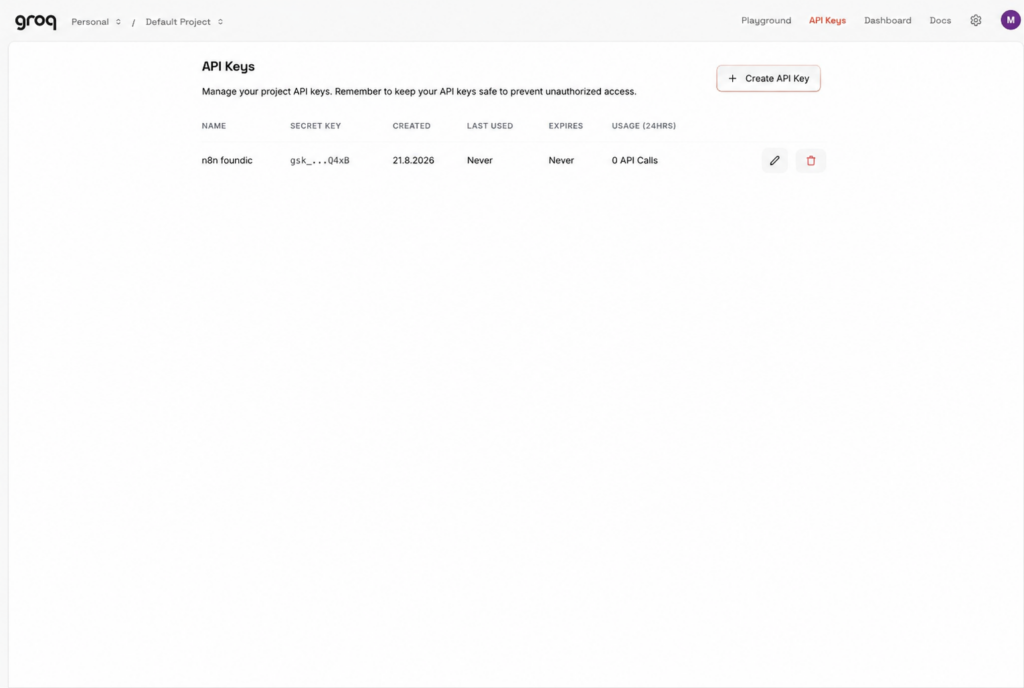
In n8n: Credentials → Create credential → Groq → paste the key → save.
Ulf: “I cannot see the key any more. There are only four characters left.”
Tanja: “Groq shows the complete key exactly once, when it is created. Never again after that. If you did not copy it, you create a new one and delete the old one. That is not a bug, that is by design.”
Step 4.2: look up the limits, and do it in your own account
Click sequence: In the Groq account → Limits.
Expected result for both Whisper models:
| Requests per minute | 20 |
|---|---|
| Requests per day | 2,000 |
| Seconds of audio per hour | 7,200 |
| Seconds of audio per day | 28,800 |
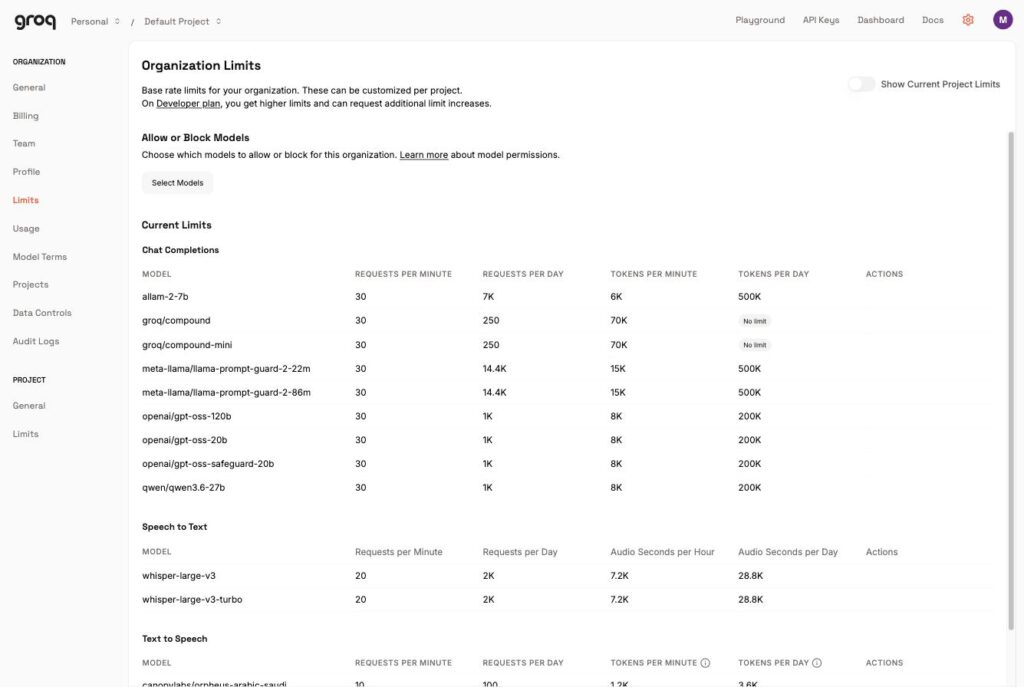
Bernd: “The limits are in every blog article. No need to look them up in the account.”
Tanja: “Look them up in your own account. Providers change plans, and blog articles age. The Limits page shows you what applies to your account today. That is the only figure you can calculate with.”
Set your own requirement against that. In the example setup: 302.5 minutes of audio per week = 18,150 seconds, spread over seven days. That fits comfortably into the free allowance. Podcast transcription therefore costs €0.
Step 4.3: the five nodes
Offene Folgen holen (Postgres, Execute Once):
SELECT id,
       substring(description from 'AUDIO: (\S+)') AS audio,
       COALESCE(dauer_sekunden, 0) AS dauer_sekunden,
       source
FROM ki_artikel
WHERE source_type = 'podcast'
  AND status = 'GESAMMELT'
  AND (content IS NULL OR content = '')
  AND description LIKE '%AUDIO:%'
ORDER BY published_date DESC NULLS LAST
LIMIT 25
The audio address is in the description field after the marker AUDIO:. That is where the collecting node put it, taken from the <enclosure> element of the feed.
Kontingent beachten (Code), the node that prevents a run from blowing the hourly limit:
const GRENZE_SEKUNDEN = 3600;
const STANDARDDAUER = 1800; // unknown length: calculate cautiously with 30 minutes

const alle = $input.all().filter(i => i.json && i.json.id && i.json.audio);
const genommen = [];
let summe = 0;
for (const eintrag of alle) {
  const dauer = Number(eintrag.json.dauer_sekunden) || STANDARDDAUER;
  if (genommen.length && summe + dauer > GRENZE_SEKUNDEN) break;
  genommen.push({ json: {
    id: eintrag.json.id, audio: eintrag.json.audio,
    source: eintrag.json.source, dauer_sekunden: dauer,
  }});
  summe += dauer;
}
if (genommen.length) {
  genommen[0].json._protokoll = {
    offen_gesamt: alle.length, genommen: genommen.length,
    vertagt: alle.length - genommen.length, tonminuten: Math.round(summe / 60),
  };
}
return genommen;
Why 3,600 instead of the permitted 7,200 seconds? Because the limit is a sliding window across the whole account, not a pot per workflow. While building, a run hit the limit for exactly that reason; the test runs from the hour before counted towards it. The error message was unambiguous:
Rate limit reached for model `whisper-large-v3-turbo` … on seconds of audio
per hour (ASPH): Limit 7200, Used 5110, Requested 2100. Please try again in 5s.Ulf: “Why do we not use the full 7,200? 7,200 are allowed, after all.”
Tanja: “Because the counter does not start with your workflow. It counts everything your account has used in the last hour, including your own test runs from a moment ago. If you use the limit to the full, the scheduled run fails because of what you tested yourself shortly before.”
With 3,600 seconds per pass there is room to spare: seven times 60 minutes is 420 minutes a week against 302 minutes of demand.
Audio klein holen (HTTP Request):
- URL:
=http://ytdlp:8080/audio?kbps=32&url={{ encodeURIComponent($json.audio) }} - Response Format: File, Output Property:
data - Timeout:
900000(15 minutes) - On Error: Continue (using regular output)
Groq: Folgen abtippen (HTTP Request):
POST https://api.groq.com/openai/v1/audio/transcriptions
Authentication: predefined type groqApi
Body type: multipart/form-data
  file              = binary field "data" from the /audio node
  model             = whisper-large-v3-turbo
  language          = de
  response_format   = json
  temperature       = 0
Also switch on Retry on Fail, three attempts five seconds apart. Groq itself suggests “try again in 5s” in its error message.
Two settings are not decoration. language = de saves the recognition from guessing. temperature = 0 stops it from drifting into invention. With automatic speech recognition, that is the most frequent source of error.
And a building rule that can be learned the expensive way: Use an HTTP Request node, not the ready-made OpenAI building block with a redirected base address. Its newer version ignores a different address and runs into error 404 at runtime, while the credential check happily passes.
Bernd: “There is a ready-made OpenAI node. You just redirect the base address to Groq, done.”
Tanja: “We tried that. The credential check passes, everything green. At runtime you get error 404, because the newer version of the node ignores the different address. Use the HTTP Request node. It does exactly what you write down.”
Folgen ordnen (Code). This is where the most important lesson of the whole project sits.Folgen ordnen, complete code ready to copy (62 lines)
// Matches the Groq responses to the episodes and decides on the status.
// The matching runs on the order: both HTTP nodes are set to
// "continue" and return exactly one output per input.
// If the counts do not match, nothing is written - better to catch up on an
// episode later than to write the transcript into the wrong row.
const quelle = $('Kontingent beachten').all();
const eingang = $input.all();

if (quelle.length !== eingang.length) {
  return [{ json: {
    _abbruch: 'counts do not match',
    erwartet: quelle.length,
    bekommen: eingang.length,
  }}];
}

// Groq wraps the reason in nested form. Without this function the log only says
// "[object Object]" - which does not help troubleshooting one bit.
function grundFinden(antwort) {
  const f = antwort && antwort.error;
  if (!f) return 'no text received';
  if (typeof f === 'string') return f;
  const teile = [f.message, f.description].filter(Boolean);
  return teile.length ? teile.join(' | ') : JSON.stringify(f);
}

// Important: a temporary error must NOT set the episode to OHNE_TRANSKRIPT
// - otherwise the query never fetches it again, because it filters on GESAMMELT.
// Temporary errors are therefore skipped: the row stays untouched
// on GESAMMELT and comes round again on the next run.
// The bot check is explicitly included here although it cannot occur at this
// point - Groq does not check for bots. It is in BOTH branches so that the
// lists do not drift apart again. That was exactly the mistake of 26 August.
const VORUEBERGEHEND = /rate limit|too many requests|429|timeout|time limit|ECONNRESET|ETIMEDOUT|ECONNREFUSED|EAI_AGAIN|socket hang up|503|502|504|not a bot|sign in to confirm you.?re not/i;

const zeilen = [];
const uebersprungen = [];
for (let i = 0; i < eingang.length; i++) {
  const folge = quelle[i].json || {};
  const antwort = eingang[i].json || {};
  const text = typeof antwort.text === 'string' ? antwort.text.trim() : '';
  if (!folge.id) continue;

  if (!text) {
    const grund = grundFinden(antwort);
    if (VORUEBERGEHEND.test(grund)) {
      uebersprungen.push({ id: folge.id, quelle: folge.source || null, grund: grund.slice(0, 200) });
      continue;
    }
  }

  zeilen.push({ json: {
    id: folge.id,
    content: text,
    status: text ? 'TRANSKRIBIERT' : 'OHNE_TRANSKRIPT',
    woerter: text ? text.split(/\s+/).filter(Boolean).length : 0,
    quelle: folge.source || null,
    fehler: text ? null : grundFinden(antwort).slice(0, 300),
  }});
}

if (zeilen.length && uebersprungen.length) {
  zeilen[0].json._spaeter = uebersprungen;
}
return zeilen;
What happens here and why it counts: An episode that fails at the hourly limit would otherwise get the status OHNE_TRANSKRIPT. But the query Offene Folgen holen looks for GESAMMELT, so the episode would never have been fetched again. A timing error lasting five seconds would have removed a Deutschlandfunk episode from the summary permanently, without anything turning red anywhere.
Ulf: “An error that lasts five seconds, and the episode is gone forever?”
Tanja: “Forever. Because the status is OHNE_TRANSKRIPT and the query looks for GESAMMELT. The episode is in the database, but it is never picked up again. That is why this node distinguishes temporary errors from permanent ones and leaves the row untouched on temporary ones.”
The lesson, which came due several times over while building: Writing and reading have to be thought through together. Whoever sets a status value has to know what the query is looking for that is supposed to collect it again later.
Folgen-Transkript speichern: Postgres Update on id, as with the videos.
Expected result: A 49-minute episode produced 9,078 words in 7.8 seconds. For comparison: the same episode via a paid provider took 130.7 seconds and cost 29 US cents. The word counts differed by 0.0 %.
Phase 5: the fourth strand, the pages without a feed
Now come the websites from the table right at the top. This strand hangs directly off the schedule, not off the insert node. That way it cannot shift anything in the existing chain.
Step 5.1: check beforehand what the site would like
Before a single line of code is written: read the robots.txt of the target sites. That is the file in which a website records which automated requests it would like. It is always at https://<domain>/robots.txt.
A word of context, so that nothing wrong sticks here: the robots exclusion protocol is neither an access protection nor a permission. It grants no rights and withdraws none. It is the place where an operator tells automated requests what they have in mind. We stick to it because that is the basis on which something like this is tolerated at all, not because a server would otherwise lock us out.
Bernd: “robots.txt is only a recommendation. Not an access protection. So I can ignore it.”
Tanja: “The first part is actually right. It protects nothing and permits nothing, it only says what the operator has in mind. The second part is your usual short circuit.”
Ulf: “Then why do we stick to it?”
Tanja: “Because that is precisely the basis on which something like this is tolerated. We read the file, we keep to the three seconds KI-Buzzer asks for, and we give ourselves an honest identifier. That costs ten minutes and is the difference between a reader and a nuisance.”
The result for the five sites:
| Site | Rule for User-agent: * |
|---|---|
| deeplearning.ai (The Batch) | no Disallow |
| artificialanalysis.ai | no Disallow |
| epoch.ai | only /assets/, /inspect-viewer/ |
| appliedai-institute.de | only /cache/ |
| kibuzzer.com | individual paths, Crawl-delay: 3 |
One detail is worth mentioning: The Batch blocks ClaudeBot, GPTBot and CCBot completely. Those are training crawlers that collect content for model training. For general access there is no block there. Anyone fetching as a reader with their own honest identifier is not the intended target. So set:
const UA = 'Mozilla/5.0 (compatible; mein-newsroom/1.0)';Ulf: “Why do I not simply disguise myself as a normal browser? Then nobody asks.”
Tanja: “Because you would then be making a statement that is not true. Your own identifier says: someone here is fetching texts for their own weekly summary. If a site does not want that, it can say so. That is the whole point of the thing.”
Step 5.2: Webseiten einsammeln
The node reads sitemaps, that is, tables of contents that many sites provide at /sitemap.xml, and filters on the <lastmod> field for the last 14 days. For Epoch AI there is a special route, because its sitemap carries no lastmod and is therefore useless for change detection: load the overview page /blog, find post links by pattern, and for each link take the nearest date within 1,500 characters.Webseiten einsammeln, complete code ready to copy (131 lines)
// A20 stage 1b: collect pages WITHOUT a usable feed (sitemap or overview page).
// Writes only address, date and a provisional title - the text is fetched
// afterwards by the "Offene Seitentexte holen" branch.
const helfer = this.helpers;
const UA = 'Mozilla/5.0 (compatible; mein-newsroom/1.0)';
const TAGE = 14, grenze = Date.now() - TAGE*24*3600*1000;
const hole = async (url) => String(await helfer.httpRequest({
  method:'GET', url, headers:{'User-Agent':UA}, timeout:60000 }));

const normalisiere = (roh) => {
  // without new URL: URL is not available in the n8n Code node
  const m = String(roh || '').trim().match(/^(?:https?:)?\/\/([^\/?#]+)([^?#]*)(\?[^#]*)?/i);
  if (!m) return String(roh);
  const weg = new Set(['fbclid','gclid','dclid','msclkid','igshid','mc_cid','mc_eid','mkt_tok','yclid','cmpid']);
  const host = m[1].replace(/^www\./i, '').toLowerCase();
  const rest = (m[3] || '').slice(1).split('&').filter(p => {
    const s = p.split('=')[0].toLowerCase();
    return p && !(s.startsWith('utm_') || weg.has(s));
  });
  return 'https://' + host + (m[2] || '/') + (rest.length ? '?' + rest.join('&') : '');
};

// Provisional title from the last part of the address - the real one comes later
// from og:title or <h1>, once "Seiten abrufen" has loaded the page.
const titelAusAdresse = (adr) => {
  try {
    const p = String(adr).replace(/^[a-z]+:\/\/[^\/?#]*/i,'').split(/[?#]/)[0].replace(/\.html?$/i,'').split('/').filter(Boolean).pop() || '';
    return p.replace(/[-_]+/g,' ').replace(/\b\w/g, c => c.toUpperCase()).slice(0,200) || adr.slice(0,200);
  } catch (e) { return String(adr).slice(0,200); }
};

// Pull from a sitemap all <url> blocks that match the pattern and
// whose <lastmod> lies within the time window.
const ausSitemap = (xml, passt) => {
  const out = []; const re = /<url>([\s\S]*?)<\/url>/g; let m;
  while ((m = re.exec(xml)) !== null) {
    const blk = m[1];
    const loc = (blk.match(/<loc>([\s\S]*?)<\/loc>/)||[])[1];
    const lm  = (blk.match(/<lastmod>([\s\S]*?)<\/lastmod>/)||[])[1];
    if (!loc || !passt(loc.trim())) continue;
    const t = lm ? Date.parse(lm) : NaN;
    if (isNaN(t) || t < grenze) continue;
    out.push({ adresse: loc.trim(), datum: new Date(t).toISOString() });
  }
  return out;
};

// Per source: name, sitemap address and a filter that recognizes real posts.
const QUELLEN = [
  ['The Batch','https://www.deeplearning.ai/sitemap.xml',
     a => a.includes('/the-batch/') && !a.includes('/tag/')],
  ['Artificial Analysis','https://artificialanalysis.ai/sitemap.xml',
     a => a.includes('/articles/')],
  ['AppliedAI Institute','https://www.appliedai-institute.de/sitemap.xml',
     a => !a.includes('/en/') && (a.includes('/publikationen/') || a.includes('/ressourcen/'))],
  ['KI-Buzzer','https://kibuzzer.com/sitemap.xml',
     a => a.includes('/de/blog/')],
];

const protokoll = [];
const gefunden = [];

for (const [name, sitemap, passt] of QUELLEN) {
  try {
    const xml = await hole(sitemap);
    const treffer = ausSitemap(xml, passt);
    treffer.forEach(t => gefunden.push({ quelle: name, adresse: t.adresse, datum: t.datum }));
    protokoll.push(name + ': ok, ' + treffer.length + ' in ' + TAGE + ' days');
  } catch (e) {
    protokoll.push(name + ': ERROR ' + String(e && e.message || e).slice(0,110));
  }
}

// Epoch AI: sitemap without lastmod, so useless for change detection.
// Instead read the overview page and take the date next to the link.
try {
  const html = await hole('https://epoch.ai/blog');
  const re = /\/(?:gradient-updates|publications|data-insights)\/[a-z0-9-]{4,}/g;
  let m, roh = [];
  while ((m = re.exec(html)) !== null) roh.push({ pfad: m[0], pos: m.index });
  const gesehen = new Set();
  let n = 0;
  for (const r of roh) {
    if (gesehen.has(r.pfad)) continue;
    const slug = r.pfad.split('/').pop();
    // Fragments like "/gradient-updates/2026" are not posts:
    // a real slug contains letters and at least one hyphen.
    if (!/[a-z]{3}/.test(slug) || !slug.includes('-')) continue;
    gesehen.add(r.pfad);
    // next date within 1500 characters after the link
    const fenster = html.slice(r.pos, r.pos + 1500);
    const dm = fenster.match(/(20\d\d-\d\d-\d\d)/);
    if (!dm) continue;
    const t = Date.parse(dm[1] + 'T00:00:00Z');
    if (isNaN(t) || t < grenze) continue;
    gefunden.push({ quelle: 'Epoch AI', adresse: 'https://epoch.ai' + r.pfad, datum: new Date(t).toISOString() });
    n++;
  }
  protokoll.push('Epoch AI: ok, ' + gesehen.size + ' Links, ' + n + ' in ' + TAGE + ' days');
} catch (e) {
  protokoll.push('Epoch AI: ERROR ' + String(e && e.message || e).slice(0,110));
}

// Deduplicate within the run
const raus = [];
const bekannt = new Set();
for (const g of gefunden) {
  const norm = normalisiere(g.adresse);
  if (bekannt.has(norm)) continue;
  bekannt.add(norm);
  raus.push({
    title: titelAusAdresse(g.adresse),
    url: g.adresse,
    url_normalized: norm,
    source: g.quelle,
    source_type: 'blog',
    status: 'GESAMMELT',
    description: '',
    published_date: g.datum,
    dauer_sekunden: null,
  });
}

if (!raus.length) return [{ json: { _protokoll: protokoll, _gefunden: 0 } }];
raus[0]._protokoll = protokoll;
raus[0]._gefunden = raus.length;
return raus.map(json => ({ json }));
What you adjust is the list QUELLEN. Three things per entry: the name under which the source appears in the database, the address of the sitemap, and a filter that separates real posts from overview and tag pages.
One line in it was bought dearly:
// Fragments like "/gradient-updates/2026" are not posts:
// a real slug contains letters and at least one hyphen.
if (!/[a-z]{3}/.test(slug) || !slug.includes('-')) continue;
Without it, the address pattern found a piece of an address in the page source, took it for a post, fetched it, and got a 404.
Ulf: “What is a slug?”
Tanja: “The readable tail end of an address. With epoch.ai/blog/gradient-updates-2026, gradient-updates-2026 is the slug. We require it to contain letters and a hyphen. Fragments like /2026 drop out as a result, and those were exactly what had given us the 404s.”
It is written with source_type = 'blog' and status GESAMMELT. So the posts land in the same pot as the blogs with a feed.
Step 5.3: Offene Seitentexte holen and Seiten abrufen
The query fetches whatever does not yet have usable text:
SELECT id, url, source, title
FROM ki_artikel
WHERE source IN ('The Batch','Artificial Analysis','AppliedAI Institute',
                 'KI-Buzzer','Epoch AI','KI-Beratung')
  AND url IS NOT NULL AND url <> ''
  AND published_date > now() - interval '30 days'
  AND (content IS NULL OR (length(content) < 1200 AND content NOT LIKE '[ohne Text]%'))
ORDER BY published_date DESC NULLS LAST
LIMIT 12
The 30-day limit is an economy measure with a history: one source’s back catalogue reached back months, and because A21 only looks at seven days anyway, the old full texts would have cost 81 requests and never played a role. The LIMIT 12 is deliberately restrained; the sites are not to be swamped with requests.
Bernd: “LIMIT 12? Take everything at once, then you are through in one pass.”
Tanja: “And send a stranger’s site eighty requests in one minute. We run every night. Twelve a day is eighty-four in a week, and nobody notices a thing.”
Seiten abrufen fetches the page for each row, cuts out <article> or <main>, throws away scripts and style declarations, turns it into text, and reads the title from og:title, <h1> or <title>.Seiten abrufen, complete code ready to copy (93 lines)
// A20 stage 2c: fetch the full text of websites that have no usable feed.
// Carries on if a page does not answer. Distinguishes temporary
// from permanent - the same rule as with the podcast episodes.
const helfer = this.helpers;
const UA = 'Mozilla/5.0 (compatible; mein-newsroom/1.0)';
const VORUEBERGEHEND = /rate limit|too many requests|429|timeout|time limit|ECONNRESET|ETIMEDOUT|ECONNREFUSED|socket hang up|503|502|504/i;
const alle = $input.all().filter(i => i.json && i.json.id);
// IMPORTANT: return an empty list, NO placeholder without an id.
// The Postgres update behind it matches on id and would otherwise
// topple the whole run with "The row you are trying to update doesn't exist".
if (!alle.length) return [];
// Know both forms - decimal (') and hexadecimal (').
// & comes LAST, otherwise sequences just decoded get taken apart again.
const entschluessle = (s) => String(s)
.replace(/&#x([0-9a-fA-F]+);/g, (m, hx) => String.fromCharCode(parseInt(hx, 16)))
.replace(/&#(\d+);/g, (m, d) => String.fromCharCode(Number(d)))
.replace(/ /g, ' ').replace(/</g, '<').replace(/>/g, '>')
.replace(/"/g, '"').replace(/'/g, "'").replace(/&/g, '&');
const textAus = (html) => {
let s = String(html);
s = s.replace(/<script[\s\S]*?<\/script>/gi, ' ')
.replace(/<style[\s\S]*?<\/style>/gi, ' ')
.replace(/<noscript[\s\S]*?<\/noscript>/gi, ' ')
.replace(/<!--[\s\S]*?-->/g, ' ');
// If there is an <article> or <main>, take only that - otherwise the whole page.
const haupt = s.match(/<article[\s\S]*?<\/article>/i) || s.match(/<main[\s\S]*?<\/main>/i);
const teil = haupt ? haupt[0] : s;
return entschluessle(teil.replace(/<br\s*\/?>/gi, '\n')
.replace(/<\/(p|div|h[1-6]|li|section)>/gi, '\n')
.replace(/<[^>]+>/g, ' ')
).replace(/[ \t]+/g, ' ').replace(/\n\s*\n\s*\n+/g, '\n\n').trim();
};
const titelAus = (html) => {
const og = html.match(/<meta[^>]+property=["']og:title["'][^>]+content=["']([^"']{3,300})["']/i);
if (og) return entschluessle(og[1]).trim();
const h1 = html.match(/<h1[^>]*>([\s\S]{3,300}?)<\/h1>/i);
if (h1) return entschluessle(h1[1].replace(/<[^>]+>/g,'')).trim();
const t = html.match(/<title[^>]*>([\s\S]{3,300}?)<\/title>/i);
return t ? t[1].replace(/\s*[|\-–]\s*[^|\-–]{2,40}$/,'').trim() : '';
};
// The robots.txt of individual sources sets "Crawl-delay: 3". We keep three seconds
// between requests per domain. With LIMIT 12 that costs only a few seconds per run.
const PAUSE_MS = 3000;
const warte = (ms) => new Promise(r => setTimeout(r, ms));
const zuletzt = {};
const bremse = async (adresse) => {
let host = String(adresse);
const m = String(adresse).match(/^[a-z]+:\/\/([^\/?#:]+)/i);
if (m) host = m[1].toLowerCase();
const rest = PAUSE_MS - (Date.now() - (zuletzt[host] || 0));
if (rest > 0) await warte(rest);
zuletzt[host] = Date.now();
};
const raus = [], protokoll = [], spaeter = [];
for (const item of alle) {
const z = item.json;
await bremse(z.url);
try {
const html = String(await helfer.httpRequest({ method:'GET', url:z.url,
headers:{'User-Agent':UA}, timeout:30000 }));
const text = textAus(html);
const titel = titelAus(html);
// The threshold has to match the selection: "Offene Seitentexte holen" re-fetches
// everything under 1,200 characters. If 400 were marked here, everything in between
// would be fetched again on every run - a silent endless loop.
if (text.length < 1200) {
raus.push({ json: { id: z.id, content: '[ohne Text] ' + (text||'').slice(0,2000), title: z.title } });
protokoll.push(z.source + ' ' + z.id + ': only ' + text.length + ' characters - recorded as [ohne Text]');
} else {
raus.push({ json: { id: z.id, content: text.slice(0, 200000), title: titel || z.title } });
protokoll.push(z.source + ' ' + z.id + ': ' + text.length + ' characters');
}
} catch (e) {
const m = String(e && e.message || e);
if (VORUEBERGEHEND.test(m)) {
spaeter.push(z.id);
protokoll.push(z.source + ' ' + z.id + ': temporary (' + m.slice(0,60) + ') - untouched');
} else {
raus.push({ json: { id: z.id, content: '[ohne Text] ' + m.slice(0,150), title: z.title } });
protokoll.push(z.source + ' ' + z.id + ': permanent (' + m.slice(0,60) + ')');
}
}
}
if (!raus.length) return [];
raus[0].json._protokoll = protokoll;
raus[0].json._spaeter = spaeter;
raus[0].json._geholt = raus.length;
return raus;Four places in it are experience, not taste:
The empty case returns [], not a placeholder object. Behind it hangs a Postgres Update that matches on id. An object without an id makes it fail with “The row you are trying to update doesn’t exist”, and with it the whole run. The error occurs, of all times, in the normal case: on a day when there is nothing to do. That is exactly what happened on the very first scheduled run.
Bernd: “With an empty input I always return an empty object. So that something arrives at the other end and the chain does not break off.”
Tanja: “And that is exactly what the first real run failed on. An object without an id goes into an update node. It looks for the row with that id, finds none, and tears down the whole run. With an empty input you return []. Then the branch does nothing, and nothing is exactly right here.”
Ulf: “And that happens on a day when everything is normal.”
Tanja: “On a day when there is simply nothing to do. That is why you test this case explicitly. Once with material, once without.”
The decoder knows both forms of HTML special characters, decimal (') and hexadecimal ('). Before that, the result read Minimax H3's Weights Are Free, because only the decimal form was known. And & comes last, otherwise you take apart sequences you have just decoded.
The threshold of 1,200 characters has to match the selection. The query before it re-fetches everything under 1,200 characters. If 400 were marked here, everything in between would be fetched again on every run – a silent endless loop.
Three seconds between requests per domain. kibuzzer.com sets a Crawl-delay: 3 in its robots.txt. Anyone who quotes the file should also keep to it. The little brake remembers the time of the last request per hostname and waits if less than three seconds have passed since. With LIMIT 12 across five domains that costs a few seconds per run. Expect your run to take somewhat longer than the one shown in image 16 as a result.
Step 5.4: Seitentext speichern
Click sequence: Attach a Postgres node → operation Update → table ki_artikel → Map Each Column Manually → matching on id.
| Column | Value |
|---|---|
id | ={{ $json.id }} |
content | ={{ $json.content }} |
title | ={{ $json.title }} |
Under Settings: On Error → Continue (using regular output).
Test your setup twice: once with material, once when nothing is open. Both runs have to stay green. The second case is the one the installation failed on during the first real run.
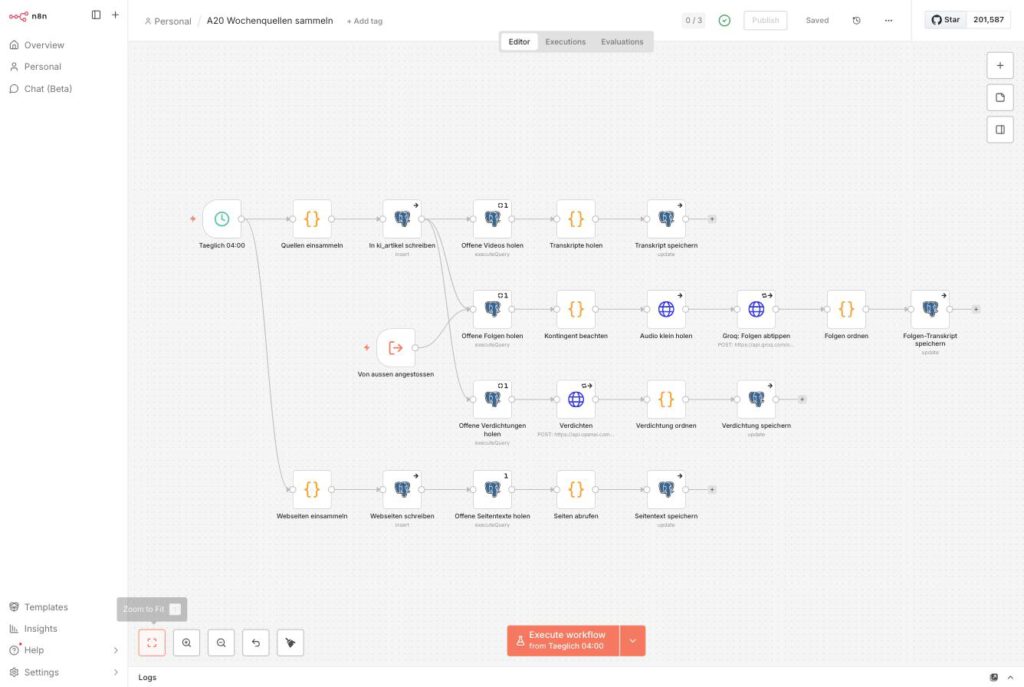
Expected result: In the example setup, the first complete run delivered 17 posts (The Batch 6, Artificial Analysis 5, KI-Buzzer 1, Epoch AI 5, AppliedAI 0 – nothing had appeared there for 14 days), 12 of them texts between 5,013 and 40,676 characters.
Phase 6: condensing, one million characters down to 37,000
By now there is a lot of text in the database. After a few days it was 1,176,577 characters of raw material, roughly 300,000 to 400,000 tokens.
Putting that into a single call is no longer technically out of the question; context windows are big enough by now. It is still not sensible. You then pay again every week for the same raw material, and the more goes in at once, the worse the selection becomes: the little that matters drowns in the mass.
So every find is condensed individually into three to five sentences. 1.18 million characters became 37,012, a ratio of 1 to 32, and that fits into a single call.
Ulf: “Why not put it all in at once? The new models can handle enormous texts.”
Tanja: “They can take in a lot, yes. It is just that the selection gets worse the more goes in at once. We condense every find individually, as it arrives. Then on Sunday 37,000 characters are ready instead of 1.18 million, and the work has long been done.”
Step 6.1: the choice of model, and why it is not Groq
The obvious thing would be to do everything through Groq, since you already have the credential. It does not work: on the relevant chat models, Groq’s free plan allows 8,000 tokens per minute (a token is a unit of text, roughly half a word). An average YouTube transcript has around 6,000 tokens and just fits. The 56,000 characters of a long podcast episode do not.
Bernd: “You already have Groq. Everything through one provider, that is clean.”
Tanja: “Do the math. Free plan, 8,000 tokens per minute on the chat models. A YouTube transcript has around 6,000, that just about works. A long podcast episode has 56,000 characters and does not.”
Ulf: “Then exactly the episodes that give the most are missing.”
Tanja: “Exactly. A chain that fails on the longest and most substantial sources is not a chain.”
A chain that fails on the longest and most substantial sources is not a chain. Hence gpt-4o-mini here, via an OpenAI credential, where this per-minute limit does not exist.
The cost: The complete backlog of 295,000 tokens cost about 4 cents, one off. In continuous operation it comes to a few cents a month.
Step 6.2: Offene Verdichtungen holen
SELECT id, title, source, source_type,
       left(coalesce(content, ''), 60000) AS text,
       length(content) AS zeichen
FROM ki_artikel
WHERE source_type IN ('youtube','podcast','blog')
  AND content IS NOT NULL AND content <> ''
  AND content NOT LIKE '[ohne Text]%'
  AND (zusammenfassung IS NULL OR zusammenfassung = '')
ORDER BY published_date DESC NULLS LAST
LIMIT 12
The line content NOT LIKE '[ohne Text]%' matters: otherwise the model dutifully summarizes an error message.
Step 6.3: the prompt
An HTTP Request node against https://api.openai.com/v1/chat/completions, method POST, model gpt-4o-mini, temperature: 0.2, and above all response_format: { type: "json_object" }.
The credential is set here, exactly as with the Groq node in phase 4:
Click sequence: in the node under Authentication → Predefined Credential Type → Credential Type: OpenAI API → at Credential for OpenAI API select your OpenAI credential.
In addition, under Settings: On Error → Continue (using regular output) and Retry on Fail on.
The system prompt, here first in readable form. The exact wording is below it:
You condense raw material for a weekly summary. You are given the title, the source, and the complete text of a post. With videos and podcasts this is a machine-generated transcript.
Return a JSON object with exactly two fields:
1.
zusammenfassung: German running text, no bullet list, no heading. Three to five sentences. For podcast episodes with several topics, up to eight sentences. In that case name each topic in a sentence of its own.
Write WHAT was said and WHAT it is about, not that it is a video or a podcast. Do not begin with “In this video” or “The episode deals with”. Name concrete names, products, and figures if they appear in the text.
Invent nothing. If something is not in the text, it does not go into the summary.
Do NOT quote verbatim. The transcripts are machine-generated and stumble over proper names and technical terms.
If the text is unusable (empty, cut off, no recognizable content), write exactly:UNBRAUCHBAR2.
subkategorie: exactly ONE of these twelve values, copied character for character:Use Cases & Best Practices·Prompting·Learning & Skill Building·Tools & Product Updates·Automation & Agents·AI Creativity·News & Developments·Models & Open Source·Hardware & Local AI·Security & Privacy·Ethics, Law & Politics·No AI Focus
Do not invent a new value and do not change the spelling. If nothing fits, takeNo AI Focus.
The ban on quoting is not squeamishness. Automatic speech recognition stumbles over proper names. A verbatim quote from a transcript is a quote the speaker may never have said that way.
Bernd: “A verbatim quote is far more credible, though. I would allow that.”
Tanja: “A verbatim quote from a machine transcript is a sentence the speaker may never have said that way. The recognition stumbles over proper names and technical terms. You then misquote somebody, under their name. So: in substance, never word for word.”Condensing, the exact wording for the Body field
A tried-and-tested list of twelve subcategories for the AI field is in the newsroom article in section 3.3.4; it can be adopted directly or adapted to your topic.
Step 6.4: Verdichtung ordnen pulls the category into line
Language models occasionally write free text, even when you give them a list. In the end the database held 32 different subcategories instead of twelve: “Automation & Agenten” instead of “Automation & Agents”, five spellings of “No AI Focus”, plus outliers such as “Schnäppchen”.
Ulf: “But the prompt clearly says there are exactly twelve values.”
Tanja: “It does. Thirty-two came out anyway. A prompt is a request, not a guarantee. Whatever has to be exact character for character, you check afterwards in code.”
The finding comes from a grown production table with a good 227,000 rows, which a second system writes into besides this installation. 45 rows were affected there, so very rarely, and correspondingly fewer with a fresh setup following this guide.
But rare does not mean harmless. Every one of those rows makes later assignments come to nothing, because the comparison is character-exact.
That is why the answer is looked up deterministically, with umlauts resolved, without special characters, using a table of known spelling variants. The same node also reads out the OpenAI response (it sits as a JSON string in choices[0].message.content) and distinguishes temporary from permanent errors.Verdichtung ordnen, complete code ready to copy (102 lines)
// A20 stage 3: file the answer and pull the subcategory firmly onto the twelve
// permitted values. Reason: language models occasionally write free text
// ("Automation & Agenten" instead of "Automation & Agents"). A typo
// makes later assignments come to nothing, because the comparison is character-exact.
const ERLAUBT = [
  'Use Cases & Best Practices', 'Prompting', 'Learning & Skill Building',
  'Tools & Product Updates', 'Automation & Agents', 'AI Creativity',
  'News & Developments', 'Models & Open Source', 'Hardware & Local AI',
  'Security & Privacy', 'Ethics, Law & Politics', 'No AI Focus',
];

// Key: lower case, umlauts resolved, without special characters.
function schluessel(w) {
  return String(w || '').toLowerCase()
    .replace(/ä/g,'a').replace(/ö/g,'o').replace(/ü/g,'u').replace(/ß/g,'ss')
    .replace(/[^a-z0-9]/g,'');
}
const NACHSCHLAG = {};
for (const e of ERLAUBT) NACHSCHLAG[schluessel(e)] = e;

// Known spelling variants that actually occurred in operation.
const VARIANTEN = {
  'automationagenten': 'Automation & Agents',
  'modelsopensource': 'Models & Open Source',
  'toolproduktupdates': 'Tools & Product Updates',
  'ktoolsproduktupdates': 'Tools & Product Updates',
  'nachrichtenentwicklungen': 'News & Developments',
  'kenntnisskillaufbau': 'Learning & Skill Building',
  'kreativitat': 'AI Creativity',
  'kikreativitat': 'AI Creativity',
  'anwendungsfalleebestpractices': 'Use Cases & Best Practices',
  'ethikrechtpolitik': 'Ethics, Law & Politics',
  'keinekifokus': 'No AI Focus',
  'keinkifocus': 'No AI Focus',
};

// Distinguish temporary from permanent - the same rule as in
// "Folgen ordnen". Without it, a permanently failing row occupies one of the twelve
// slots on EVERY run, forever.
const VORUEBERGEHEND = /rate limit|too many requests|429|timeout|time limit|ECONNRESET|ETIMEDOUT|ECONNREFUSED|socket hang up|503|502|504/i;

const quelle = $('Offene Verdichtungen holen').all();
const eingang = $input.all();
if (quelle.length !== eingang.length) {
  return [{ json: { _abbruch: 'counts do not match',
    erwartet: quelle.length, bekommen: eingang.length } }];
}

const zeilen = [];
const uebersprungen = [];
for (let i = 0; i < eingang.length; i++) {
  const b = quelle[i].json || {};
  const a = eingang[i].json || {};
  if (!b.id) continue;

  // The OpenAI response sits as a JSON string in choices[0].message.content.
  let inhalt = null;
  try {
    const roh = a.choices && a.choices[0] && a.choices[0].message && a.choices[0].message.content;
    inhalt = roh ? JSON.parse(roh) : null;
  } catch (f) { inhalt = null; }

  if (!inhalt || !inhalt.zusammenfassung) {
    const grund = String((a.error && (a.error.message || a.error)) || 'no usable response').slice(0, 200);
    if (VORUEBERGEHEND.test(grund)) {
      // Network problem or quota limit: leave the row untouched, again tomorrow.
      uebersprungen.push({ id: b.id, titel: String(b.title || '').slice(0, 60), grund });
      continue;
    }
    // Permanent: mark it so the row drops out of the selection.
    zeilen.push({ json: { id: b.id, zusammenfassung: '[unbrauchbar]',
      subkategorie: 'No AI Focus', status: 'OHNE_INHALT', _grund: grund } });
    continue;
  }

  const text = String(inhalt.zusammenfassung).trim();
  if (text === 'UNBRAUCHBAR') {
    // A marker instead of an empty string: otherwise the query selects the row again
    // on every run (it filters on an empty zusammenfassung) and condenses it forever.
    zeilen.push({ json: { id: b.id, zusammenfassung: '[unbrauchbar]',
      subkategorie: 'No AI Focus', status: 'OHNE_INHALT' } });
    continue;
  }

  const k = schluessel(inhalt.subkategorie);
  const kat = NACHSCHLAG[k] || VARIANTEN[k] || 'No AI Focus';

  zeilen.push({ json: {
    id: b.id,
    zusammenfassung: text,
    subkategorie: kat,
    status: 'VERDICHTET',
    _titel: String(b.title || '').slice(0, 70),
    _quelle: b.source || null,
    _zeichen_vorher: b.zeichen,
    _zeichen_nachher: text.length,
    _kategorie_roh: inhalt.subkategorie === kat ? null : inhalt.subkategorie,
  }});
}

if (zeilen.length && uebersprungen.length) zeilen[0].json._spaeter = uebersprungen;
return zeilen;
Two details with consequences. If the model answers UNBRAUCHBAR, the node writes the marker [unbrauchbar] into the column, but not an empty string. The query filters on an empty zusammenfassung; an empty string would select the row again on every run, forever. And a rate limit leaves the row untouched, so that it comes round again tomorrow.
Ulf: “Why is an empty string worse than a word?”
Tanja: “Because the query looks for empty summaries. If you write an empty string into it, the row is still empty, gets selected again tomorrow, condensed again, recognized as unusable again. Every day, forever. The marker [unbrauchbar] is the note: somebody worked on this, the result was nothing.”
Step 6.5: Verdichtung speichern
Click sequence: Postgres node → operation Update → table ki_artikel → Map Each Column Manually → matching on id. Under Settings: On Error → Continue (using regular output).
| Column | Value |
|---|---|
id | ={{ $json.id }} |
zusammenfassung | ={{ $json.zusammenfassung }} |
subkategorie | ={{ $json.subkategorie }} |
status | ={{ $json.status }} |
Expected result: 49 posts condensed, 755 characters per summary on average, 12 posts in 12 seconds.
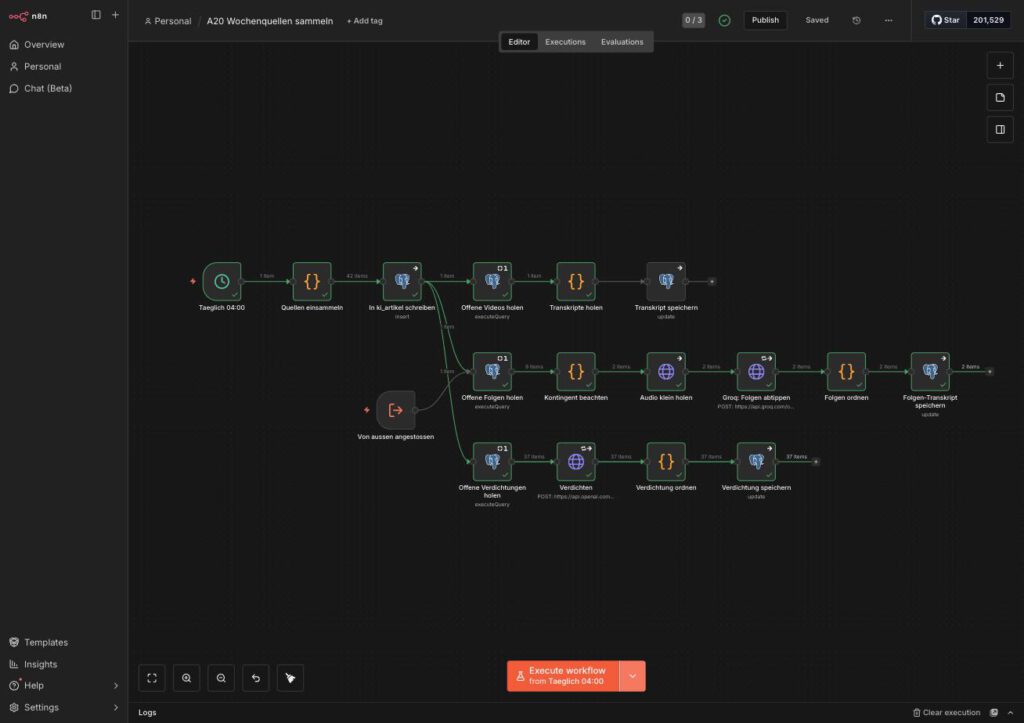
A sample on quality, so that it is clear what comes out of it:
“The future of human dubbing voices hangs in the balance, as streaming services such as Netflix are introducing clauses into contracts that allow them to use voice actors’ voices for AI training without their consent. …”
Concrete names, no filler, no “In this episode”.
That completes A20. Do not forget the last step. Phase 8 covers that.
Phase 7: A21, the summary itself
New workflow, A21 Wochenzusammenfassung schreiben, Schedule Trigger set to Weeks, Sunday, 06:00.
Step 7.1: Wochenmaterial holen
SELECT source_type, source, title, url,
       zusammenfassung AS text, subkategorie, published_date
FROM ki_artikel
WHERE published_date > now() - interval '7 days'
  AND zusammenfassung IS NOT NULL
  AND zusammenfassung <> ''
  AND zusammenfassung <> '[unbrauchbar]'
ORDER BY published_date DESC
The selection runs on the zusammenfassung column, not on the status. That is more robust: it fetches exactly what is actually available in condensed form, no matter which path the row took.
Step 7.2: Material aufbereiten
A code node builds a readable block of text from the database rows and gives every source an identifier K1…Kn. Using these identifiers, the planning step assigns sources to blocks in a moment, and Bloecke aufteilen uses them later to find the text again. The same node works out the calendar week and the period, without an extra library.
Ulf: “What are the identifiers for? The titles are right there.”
Tanja: “Titles are long, they repeat, and a model easily writes them differently when copying them out. K17 is short and unambiguous. The planning step says: block three consists of K3, K17 and K24. And the next node uses that to find the corresponding text again, without having to guess.”Material aufbereiten, complete code ready to copy (49 lines)
Note that source_type is passed along per source. The model is meant to know whether a statement comes from a podcast, a video, or a website. Whether it can set differing assessments against each other depends on exactly that.
Step 7.3: the rebuild that makes the difference
A short story is worth telling here, because it saves you an afternoon.
The first setup was the obvious one: one node, one call, “write me a summary of around 3,500 words”. The result was decent: six topic blocks, 23 paragraphs, 20 source links, no bullet lists. Only 1,507 words instead of 3,500. Around 244 words per block.
Not too few topics. Too little development per topic.
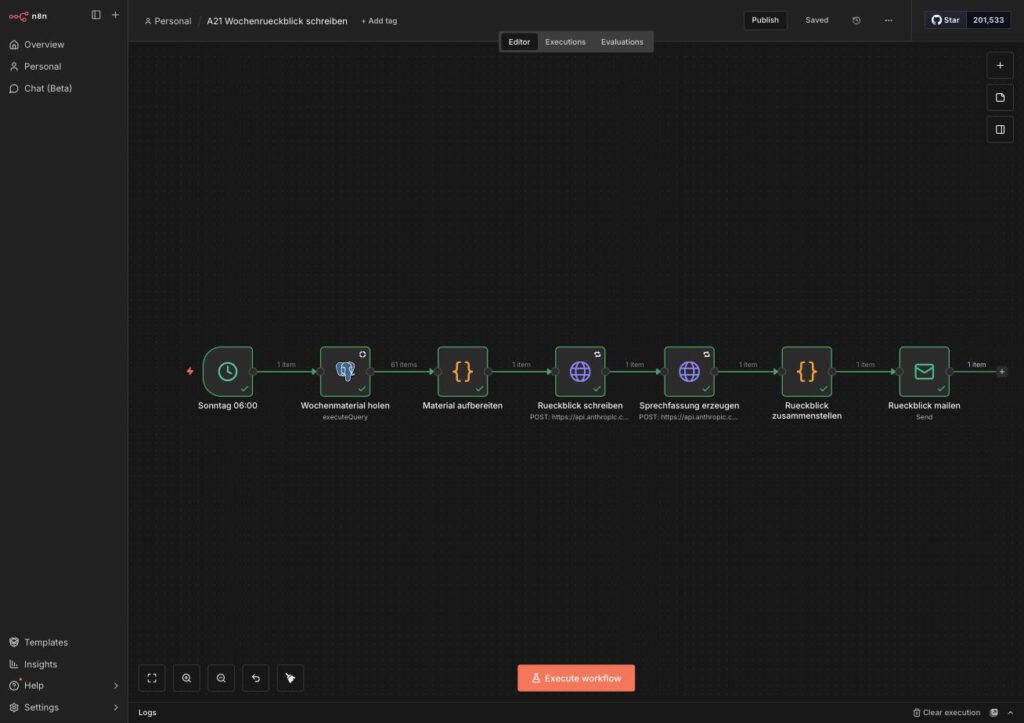
Bernd: “Then just write ‘at least 3,500 words’ in the prompt. In capitals. And a few exclamation marks.”
Tanja: “We did. 1,507 words came out. Models are bad at estimating their own length; that is not a question of emphasis.”
Ulf: “And what helps then?”
Tanja: “Making the task smaller. First plan how many blocks there are. Then have each block written individually, with a target of 550 to 700 words for that one block. Six small tasks instead of one big one.”
A length target in the prompt demonstrably is not enough. Models are bad at estimating their own length.
The solution: write block by block. First a call that plans the blocks. Then one call per block. Then the opening and the closing. Then assemble.
… → Bloecke planen → Bloecke aufteilen → Block schreiben (one call per block)
  → Bloecke sammeln → Rahmen schreiben → Zusammenfassung bauen → Zusammenfassung mailen
The result, measured on the same week:
| one call | block by block | |
|---|---|---|
| Topic blocks | 6 | 6 |
| Words | 1,507 | 2,898 |
| Words per block | 244 | around 450 |
| Paragraphs | 23 | 32 |
| Runtime | 3 min 9 s | 3 min 33 s |
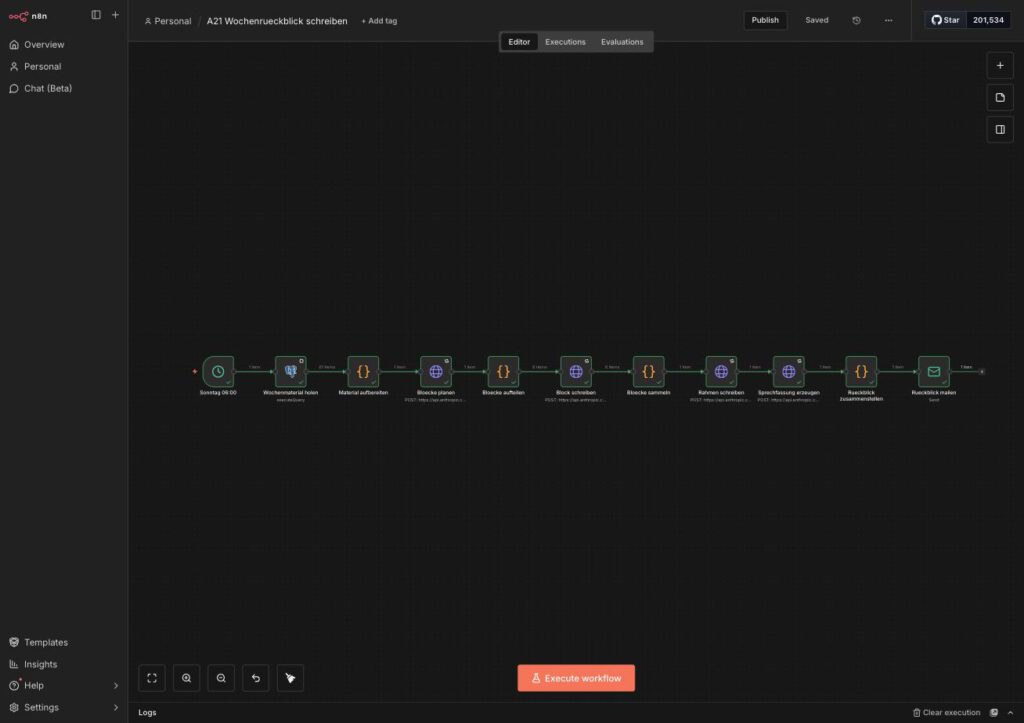
The screenshots come from the original setup, in which the workflow still had a different name and carried one node more. That changes nothing about the chain shown.
The depth visibly increased as well. Before, a subheading read “Labelling obligation and invisible watermarks”; afterwards “AI Act in force: what actually has to be labelled now”.
Cost and runtime roughly double. With one run a week that is of no consequence.
Step 7.4: Bloecke planen
HTTP Request against https://api.anthropic.com/v1/messages, method POST, header anthropic-version: 2023-06-01, max_tokens: 4000, temperature: 0.4.
Click sequence for the credential: in the node under Authentication → Predefined Credential Type → Credential Type: Anthropic API → select your Anthropic credential. In addition, Retry on Fail on and timeout 600000.
The system prompt:
You plan the weekly summary. You do NOT write it. You only determine which topic blocks it consists of and which source belongs where.
This is not a press review. The summary puts things in context: it recognizes that several sources from the same week belong to the same topic, and that a voice from a podcast assesses something differently from a specialist site.
Form FIVE OR SIX topic blocks. Each block should if possible contain sources of different kinds: a video, a podcast, an analysis. A block for which there is only a single thin source is not a block.
Answer with pure JSON, without code block characters, without explanation:
{ "titel": "heading for the whole thing — names the topic of the week,
             no filler phrase such as 'The AI week'",
  "leitgedanke": "one sentence: what holds this week together",
  "bloecke": [ { "ueberschrift": "...", "kernfrage": "...",
                 "quellen": ["K3", "K17", "K24"] } ] }
Each source may appear in only one block. Sources without insight value you leave out.
Ulf: “Why can the planner not write at the same time? Then you would be done in one step.”
Tanja: “Because those are two different jobs. Planning means: keeping an overview, sorting, deciding what belongs together. Writing means: going into depth. Whoever does both at once does both by halves. That is why the prompt says in capitals that it does NOT write.”Bloecke planen, the exact wording for the Body field
Step 7.4b: Bloecke aufteilen
A code node breaks the plan down into individual work orders and attaches its material to each one, plus the headings of the other blocks for demarcation.Bloecke aufteilen, complete code ready to copy (35 lines)
Step 7.5: Block schreiben
The same setup as Bloecke planen: HTTP Request against https://api.anthropic.com/v1/messages, credential via Predefined Credential Type → Anthropic API, header anthropic-version: 2023-06-01, Retry on Fail on. Only max_tokens is set to 8000 here and temperature to 0.7.
The prompt is the most important one in the whole installation:
You write ONE topic block of the weekly summary. Not the whole thing, only this one block.
LENGTH: 550 to 700 words. That is the most important requirement. A block of 250 words is too short and will be rejected. Count as you go.
DEPTH. This is what matters:
- Do not just say THAT something happened, but what exactly, on what grounds, and with what consequence.
- If two sources assess the same thing differently, work out the difference. That is the core.
- Name concrete names, products, figures, and deadlines if they appear in the material.
- Explain technical terms in a subordinate clause on first occurrence.
- Close with one or two sentences on why this counts beyond the week.
TONE: Grown-up, concrete, without advertising language. No exclamation marks, no “revolutionary”, no “groundbreaking”. Whole paragraphs, no bullet points. Four to six paragraphs.
SOURCES: Name the source in the running text when a statement comes from it: “In heise’s KI-Update it says…”. Link the source title as an HTML link. Link each source at most once.
FORBIDDEN:
- Invent nothing. What is not in the material does not go into the text.
- Do not quote verbatim: the transcripts are machine-generated.
- No figure, study, or research finding without its author in the same sentence.
- No collective labels such as “studies show” or “researchers have found”.
- No repetition of what is in other blocks.
FORMAT: Pure HTML, beginning with
<h2>, after that only<p>and<a href>.
Each call is additionally given the headings of the other blocks, for demarcation, so that nothing is duplicated.
Two things about this prompt, before you take its numbers at face value.
The target is deliberately above the goal. Six blocks of 550 words would arithmetically be 3,300; the measured run produced 2,898 at around 450 words per block. That is not a contradiction but the reason for the high target: models reliably land below what you name to them. Enter 450 here and you get 350. The number in the prompt is a target mark, not a forecast.
The rejection is rhetoric, not technology. Nothing in the workflow checks the length, and nothing rejects anything. Bloecke sammeln does count the words and stores them in woerter_bloecke, but it does not abort. That is deliberate: a block that is too short is annoying, an aborted Sunday run is worse. The word count is in the header table of the email; you see it there every week and can steer accordingly.
Bernd: “Six separate calls. They know nothing about each other. In the end the same thing will be in there six times.”
Tanja: “That is why each call is given the headings of the other five blocks and the instruction to set itself apart from them. It does not see their text, but it knows what the others are writing about. That is enough.”Block schreiben, the exact wording for the Body field
Insert as Body Content Type: JSON, mode Expression. A single line:
={{ JSON.stringify({ model: "claude-sonnet-4-5-20250929", max_tokens: 8000, temperature: 0.7, system: "You write ONE topic block of the weekly summary.\nNot the whole thing - only this one block.\n\nLENGTH: 550 to 700 words. That is the most important requirement. A block of 250 words\nis too short and will be rejected. Count as you go.\n\nDEPTH - this is what matters:\n- Do not just say THAT something happened, but what exactly, on what grounds\n and with what consequence.\n- If two sources assess the same thing differently, work the difference\n out. That is the core.\n- Name concrete names, products, figures and deadlines if they appear in the material.\n- Explain technical terms in a subordinate clause on first occurrence.\n- Close with one or two sentences on why this counts beyond the week.\n\nTONE: Grown-up, concrete, without advertising language. No exclamation marks, no\n'revolutionary', no 'groundbreaking'. Whole paragraphs, no bullet points.\nFour to six paragraphs.\n\nSOURCES: Name the source in the running text when a statement comes from it - 'In\nheise's KI-Update it says...'. Link the source title as an HTML link to the\naddress given. Link each source at most once.\n\nFORBIDDEN:\n- Invent nothing. What is not in the material does not go into the text.\n- Do not quote verbatim: the transcripts are machine-generated and stumble\n over proper names. Render them in substance.\n- No figure, study or research finding without its author in the same sentence.\n- No collective labels such as 'studies show' or 'researchers have found'.\n- No repetition of what is in other blocks (you are given their\n headings for demarcation).\n\nFORMAT: Pure HTML, beginning with <h2>your heading</h2>, after that only <p> and\n<a href>. No code block characters, no Markdown, no explanation before or after.", messages: [ { role: "user", content: "Title of the summary: " + $json.titel + "\nGuiding idea of the week: " + $json.leitgedanke + "\n\nYour block " + $json.nummer + " of " + $json.von + ": " + $json.ueberschrift + "\nKey question: " + $json.kernfrage + "\n\nThe other blocks (do not cover, only demarcate): " + $json.alle_ueberschriften + "\n\nYour material (" + $json.quellen_anzahl + " sources):\n\n" + $json.material } ] }) }}Step 7.5b: Bloecke sammeln
A code node brings the individually written blocks back together into one piece. It runs once for all inputs, and that is exactly what is needed here.Bloecke sammeln, complete code ready to copy (23 lines)
Step 7.5c: Rahmen schreiben
A final call writes the opening and the closing, and it does so after the blocks are in place, so that it can refer to them. HTTP Request against https://api.anthropic.com/v1/messages, credential via Predefined Credential Type → Anthropic API, header anthropic-version: 2023-06-01, max_tokens: 3000, temperature: 0.7, Retry on Fail on.
The system prompt calls for three to five sentences of opening (“What holds this week together? Do not list the blocks, but name the connection a reader would otherwise miss.”) and three to four sentences of closing (“What of this still counts next week?”). What is returned is pure JSON with the two fields vorspann and schluss.
Ulf: “The opening comes at the end? That sounds the wrong way round.”
Tanja: “For writing it is exactly right. An opening written before the blocks are in place can only announce what is supposed to come. One written afterwards can say what is actually in there. Newspapers have done it that way for a hundred years.”Rahmen schreiben, the exact wording for the Body field
Step 7.6: the AI notice and where it belongs
Article 50 of the AI Regulation has applied since 2 August 2026. For texts, the labelling obligation takes effect when three things come together: the AI-generated or AI-modified text is published, it is intended to inform the public, and it concerns matters of public interest. That covers, for example, political processes, administration, the judiciary, fundamental rights, public safety, health, as well as economic and scientific developments of societal significance.
There is an exception, and it matters: If the content is checked for substance by a human and a natural or legal person assumes editorial responsibility for the publication, the labelling obligation does not apply. A mere spelling, grammar, or formatting check expressly does not suffice for this; what has to be checked is the content.
For this installation that means: anyone who only drops the Sunday summary into their own mailbox publishes nothing and is not affected by Article 50. Anyone who puts it online unchecked very much is. This workflow labels in both cases, regardless of the legal position, because a fixed label costs nothing and settles the question once and for all.
For anyone rebuilding this, what counts above all is the design decision, and that one is right regardless of the legal position:
The notice belongs in the code, not in the prompt. A mandatory notice must not depend on whether a model writes it out this time or rephrases it. It sits as a fixed string in the node Zusammenfassung bauen, is inserted and then checked, and the result of the check appears in the header table of the email.
Bernd: “Write in the prompt: ‘Put an AI notice at the top.’ Done.”
Tanja: “And in week seven the model rephrases it, or leaves it out because the text is running short. A mandatory notice is a fixed string in the code. It is inserted and then checked, and the result of the check is at the top of the email.”
Ulf: “So not ask, but build in.”
Tanja: “Everything that has to be binding belongs in the code. The prompt is responsible for what needs judgement.”
On placement, the rule requires the information to be given clearly and distinguishably at the latest on first contact with the content. It does not prescribe a particular line. This setup puts the notice directly after the heading, before the opening, because that is the place where nobody can overlook it. At the end of the text or in the imprint it would be a bet that somebody reads that far.
(As of August 2026. This is not legal advice but an evaluation of public sources. On Article 50 there is so far neither case law nor established administrative practice. Whether your case falls under the exception is not for you to decide, and certainly not for this text.)
Step 7.6b: Zusammenfassung bauen
The node puts together the title, notice, opening, blocks, and closing, measures the length, and builds the email including the header table.Zusammenfassung bauen, complete code ready to copy (55 lines)
// A21 final step: assemble the text, measure it, build the email.

// ---------------------------------------------------------------------------
// AI notice under Article 50 of the AI Regulation.
// Deliberately hard-wired HERE and not in the prompt: a mandatory notice must not
// depend on whether a model writes it out this time or rephrases it.
// Placed directly after the heading, because the Commission guidelines require
// the notice to be visible on first contact - a note at the end of the text
// or in the imprint expressly does not suffice.
const HINWEIS_HTML = '<p style="font-size:0.9em;opacity:0.75"><strong>Notice:</strong> This article was created with AI.</p>';
// ---------------------------------------------------------------------------

const vor = $('Material aufbereiten').first().json;
const teile = $('Bloecke sammeln').first().json;

// Read in the frame. If parsing fails, the node carries on WITHOUT an opening
// instead of aborting - better a text without a frame than none at all.
let rahmen = { vorspann: '', schluss: '' };
try {
  const roh = String((($('Rahmen schreiben').first().json.content || [])[0] || {}).text || '');
  const t = roh.replace(/^```(?:json)?/i,'').replace(/```$/,'').trim();
  rahmen = JSON.parse(t.slice(t.indexOf('{'), t.lastIndexOf('}') + 1));
} catch (f) { /* carry on without a frame */ }

const artikel = '<h1>' + teile.titel + '</h1>\n' + HINWEIS_HTML + '\n'
  + (rahmen.vorspann || '') + '\n'
  + teile.bloecke_html + '\n'
  + (rahmen.schluss || '');

const woerter = t => String(t).replace(/<[^>]+>/g,' ').split(/\s+/).filter(Boolean).length;
const wArtikel = woerter(artikel);

// Safeguard: the notice has to be in the text, otherwise it shows up in the mail.
const hinweis_ok = artikel.indexOf('created with AI') >= 0;

const kopf = [
  '<h2 style="font:600 15px sans-serif">Weekly summary, week ' + vor.kw + ' — ' + vor.zeitraum + '</h2>',
  '<table style="font:13px sans-serif;border-collapse:collapse">',
  '<tr><td style="padding:2px 12px 2px 0">Sources</td><td>' + vor.anzahl_quellen + '</td></tr>',
  '<tr><td style="padding:2px 12px 2px 0">Topic blocks</td><td>' + teile.bloecke_anzahl + '</td></tr>',
  '<tr><td style="padding:2px 12px 2px 0">Length</td><td>' + wArtikel + ' words</td></tr>',
  '<tr><td style="padding:2px 12px 2px 0">AI notice included</td><td>' + (hinweis_ok ? 'yes' : 'MISSING') + '</td></tr>',
  '</table><hr>',
].join('');

return [{ json: {
  betreff: 'Weekly summary, week ' + vor.kw + ' (' + vor.zeitraum + ')',
  koerper: kopf + artikel,
  wp_content: artikel,
  kw: vor.kw,
  woerter_artikel: wArtikel,
  bloecke: teile.bloecke_anzahl,
  woerter_bloecke: teile.woerter_bloecke,
  hinweis_ok,
}}];
A small thing that saves the run: If the response from Rahmen schreiben cannot be read as JSON, the try block catches it and the node carries on without an opening. Better a text without a frame than none at all.
Step 7.7: the email
The assembly node puts a small header table in front of the text that reports on the run itself:
| Sources | 83 |
| Topic blocks | 6 |
| Length | 2,796 words |
| AI notice included | yes |
That is one of the most useful little things in the whole setup. On opening the mail you can see whether the run was healthy, without opening n8n.
Ulf: “Four lines of table. Does that really achieve anything?”
Tanja: “Sunday morning, you open the mail and see: 83 sources, six blocks, 2,796 words, notice included. All in order. If it suddenly says 11 sources, you know immediately that something is jammed, without opening n8n. A system should report on itself.”
Then a Send Email node with your SMTP credential, subject ={{ $json.betreff }}, HTML ={{ $json.koerper }}.
Phase 8: the three things you only notice afterwards
This phase has no nodes and still decides between success and failure.
8.1: the time zone belongs on the workflow
As delivered, n8n calculates in America/New_York. A schedule node without a time zone of its own inherits this value. The interface dutifully shows “4am”. It just means a different time zone from yours.
Concretely that meant: A20 did not run at 04:00 but at 10:00 German time. A21 not on Sundays at 06:00 but on Sundays at 12:00. It was only noticed because someone asked whether everything had worked; nothing had turned red.
Ulf: “But the screen said four o’clock.”
Tanja: “It said ‘4am’. Just not your four o’clock. Out of the box n8n calculates in America/New_York, and a schedule node without a time zone of its own inherits that. A20 ran at ten, A21 on Sundays at twelve. Nothing turned red. It was noticed because somebody asked.”
Bernd: “The time is right on mine. I set the NAS to German time.”
Tanja: “The NAS, yes. n8n has its own setting, and it takes no interest in the system time of the machine underneath.”
Click sequence per workflow: Open the workflow → … (three dots at the top right) → Settings → field Timezone → Europe/Berlin → save.
Permanently you solve it at the instance: GENERIC_TIMEZONE=Europe/Berlin entered into n8n’s Docker environment and the container restarted. Then it applies to every future workflow as well.
For the running schedule to pick up the new time zone, every affected workflow has to be deactivated and activated again once.
8.2: publishing is a step of its own
A manual run executes the draft. A scheduled run executes the published version.
Anyone who only tests by hand has never checked what actually runs at night. Only the click on Publish makes the change the running version.
Bernd: “But I tested it. Ran through green, all good.”
Tanja: “You tested the draft. At night the published version runs. Those are two different things, as long as you have not clicked Publish.”
Ulf: “How do I see which one currently applies?”
Tanja: “By the Publish button at the top right. Grey means: draft and running version are the same. Coloured means: there is something in your draft that does not run at night.”
How to recognize it: The Publish button is grey when the draft and the published version match. If it is coloured, there is something unpublished in the draft.
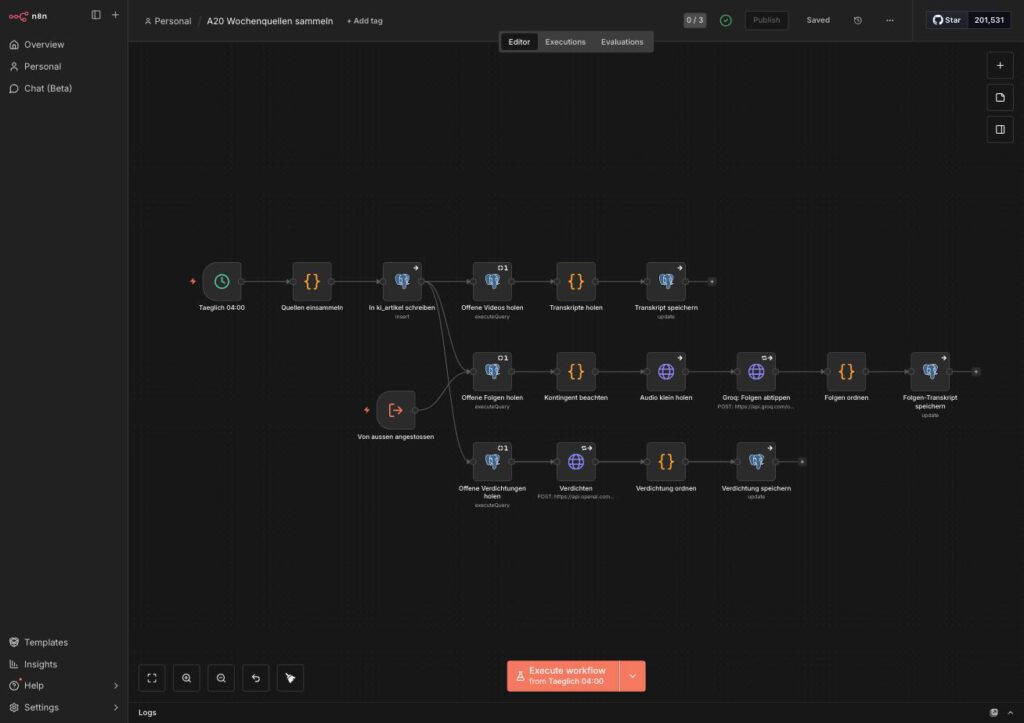
A side effect that can catch you cold: anyone working on a workflow in which unpublished changes have been sitting for weeks publishes them too. So before the first click on Publish, check what is in the draft.
8.3: the proof is the scheduled run
The rule that forced itself on us while building, after several failures:
A thing only counts as proven when two things are in place: the published version and a scheduled run that shows it.
Until then, “runs by itself at night” is a well-founded expectation, not a finding.
On the first scheduled Sunday the record was mixed: A21 ran through cleanly at 06:00:51, 83 sources, six blocks, mail sent. A20 fired at 04:00:07, that is, at the correct time. The time zone was right – and it failed on the empty case from phase 5.
Ulf: “Annoying. Everything tested, and then it goes wrong on the first real run.”
Tanja: “Not annoying. That is exactly what the first real run is for. You start a manual run when you have something to process. The scheduled run starts even when there is nothing there. You never had that state before.”
Expect the first real run to find something no manual run found. That is not a failure, that is the purpose of the first run.
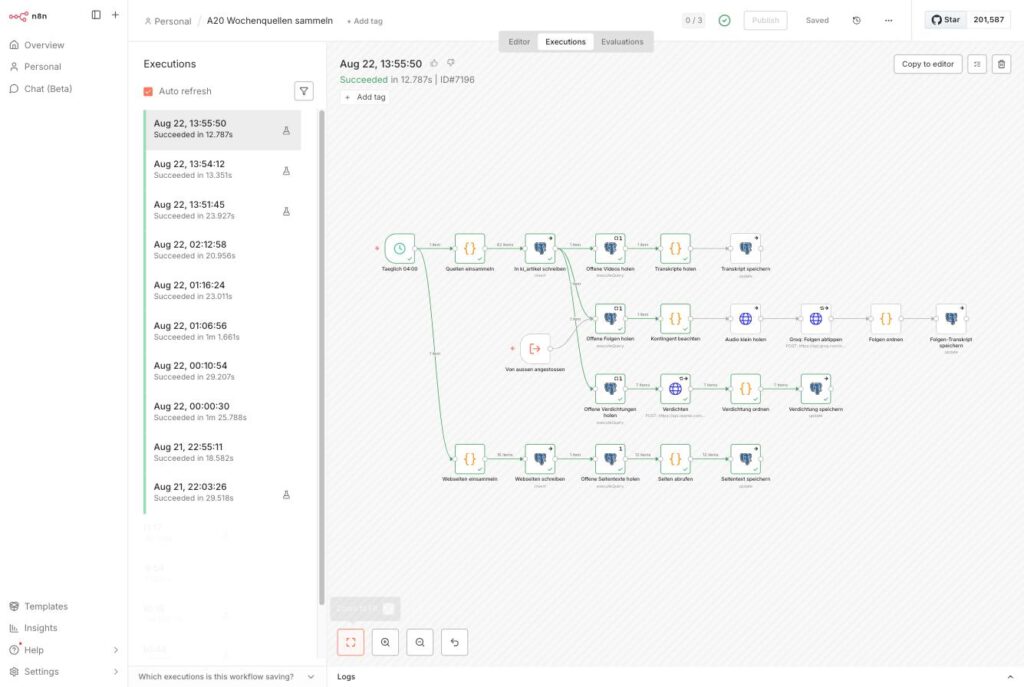
Appendix: the blueprint at a glance
When everything is in place, your installation should look exactly like this. This list is meant for checking against, node by node, connection by connection.
A20 Wochenquellen sammeln, 22 nodes
Time zone Europe/Berlin, active, daily 04:00.
| # | Node | Type in n8n | Special feature |
|---|---|---|---|
| 1 | Täglich 04:00 | scheduleTrigger | Days, hour 4, minute 0 |
| 2 | Quellen einsammeln | code | the three source lists |
| 3 | In ki_artikel schreiben | postgres insert | Skip on Conflict, Map Each Column Manually, On Error: continue |
| 4 | Offene Videos holen | postgres query | Execute Once, 21-day window |
| 5 | Transkripte holen | code | three at a time, write off only on a positively identified reason |
| 6 | Transkript speichern | postgres update | matching on id, On Error: continue |
| 7 | Offene Folgen holen | postgres query | Execute Once |
| 8 | Kontingent beachten | code | 3,600 seconds per pass |
| 9 | Audio klein holen | httpRequest | Response Format File, Output data, timeout 900000 |
| 10 | Groq: Folgen abtippen | httpRequest | credential groqApi, multipart, Retry on Fail |
| 11 | Folgen ordnen | code | temporary ≠ permanent |
| 12 | Folgen-Transkript speichern | postgres update | matching on id, On Error: continue |
| 13 | Von aussen angestossen | executeWorkflowTrigger | second entry point, input passthrough |
| 14 | Offene Verdichtungen holen | postgres query | LIMIT 12 |
| 15 | Verdichten | httpRequest | credential openAiApi, Retry on Fail |
| 16 | Verdichtung ordnen | code | pull the category into line |
| 17 | Verdichtung speichern | postgres update | matching on id, On Error: continue |
| 18 | Webseiten einsammeln | code | sitemaps and overview page |
| 19 | Webseiten schreiben | postgres insert | Skip on Conflict, On Error: continue |
| 20 | Offene Seitentexte holen | postgres query | LIMIT 12, 30-day window |
| 21 | Seiten abrufen | code | empty case returns [], 3 s between requests per domain |
| 22 | Seitentext speichern | postgres update | matching on id, On Error: continue |
The connections. Four strands, three of them hanging off the insert node, the fourth directly off the schedule:
Täglich 04:00              → Quellen einsammeln
Täglich 04:00              → Webseiten einsammeln
Quellen einsammeln         → In ki_artikel schreiben
In ki_artikel schreiben    → Offene Videos holen
In ki_artikel schreiben    → Offene Folgen holen
In ki_artikel schreiben    → Offene Verdichtungen holen
Offene Videos holen        → Transkripte holen
Transkripte holen          → Transkript speichern
Offene Folgen holen        → Kontingent beachten
Kontingent beachten        → Audio klein holen
Audio klein holen          → Groq: Folgen abtippen
Groq: Folgen abtippen      → Folgen ordnen
Folgen ordnen              → Folgen-Transkript speichern
Von aussen angestossen     → Offene Folgen holen
Offene Verdichtungen holen → Verdichten
Verdichten                 → Verdichtung ordnen
Verdichtung ordnen         → Verdichtung speichern
Webseiten einsammeln       → Webseiten schreiben
Webseiten schreiben        → Offene Seitentexte holen
Offene Seitentexte holen   → Seiten abrufen
Seiten abrufen             → Seitentext speichern
Node 13 (Von aussen angestossen) is optional. It makes it possible to call the podcast branch on its own, without collecting the feeds again. That is handy for working through a backlog. A workflow can only be called as a sub-workflow if it has been published.
A21 Wochenzusammenfassung schreiben, 10 nodes
Time zone Europe/Berlin, active, Sundays 06:00. A straight chain without branching.
| # | Node | Type in n8n | Special feature |
|---|---|---|---|
| 1 | Sonntag 06:00 | scheduleTrigger | Weeks, Sunday, hour 6 |
| 2 | Wochenmaterial holen | postgres query | seven days, condensed rows only |
| 3 | Material aufbereiten | code | identifiers K1…Kn |
| 4 | Bloecke planen | httpRequest | credential anthropicApi, Retry on Fail |
| 5 | Bloecke aufteilen | code | one item per block |
| 6 | Block schreiben | httpRequest | runs once per item |
| 7 | Bloecke sammeln | code | runs once for all |
| 8 | Rahmen schreiben | httpRequest | opening and closing |
| 9 | Zusammenfassung bauen | code | AI notice hard-wired |
| 10 | Zusammenfassung mailen | emailSend | credential smtp |
Sonntag 06:00         → Wochenmaterial holen
Wochenmaterial holen  → Material aufbereiten
Material aufbereiten  → Bloecke planen
Bloecke planen        → Bloecke aufteilen
Bloecke aufteilen     → Block schreiben
Block schreiben       → Bloecke sammeln
Bloecke sammeln       → Rahmen schreiben
Rahmen schreiben      → Zusammenfassung bauen
Zusammenfassung bauen → Zusammenfassung mailen
For all three Anthropic nodes: header anthropic-version: 2023-06-01, timeout 600000.
The checkpoints per stage
After every step there is a number that shows whether it is in place. The values come from real runs, not from an estimate.
| Step | What is built | How you can tell it is in place |
|---|---|---|
| 0 | table and Postgres credential | SELECT count(*) FROM ki_artikel answers without complaining |
| 1 | yt-dlp service on the NAS | /gesund reports both versions; four channels deliver 29,323 words in 27 seconds |
| 2 | schedule → Quellen einsammeln → insert | 46 finds collected, 46 written in 1.775 seconds |
| 3 | the three YouTube nodes | 25 videos in 37 seconds, 88,448 words, status changes to TRANSKRIBIERT |
| 4 | the five podcast nodes | a 49-minute episode: 9,078 words in 7.8 seconds, €0 |
| 5 | the fourth strand | 17 posts collected, 12 texts between 5,013 and 40,676 characters. Second test: run it once when nothing is open; it has to stay green |
| 6 | the three condensation nodes | 12 posts in 12 seconds, rows have a zusammenfassung, status VERDICHTET |
| 7 | A21 complete | first run: the email arrives. After the rebuild to block-by-block writing: 2,898 words, hinweis_ok = true |
Tanja: “This table is the actual blueprint. After every stage there is a number. If it is right, you move on. If it is not, you look here and not three phases later.”
Bernd: “I always build everything first and then test at the end.”
Tanja: “And then look for the error in thirty-two nodes instead of in three.”
The five credentials
| Credential | Type in n8n | Used by |
|---|---|---|
| Postgres | postgres | all database nodes in A20 and A21 |
| Groq | groqApi | Groq: Folgen abtippen |
| OpenAI | openAiApi | Verdichten |
| Anthropic | anthropicApi | Bloecke planen, Block schreiben, Rahmen schreiben |
| SMTP | smtp | Zusammenfassung mailen, the only one that just A21 needs |
Passwords and keys you enter yourself. That rule applies here as everywhere.
Maintenance: what still comes up afterwards
Astonishingly little.
yt-dlp updates itself on every container start. If transcripts stop coming because YouTube has changed something, a restart of the container is usually enough.
New sources are one line in Quellen einsammeln (feed) or in Webseiten einsammeln (sitemap). No new node, no new workflow.
Once a month, look into the database:
SELECT source_type, status, count(*)
FROM ki_artikel
GROUP BY source_type, status
ORDER BY 1, 2;
If rows pile up on OHNE_TRANSKRIPT or OHNE_INHALT, a source is broken.
Read the log. Every run puts a field _protokoll on the first result. It states per source whether it answered. A source that permanently reports “0 hits” is either quiet or dead, and without the log those two cases look the same.
A screenshot before every change, one after it. It sounds pedantic, and it is, and it is the only way to reconstruct three weeks later why something is set the way it is. With one condition: Look at every screenshot once after saving it. A screenshot you have never looked at yourself proves nothing; it is just a file.
Bernd: “I take masses of screenshots. I have them all in a folder.”
Tanja: “Have you looked at them?”
Bernd: “They’re there, aren’t they.”
Tanja: “We had a screenshot in the folder that showed the wrong screen. That was only noticed when somebody opened it for the first time, weeks later. A screenshot nobody has looked at proves nothing.”
Troubleshooting: twenty-two errors, so you do not have to make them yourself
Ulf: “Twenty errors. That is a lot.”
Tanja: “That is good news. Somebody else has already paid for every line here. You read the table through once and save yourself two afternoons.”
| Symptom | Cause | Remedy |
|---|---|---|
network xy declared as external, but could not be found | network name guessed instead of looked up | Container Manager → Network → read off the real name, enter it in compose.yaml |
| container starts and shuts down immediately | folder name in compose.yaml is not character-exact | compare the path in the volumes: line against File Station |
PIDs limit discarded on start | the NAS kernel does not support the process limit | Harmless. The container runs; pids_limit simply has no effect on this system |
| subtitle request returns HTTP 200 and zero bytes | home-made request without a PO token | do not build it yourself, use yt-dlp |
| “Sign in to confirm you’re not a bot” on every video | the installation reaches the network through a data center | not solvable with reasonable effort. Run it over a private connection |
| feed reports “ok, 0 hits” although there are new posts | server answers every path with HTTP 200 and the home page | check for <item> or <entry> in the content, not the status code |
| podcast transcription returns nothing for long episodes | file over 25 MB | put the /audio endpoint with ffmpeg in front |
Rate limit … seconds of audio per hour (ASPH) | sliding hourly window across the whole account; test runs count towards it | limit per pass to 3,600 s, three retries 5 s apart |
| an episode or a video disappears from the summary permanently | a temporary error wrote OHNE_TRANSKRIPT; the query looks for GESAMMELT | write off only on a positively identified permanent reason. Unknown errors stay GESAMMELT |
videos sit on OHNE_TRANSKRIPT with “Sign in to confirm you’re not a bot” | the bot check was in no list of temporary errors | list the bot check explicitly as temporary, in both branches |
| every video is transcribed several times | query node is set to “run per input row” | set it to Execute Once |
| the insert node falls apart | automatic column mapping takes _protokoll for a column | Map Each Column Manually |
| the table grows by the same rows on every run | Skip on Conflict on, but no UNIQUE on url_normalized | create the unique constraint in the database |
| a row is condensed afresh on every run | an empty string was written on UNBRAUCHBAR | write the marker [unbrauchbar] |
| the summary is an error message | rows with [ohne Text] were condensed along with the rest | add AND content NOT LIKE '[ohne Text]%' |
| assignments come to nothing | the model phrased the category freely | look the answer up deterministically in a list |
Minimax H3's Weights… in the title | the decoder only knows the decimal form | decode both forms, & last |
| a 404 among the finds | the address pattern caught a fragment | the slug has to contain letters and a hyphen |
| the whole run fails: “The row you are trying to update doesn’t exist” | a code node passes a placeholder without an id to an update node on an empty input | return [] on an empty input. Test once without material! |
| the workflow runs six hours late | n8n calculates in America/New_York | time zone per workflow to Europe/Berlin, plus GENERIC_TIMEZONE at the instance |
| a change has no effect at night although the manual run works | the change is in the draft, not published | press Publish. Grey button = both the same |
| the text stops at 1,500 instead of 3,500 words | one call for all blocks | write block by block, one call per block, with a word target |
What is there at the end
An installation that works its way through a dozen sources every day at four in the morning, transcribes videos and podcasts, reads out websites without a feed, boils every find down to a few sentences, and on Sunday at six puts a text of around 2,800 words into the mailbox that names six topics and, in each of them, sets different voices against each other.
The running costs: zero euros for the speech recognition, a few cents a month for condensing, and one writing run per week with typically eight language model calls: once the planning, six times one block each, once the frame.
What occupied me most on re-reading the project diary is not the technology. It is an observation that runs through almost every error: The expensive mistakes were never the complicated ones. The wrong folder name. The guessed network name. The time zone that looked right on screen and meant a different one. Every time it was the same thing: a value from the environment was assumed instead of queried, although looking it up would have taken two seconds.
Bernd: “So in the end it was all half as bad.”
Tanja: “In the end, yes. Just look at what it was down to: a folder name, a network name, a time zone. None of them was difficult. They were guessed instead of looked up.”
Ulf: “And next time?”
Tanja: “Look it up. Always take the value from the environment, never the one you believe is there.”
And the second most expensive were the ones where something worked, but not what you thought. An empty response with status code 200. A workflow that counts as “successful” because it established that there was nothing to do. A screenshot that was dutifully filed but never looked at and therefore showed the wrong screen.
That is not a peculiarity of this project. That is the basic condition of automation as such: A system that stays silent is not telling you that it works. It is only telling you that it is silent.
Which raises a question at the end that reaches beyond the workbench. We are all currently building ourselves systems that read, listen, sort, and summarize for us. In doing so they inevitably decide what we do not get to see. In this installation a language model makes the selection: which five topics the week was, which sources are “without insight value” and get dropped.
That is an editorial decision. It is written in a prompt that can be changed, and that is the real gain in building something like this yourself instead of subscribing to it. With an off-the-shelf service the same decision would have been made too, only nobody would have written it down, and changing it would be out of the question.
Ulf: “So an AI decides what I get to read on Sunday.”
Tanja: “Yes. And the difference from an off-the-shelf service is not that nobody decides there. Somebody decides there too, you just cannot read it up. With yours, the decision is in a prompt you can open and change.”
So the question is not whether such filters exist. It is whether you can read yours.
And whether you notice when it starts withholding something from you.
FOUNDIC.org is ad-free and has no paywall. If this guide helped you:  Treat us to a coffee