What Coral, Hailo, Axelera and the NPU in Your Processor Can Do
Ellen notices the problem first by the sound.
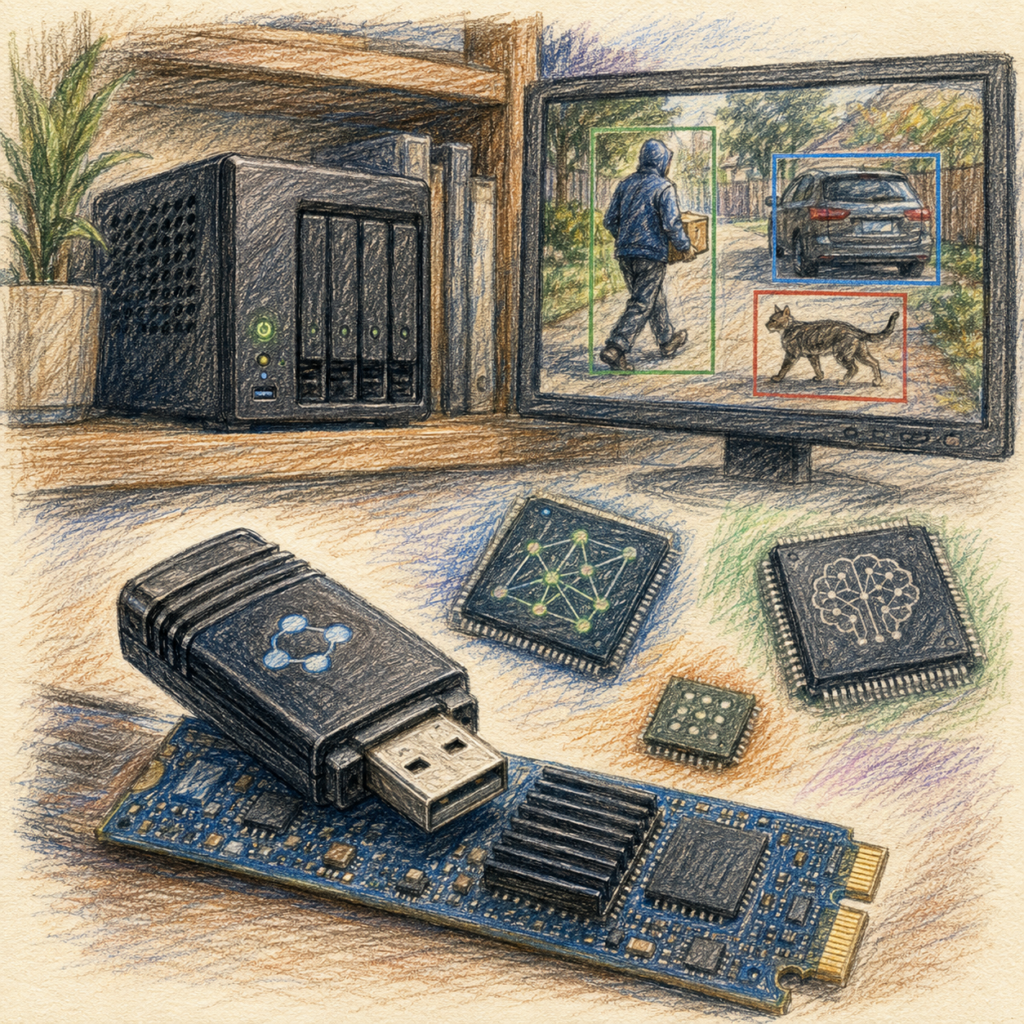
The small server under her desk, which is only supposed to manage files and record four surveillance cameras, has been running with a high-revving fan for weeks. She checks: utilization is constantly at ninety percent and above. The cause is quickly found. The software is meant to recognize whether a person, a car or a cat can be seen in the camera images, and for that the processor crunches image data around the clock that it was never built for.
Ellen goes looking for a more powerful CPU and instead ends up in a forum where someone writes that she should buy herself a stick for seventy euros.
She takes it for a joke. Four weeks later her server is running silently again, utilization has dropped considerably, and the recognition works more reliably than before: delivery driver yes, branch in the wind no.
That is the story AI accelerators are good at. It has a catch, but the catch lies somewhere other than most people suspect. And the market behind it is considerably bigger than the two or three names you keep reading in forums.
What These Devices Actually Are
The devices dealt with here are specialized computing units, often implemented as an ASIC, that is, as a chip optimized for a limited class of calculations instead of for all sorts of things. Within that class it can certainly run many different models, and do so very quickly and very frugally. Outside the intended computing operations and data formats it is severely restricted.
The terms vary. Usually such a component is called an NPU (neural processing unit), whereby an NPU can also sit as a component inside a larger chip and is not necessarily a standalone ASIC. Google uses the name Edge TPU (tensor processing unit) for its variant.
The opposite pole is the graphics card: more universal, but bigger, more expensive and thirstier. The difference is not one of degree. These are two different kinds of tool, and anyone who confuses them inevitably buys the wrong thing.
A comparison makes that clear if you draw it cleanly. An accelerator module such as the Hailo-10H typically needs around 2.5 watts. The complete small system around it, that is, board, memory, network and drive, lies above that, in total usually in the range between ten and twenty watts.
The most meaningful counterpart is not the full load of a large computer, but its idle draw. Because continuous operation means precisely that a device spends most of its time waiting. A workstation system with four graphics cards measured by c’t drew 226 watts from the socket at idle; the cards alone came to over 30 watts each, without a monitor attached and without any computing load at all.
So the situation is this: an accelerator module consumes less while working than a graphics card at idle. The one you start up for a task. The other runs all year round, and you barely notice it on the electricity bill
The Map: Four Categories
Anyone searching for accelerators stumbles over a dozen names with no recognizable order. In fact the market can be roughly divided into four groups. They differ in purpose, memory architecture, software support and in the question of whether they are an add-on chip or a complete computer.
Group 1: Vision NPUs, the Large Majority
This is the main part of the market. Chips that process images, usually in the M.2 format, that is, in the same form factor as a small SSD.
| Chip | Performance | Consumption | Special feature |
|---|---|---|---|
| Hailo-8 | 26 TOPS | a few watts | One of the most widely used edge accelerators, also available as Hailo-8L with 13 TOPS |
| Axelera Metis | 214 TOPS peak | 3.5 to 9 W | By far the highest figure in the field, 14.7 TOPS per watt |
| DEEPX DX-M1 | 25 TOPS | 2 to 5 W | Image processing and encoder integrated, industrial grade from -25 to 85 °C |
| MemryX MX3 | around 24 TOPS | about 2 W | Open drivers and open SDK, installation in under ten minutes |
| Kinara Ara-2 | high throughput | medium | Designed for transformers and multi-model operation, since acquired by NXP |
On top of that there are SiMa.ai, Blaize, Ambarella, EdgeCortix, Renesas and ARM Ethos.
It is remarkable how differently chips with almost identical key figures work. DEEPX and Hailo-8 both sit in the range of 25 to 26 TOPS, but they aim at different things: DEEPX at even latency per individual frame, Hailo-8 at stable throughput with several parallel camera streams. Same number, different strength. Anyone analyzing four cameras at once wants the one. Anyone controlling a machine wants the other.
MemryX deserves a mention of its own for everyone who wants to tinker. The manufacturer positions itself explicitly as developer-friendly with openly accessible drivers, an open SDK and detailed documentation, which in this market segment remains the exception to this day. It is not the fastest chip.
All the figures in this table come from manufacturer documents and published comparative tests. Because specifications, software versions and even ownership change quickly in this segment, a look at the current data sheet of the respective supplier belongs before every purchase.
Group 2: The Few That Can Do Language Models
Here the air gets thin, and dramatically so.
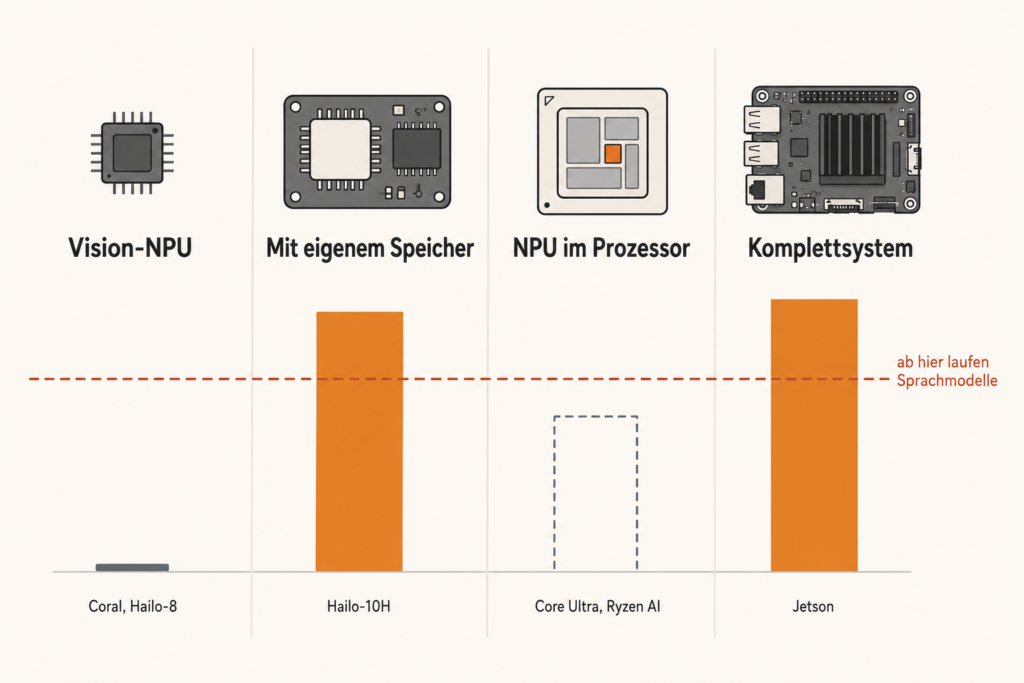
With most vision NPUs, at least one of three prerequisites is currently missing: enough memory of their own, supported computing operations for transformer architectures, or publicly available models in a suitable format. From a high TOPS figure you may therefore under no circumstances conclude that generative language models will run.
How tight the memory actually is, is shown by a documented example: with MemryX around 10 MB per core are available, about 40 MB in total across four cores. For a language model that is orders of magnitude too little.
What is currently within reach for end customers is above all the Hailo-10H, which is covered in detail further below. Other chips from various manufacturers now also target local language models, but they are mostly intended for device manufacturers and are hard to obtain individually.
For the purchase decision a simple rule follows from this: before buying, it has to be checked for the specific device whether the desired model and the required software are officially supported. Everything else is hope.
Group 3: The NPU You Probably Already Have
This group is overlooked most often and is the only one that costs nothing.
Modern processors come with an NPU built in: Intel Core Ultra with AI Boost, AMD Ryzen AI with XDNA, Qualcomm Snapdragon X with Hexagon, Apple with the Neural Engine. Anyone who has bought a notebook in the last two years very probably owns one.
The question of whether a separate accelerator is worth it alongside has by now become so common that it fills comparison articles of its own. The answer from the industry is nuanced: modern processors increasingly integrate NPUs for basic tasks, while many industrial applications demand more flexibility, higher computing density or tighter control over the power and heat budget.
For private use that simply means: before you buy anything, look at what is already there.
Group 4: NVIDIA Jetson, a Beast of Its Own
The Jetson range falls outside the pattern, because it is not an add-on chip for a host but a complete small computer with shared memory and NVIDIA’s CUDA environment.
The practical difference is considerable: on a Jetson a much broader software landscape is available, with CUDA, the common development tools and normal Linux. Models are far less tied to a manufacturer’s own catalog. It does not work entirely without adaptation here either: they have to match the ARM64 platform, the available memory and the respective runtime environment, and individual packages depend on particular versions. In return, a Jetson costs a multiple of the M.2 modules and consumes more. In comparative tests on local models of the 7-billion class it regularly turns up alongside Hailo and RK1828.
The Classic: Coral USB Accelerator
The stick that solved Ellen’s problem is with some probability Google’s Coral USB Accelerator. It delivers four trillion operations per second at about two trillion per watt and runs a common image model at over a hundred frames per second.
For camera analysis this has been the standard solution for years. The combination of Coral and surveillance software such as Frigate is so widespread in home networks that it practically counts as a reference.
What the Coral cannot do: generate text. Not a little slowly, but not at all.
The reason is twofold. First, a model has to be available as a compatible TensorFlow Lite model and be supported by the associated compiler. MobileNet and Inception are common examples, but not the only possible architectures; your own models can be compiled as well, provided their computing operations are supported. That is exactly where generative language models fail: their architecture is simply not provided for on this chip.
Second, the chip has practically no memory of its own for model weights. It gets small morsels of data thrown to it over USB, processes them at lightning speed and hands them back. Even a hypothetical solution that continuously reloaded missing weights from the host would fail on bandwidth and latency. In practice it does not even get that far.
Two Unpleasant Pieces of News for Newcomers
The official software repository of the Edge TPU was archived in April 2026 and has been read-only ever since. That is a strong warning signal for newcomers, even though it does not in itself amount to a formal discontinuation of the hardware.
At the same time the price has risen from originally around 75 dollars to about 150, with poor availability at times.
Anyone who already has one can keep using it; it does not get worse. Anyone starting from scratch today should reach for a Hailo-8 or one of the newer modules.
The Generational Leap That Explains Everything
Which brings us to the most instructive episode in this whole field.
For its Pi 5, Raspberry Pi offers an expansion board, the AI HAT+, with a Hailo NPU. Two versions: 13 trillion operations per second for 70 dollars, 26 trillion for 110 dollars.
This accelerator, too, cannot do language models. Raspberry Pi writes so itself with remarkable openness: the AI HAT+ delivers first-class acceleration for image models, but it lacks the ability to run generative models.
In January 2026 the successor arrived, the AI HAT+ 2, at an official price of 130 US dollars. And now comes the number that matters.
The new chip, a Hailo-10H, delivers 40 trillion operations per second. With image models that makes it, and this is not a typo, roughly as fast as its 26-TOPS predecessor.
The difference lies elsewhere: the AI HAT+ 2 has 8 gigabytes of working memory of its own on the board. Its predecessor had no large dedicated memory for model weights and context and had to help itself from the Pi.
And suddenly language models run.
Strictly speaking, the memory was the missing prerequisite, but not the only innovation. The Hailo-10H is not an old architecture with RAM bolted on, but a new chip generation with additional computing formats and extended software. Raspberry Pi names both as the basis: the new architecture and the 8 gigabytes. What remains remarkable, though, is where the progress did not take place, namely in the advertised computing power.
TOPS alone are not enough. Without suitable memory and a software foundation, no language model runs.
How seriously that is meant is shown by a detail from an independent test: the reviewer ran the AI HAT+ 2 on a Raspberry Pi with just two gigabytes of working memory. The model lives on the add-on board, after all, not in the system.
A look at Axelera shows at the same time how fast this market is moving. With 214 TOPS, Metis is positioned above all as a vision accelerator; by now, however, the manufacturer is also demonstrating a small Llama 3.2 model on the platform. So a high TOPS figure guarantees neither language model support nor its absence. What matters is the memory architecture, the supported computing operations, the compiler, the runtime environment and the available models. Anyone buying today should check these five points for the specific device instead of relying on a single key figure.
The Chip on Its Own: Hailo-10H as an M.2 Module
The same component is also available without a Raspberry Pi around it, namely as an M.2 module. Suppliers include AAEON, Geniatech and UP Bridge the Gap. The official product sheet names versions with 4 or 8 gigabytes of their own memory; individual suppliers advertise larger configurations, which is to be checked against the specific data sheet before a purchase.
The specifications are astonishing for a component of this size: 40 trillion operations per second at 2.5 watts typical power draw, connected via third-generation PCIe with four lanes. One test measured around 9.45 tokens per second with a model of 1.5 billion parameters.
The division of labor is elegant: the chip handles the complete chain, that is, breaking the text into tokens, the actual computation, the translation back and the management of the cache, and leaves the main processor completely alone. There is even a connection to Ollama, one of the common programs for running local models. That does not mean, however, that arbitrary models from the normal Ollama library run unchanged. Only what is already available for the Hailo foundation, or has been compiled accordingly, is supported.
A detail on the side that gives away the target group: the manufacturer specifies an industrial operating temperature range of -40 to 85 °C for the module. These components are primarily intended for vehicles, cameras and industrial installations. Home users are a by-product.
The Connection Question That Destroys Many Plans
This is where most ideas fail, and early on at that.
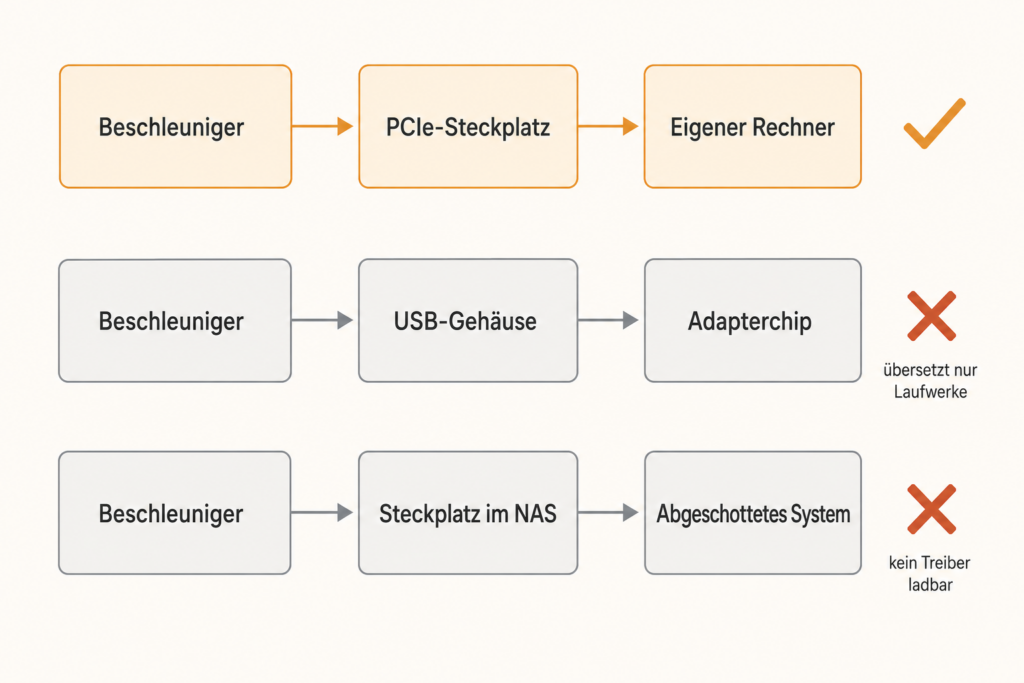
The Hailo variants for generative models dealt with here are connected via PCIe, the internal slot standard of computers. There is currently no officially supported USB version for this. That is not a law of nature – external graphics card enclosures over Thunderbolt, for instance, bring real PCIe outside – but it applies to this class of module.
Anyone hoping to put an M.2 module into a USB enclosure and hang it on a ready-made device, for example on a network drive, will be disappointed. Such enclosures contain a bridge chip that translates storage drives exclusively. An accelerator is not a storage drive.
With ready-made devices a second obstacle comes on top, and it weighs more heavily than the first: their operating systems are sealed off. An accelerator needs a driver deep in the system, and that is exactly what such devices as a rule do not allow. The Coral nevertheless works on some ready-made systems, because ready-made packages and integrations exist for it and a USB device is easier to retrofit than an internal plug-in card. It does not work without software either, though: it needs the associated runtime environment and matching driver support.
The practical consequence: accelerators belong in a computer you control yourself, or in a device built for them at the factory. There are now ready-made industrial boxes that bring an M.2 slot along and can take modules from Hailo, MemryX, NXP or DEEPX as required. For home use the Raspberry Pi is the most convenient route.
The Limits You Should Know Beforehand
First: the memory ceiling. Depending on architecture and quantization, eight gigabytes are typically enough for small models in the range of about one to seven billion parameters. At the upper end, however, little reserve remains for context and working data. For simple classification, limited assistance tasks and short summaries that can be enough; for demanding German technical texts usually not.
Second: the format constraint. Models have to be put through the manufacturer’s in-house compiler and into its format. You are dependent on the catalog it maintains. A normal mini PC with a widely used runtime environment, by contrast, supports a considerably larger selection of freely available models and is not tied to a single manufacturer’s catalog. That is not entirely arbitrary either; architecture, operating system and memory set limits there too. But the difference is considerable, and given the speed of this field it is a real price.
Third: no USB for the interesting variants. See above.
Fourth: German. With models of this size the quality of German-language output is markedly weaker than English. For German technical texts this is the class where it becomes unsatisfactory.
Fifth: the waste heat. Frugal does not mean cool. A maker who built a portable voice assistant on a Raspberry Pi reports that his accelerator card generates considerable waste heat. He had to experiment with several build variants and finally put the card on a separate adapter in order to get enough airflow.
Anyone building such a module into a tight enclosure and running it around the clock should plan the cooling in from the start. That qualifies the picture of the device you switch on and forget, at least while building it. In operation it holds true again.
On top of that comes a sixth limitation that has nothing to do with technology: these products are made for companies. They are sold through distributors to device manufacturers, come without end-customer support, and the price for a single unit is rarely attractive. As a private individual you are moving at the edge of an industry that does not have you in mind as a customer.
What They Are Really Good For
After so much dampening, the other side. Ellen is an illustrative figure, but her scenario is anything but contrived: the combination of surveillance software and accelerator is by far the most common entry point into this subject.
The strength of these devices is continuous operation. And part of that is a factor Ellen noticed first at the beginning of this text: the noise.
Large computers with several graphics cards are loud under load. A c’t test measured 0.6 sone at idle, 2.5 sone at partial load and 6.8 sone at full load on such a system, combined with the recommendation to set it up in a separate room if possible. A passively cooled accelerator module on a small board, by contrast, is completely silent.
For a device that analyzes cameras in the living room at night, that often decides more than any token rate. Ellen’s problem was never too little computing power. It was the fan.

From this arise use cases for which a large graphics card would be entirely the wrong answer:
| Application | Suitable device | Why it makes sense here |
|---|---|---|
| Surveillance cameras. Recognizing a person, a car, a delivery driver instead of raising an alarm at every branch | Coral, Hailo-8, DEEPX | Runs around the clock. The classic entry case |
| Several cameras in parallel | Hailo-8 | Designed for stable throughput with several streams |
| Voice assistant in the house. Understanding commands without anything going outside | AI HAT+ 2 | For limited command sets, small models or classic intent recognition are enough. Open conversation and reliable German demand considerably more |
| Wake word and audio recognition. Listening permanently until a keyword is spoken | Processor, microcontroller or supported NPU | A very small permanent task. An NPU only pays off once a suitable model is available and further tasks run in parallel |
| Pre-sorting documents. Invoice, contract, advertising? | AI HAT+ 2 | Classification is a simple task for a small model |
| Computing search indexes for a document system of your own | AI HAT+ 2, Hailo-10H | Runs in the background, often for hours. Requires a suitable embedding or classification model to be in the supported catalog |
| Robotics and process control. Image analysis at the machine | Hailo-8, DEEPX, Axelera | No network, no latency, industrial-grade temperature ranges |
| Hobby projects with your own models | MemryX MX3 | Open drivers, open SDK, good documentation |
What a Voice Assistant Looks Like in Practice
Because “voice assistant in the house” remains abstract in the table, here is a documented build. A maker from Hong Kong built a portable assistant on a Raspberry Pi 5 with an accelerator card, a small color display and a battery, later supplemented by a camera for image recognition.
The software consists of three building blocks, all of which run locally:
- Whisper converts spoken language into text
- Ollama runs the actual language model and formulates the answer
- Piper speaks the answer out again
The appeal of this build is that it works entirely without the internet. Not a byte leaves the device unless you expressly want it to. That is exactly the case this class of device was built for, and it does not need 128 gigabytes.
The Really Interesting Idea: Division of Labor
The most exciting use appears in no product description, because it involves two devices.
An accelerator does not have to run the main model. It can take on the supporting roles: pre-sorting incoming files, monitoring cameras, waiting for a keyword and, provided a supported embedding model is available, preparing documents for search as well. The actual language model then runs on a more powerful device or is switched in via an interface when needed.
That way one device works around the clock for two and a half watts, and the expensive one only runs when it is really needed. In a home network with a network drive, cameras and home automation, that is often the most sensible division of all.
It is not the spectacular answer. But it costs less electricity than a bedside lamp.
What of This Is Practically Achievable
After this tour, the honest condensation. For private individuals three routes remain:
The Raspberry Pi AI HAT+ 2 is currently one of the few easily obtainable and clearly documented end-customer products for small generative models in this performance class. Raspberry Pi offers it officially for 130 US dollars; the Raspberry Pi 5 itself comes on top.
A Hailo-8 or DEEPX in your own mini PC is worth it when it comes to cameras and image processing and you have a free M.2 slot. Considerably cheaper than the LLM-capable modules.
Further M.2 cards for single-board computers are now available from smaller suppliers as well, for instance the LLM-8850 from M5Stack with 24 TOPS for 139 US dollars. With such offers, however, this article’s rule applies twice over: before buying, clarify how much memory of its own the card brings and which models are available in the manufacturer’s catalog. A TOPS figure alone says nothing about that.
The NPU in the computer you already have costs nothing, because it is already there. The first step before every purchase.
And a fourth route that is often the better one: buy no accelerator at all, and put the money into a frugal mini PC that handles the task without a special chip. With two cameras and occasional classification that is frequently the simpler solution.
The Calculation You Should Draw Up Beforehand
Anyone toying with the idea of getting to language models via the accelerator should briefly lay the prices side by side.
| Route | Cost (as of August 2026) | What comes out of it |
|---|---|---|
| AI HAT+ 2 plus Raspberry Pi | around €250 | Models of about one to seven billion parameters, 2.5 watts, silent |
| Graphics card with 16 GB, AMD | from around €420 | 30 to over 60 tokens per second with considerably larger models |
| Graphics card with 16 GB, NVIDIA | from around €550 | the same, noticeably faster |
Important limitation on the graphics card prices: the market is under a memory shortage, and of all things it hits the 16-gigabyte class hardest. The memory installed at times accounted for around 260 euros of the sale price; before the crisis it was about 50. In Asia, individual models of this class became almost half as expensive again between the end of July and the beginning of August 2026. Check the current prices before you build on this table.
The figures nevertheless say something uncomfortable: the accelerator is not the cheaper route to language models. For roughly twice the price you get an entirely different model class.
It is the route to a different mode of operation. Anyone who really wants to work with language models should not put the 250 euros into an accelerator. Anyone who wants to run something small around the clock, on the other hand, will find nothing better for that money.
If It Really Has to Be a Large Language Model
This article deliberately deals with the small, frugal class. Anyone who wants to run a fully fledged language model at home will find the assessment for that in Local AI: Which Hardware You Really Need – and Which You Don’t.
Its core message fits exactly with the generational leap of the AI HAT+ 2: it is not the computing power that decides, but whether the model fits entirely into fast memory. How hard this threshold is, is shown by a measurement on one and the same machine. As long as the model fitted into the graphics memory, it delivered 152 tokens per second. As soon as it no longer did, it was 13.
In practice that means: for models of the order of gpt-oss-120b, or for comfortably run quantized 70B models, 80 to 128 gigabytes of fast contiguous memory usually make sense. Many capable models of the 14- to 35-billion class, by contrast, already run on 16 to 32 gigabytes of graphics memory. And before every purchase a test with existing hardware is worthwhile, because a weekend of trying things out costs considerably less than a bad buy.
Conclusion: Asking the Right Question
Ellen’s server runs quietly again today. The stick that brought that about would be completely useless for a language model. Both are true, and both belong together.
Anyone looking for hardware for a large local language model will be disappointed by this product category. It is not a cheap shortcut, but something else.
Anyone who has a clearly defined task that is supposed to run permanently, on the other hand, will find something here that no graphics card can offer: a solution you switch on and then forget.
So the question is not “how many trillions of operations do I get for seventy euros?”. It is: “is this device supposed to compute something big occasionally or something small constantly?”
Everything depends on the answer. And remarkably, it is the same question that decides on the purchase of a 4,000-euro machine. Only the answer turns out differently then.
FOUNDIC.org is ad-free and has no paywall. If you got something out of this article:  Treat us to a coffee