
An Introduction to RAG (Retrieval-Augmented Generation): Why Our Data Needs a Memory and How AI Learns to Browse It
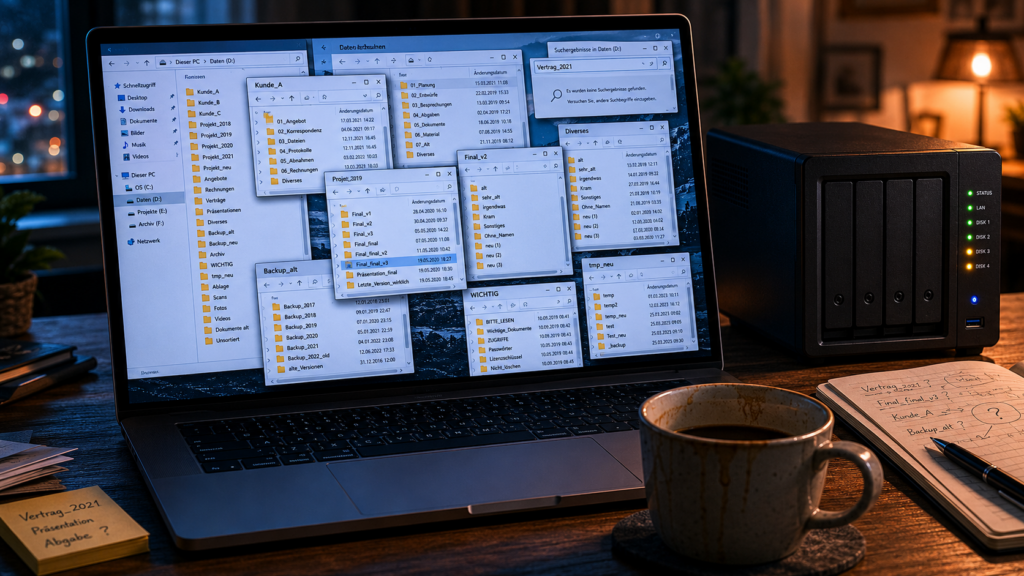
It’s 10:14 PM, and Felix gives up. For four hours he has been searching for a presentation he is fairly certain he gave three years ago. Tomorrow a client wants to know what was discussed back then. Of course it’s tomorrow.
Felix remembers the content — roughly. The closing slide. The prickly pricing discussion. That image with the three nested circles that everyone at the time found remarkably profound. What he doesn’t know: what was the file called? Which folder is it in? On which hard drive, from which old laptop, in which backup?
Felix has a Synology NAS in his living room cabinet. Nearly three terabytes, counting old backups and duplicates, collected since 2011. The presentation is in there somewhere. But searching means: navigating through a hundred and twenty thousand folders in which “Client A”, “Project 2019”, “Final v2”, “Final final v3”, and the dreaded “Miscellaneous” all reside. A full-text search finds words. Felix’s problem is only: he can no longer remember which words to search for. Was it a “communication strategy”? A “brand architecture workshop”? Did the client even have that name back then? Or did the key idea sit in a slide that elegantly sidestepped every keyword?
At 10:14 PM he closes Finder. He’ll apologize to the client tomorrow. Again. Three terabytes of memory in the cabinet, and yet a person who shows up empty-handed.
The Data Graveyard in the Living Room
Felix is not alone. Anyone who has worked digitally for years eventually ends up with a data graveyard: an archive that is technically alive and practically dead. A hard drive full of documents that someone sorted at some point and never touched again. Maybe it’s an external USB disk. Maybe a Synology NAS — a small network storage device on the home network. Maybe it’s a geological stratigraphy of Dropbox, Google Drive, local laptop folders, and that mysterious cloud that came bundled with an Office subscription like a free pen at a trade fair.
What all these collections share: they grow. Nobody deletes. Nobody re-sorts. And eventually nobody finds their way back.
The frustrating thing is not that the data is gone. It’s right there. The problem is that it is unfindable. The old knowledge lives in the same house as today’s workday — they just no longer speak to each other. Felix’s archive has forgotten nothing. Felix has simply lost the path to it.
Mark, the main character of the companion article on foundic.org, had a different problem: how does a new idea reliably make it into the vault? He solved it with a bot in his basement that files voice messages. Felix’s problem lies before and beyond that: the knowledge is already stored. It just no longer responds.
Some readers will object here that they have long maintained an active note-taking practice: Obsidian, Logseq, tags, backlinks, Sunday morning tending of their own thinking. And yes — anyone who sorts what they write today into such a system has solved part of the problem. But only one half of digital life.
This article is about the other half: the grown archive alongside the vault. The storage that numerically often exceeds it a hundredfold and has until now remained silent. The vault is the workbench. The NAS is long-term memory. Both require their own tools, because they serve different purposes.
Into this second gap has slipped, in recent years, a tool whose name sounds as though it was born on page 37 of a research proposal. Retrieval-Augmented Generation, or RAG (rhymes with “bag”). Loosely translated: a language model formulates an answer that has first been supported by specifically retrieved sources. Academic packaging, simple mechanism. And almost exactly what Felix is missing.
The Assistant in the Library
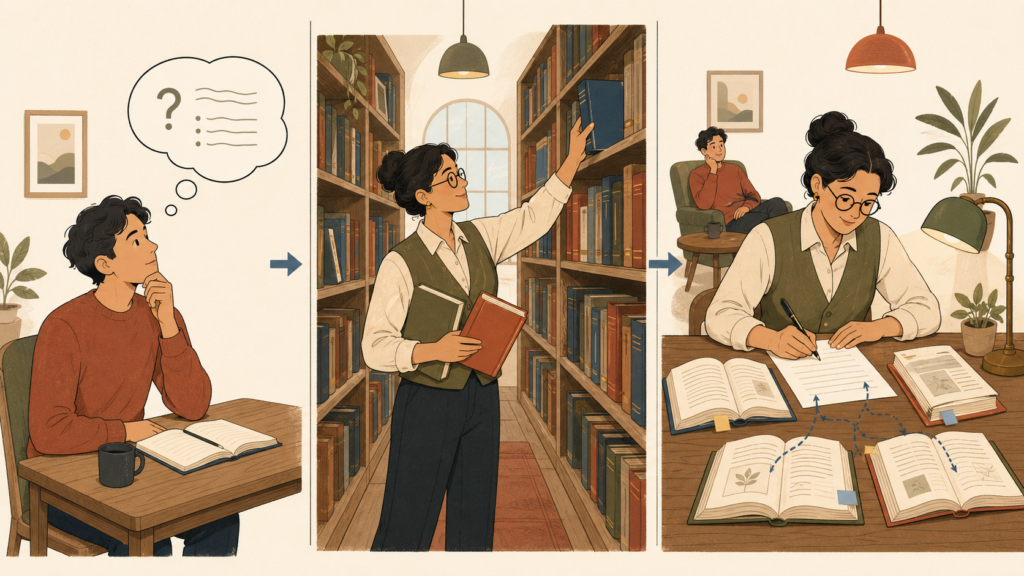
Imagine Felix had a research assistant. A very diligent, slightly pale person with a card-index obsession, who knows the entire archive. When Felix asks at ten in the evening: “What did we do in 2019 for Client A — the one with the three circles?”, the following happens:
The assistant goes to the library. He pulls out shelves, checks registers, finds three or four relevant documents: a workshop plan, a presentation, a meeting report. He lays the stack on the table, leafs through it, compares, and writes Felix a summary — with concrete references: “The presentation is in folder X; page 12 contains the image with the circles; it was about a brand architecture concept.”
That is RAG. Almost word for word. Step one: Retrieval — fetching the relevant sources. Step two: Generation — formulating an answer based on those sources.
When a language model answers without RAG, it writes from its trained world knowledge. It knows nothing about Felix’s 2019 presentation. At best it says so. At worst it writes a confidently worded mini-essay on adaptive cooling systems in general — technically neat, practically worthless. With RAG, the model writes with open sources on the table. The answer gets a backbone.
That’s the core. Everything else is mechanics. Important, but not mysterious.
A Mini-Example, Without the Technical Jargon
So the library doesn’t become wallpaper, a small example. Felix types into a chat:
Question: “What did we work on in 2019 regarding adaptive cooling systems?”
Without RAG, the language model replies: “I don’t have access to your personal files and therefore cannot provide specific information about your projects.” Or worse: it writes a sovereignly worded mini-essay on adaptive cooling systems in general. Technically handsome, practically useless.
With RAG, the following happens:
- The system searches Felix’s archive for content related to the question.
- It finds a report from 2018, a presentation from 2019, an Excel spreadsheet with measurement data from 2017.
- It takes the most relevant excerpts from each of these files.
- It passes these excerpts, together with Felix’s question, to the language model.
- The model answers based on the excerpts and cites the sources.
The answer might look like this: “Three prior pieces of work on this topic: a report from 2018 with pressure drop measurement series, a presentation from 2019 with a flow model, and an Excel Q3 measurement series from 2017. On pump control I find no reliable source in the archive — that would be a gap.”
Felix clicks the source links. The documents open. He knows again what he knows.
What Is Actually Being Stored?
Here comes the most important clarification — because data privacy, trust, and a great deal of unease hang on it: “If I give the AI my documents, can it memorize them?”
No. RAG doesn’t work that way. In a RAG system, several layers are stored — but the language model itself sees only the smallest, individually selected excerpt:
| What | Where | Does the language model see it? |
|---|---|---|
| Original files | NAS / hard drive | no |
| Extracted full text | local intermediate layer | no |
| Chunks / text fragments | local index | no, unless selected |
| Embeddings (mathematical representations) | vector database | no |
| Selected result snippets | per request in the prompt | yes, when a cloud LLM is used |
Per request, the language model therefore sees only those few excerpts that the search system has deemed relevant. It does not learn from them permanently. On the next call, the table is empty again. The model is like an external consultant who receives fresh files for every appointment and is not allowed to take any notes home.
This has an important consequence: Felix’s original files do not need to leave his cabinet. The mathematical representations of his texts — the embeddings (more on those shortly) — can remain local too. Only the text excerpts selected for a specific query are sent to the language model. And even that, only if Felix has decided that the relevant content is not sensitive enough to be a concern. With a local LLM, even that step never leaves the house.
RAG Is Not “AI with Memory”
The previous point leads to the second major misconception: RAG is not training. The language model is not adapted, extended, or secretly fed Felix’s archive. It retains nothing from it.
RAG builds a search system alongside the model. When a question arrives, that search system looks things up and passes the hits along. The model treats them like any other input text: read, respond, forget.
Anyone who genuinely wanted to enrich a language model with their own knowledge would need to retrain it. That is called fine-tuning. For specific specialized tasks it can make sense. But for a private or mid-sized business knowledge archive, it is usually the wrong approach: new documents require new training runs, sources remain hard to trace, confidential content goes deep into model processing, and the costs rarely justify the benefit.
RAG solves the problem more elegantly. It doesn’t retrain the model — it couples it to a search system. The data stays separate. The answer only comes into being the moment a question is asked, using the sources that are actually relevant at that point. That is precisely why RAG has become the standard path when one wants to connect proprietary knowledge with generative AI.
From this follows the principle that runs through this article like a red thread: A RAG answer without sources is just a prettier chat. Only the source makes it verifiable.
It Doesn’t Always Have to Be a Chatbot
Most introductions present RAG as a chat window in which someone converses with their PDFs. That works. But it is only the postcard view of a larger landscape.
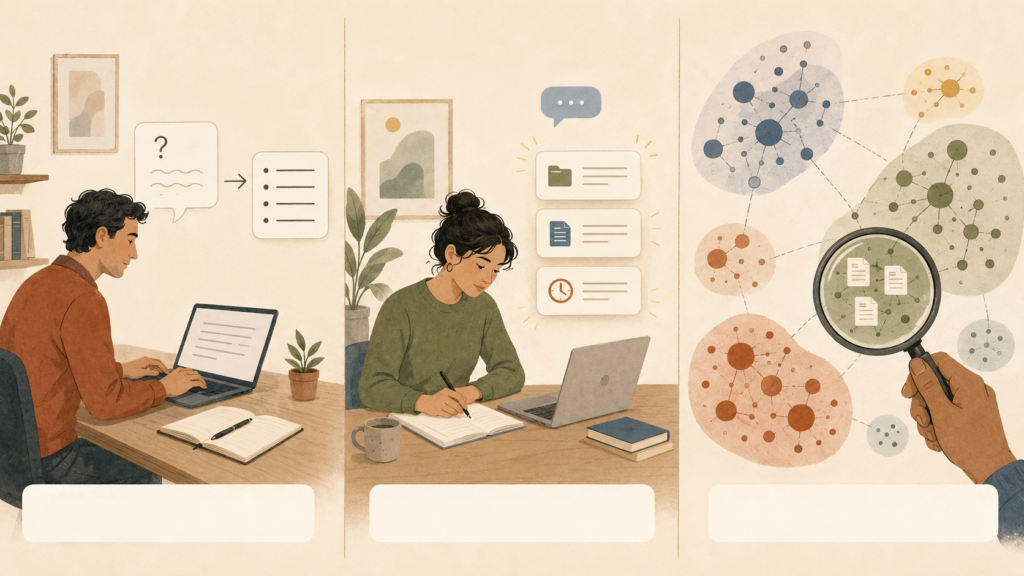
At least three variants can be distinguished:
First: reactive search. Felix types a question, the system responds. This is the classic “chat with my documents” form. It works well when he knows what he’s looking for. And less well when he can’t even remember that he ever worked on the topic.
Second: proactive linking. While Felix is writing a new project note, a context-aware search runs in the background. As soon as terms appear that were once important in the archive, a sidebar alerts him: “You had a similar topic in 2019 — see these three documents.” Felix doesn’t need to ask anything. The old knowledge knocks on the door itself.
Third: exploratory mapping. Felix doesn’t even know what’s all in his archive. A third form of RAG creates a map: thematic clusters, automatically generated overviews — “here are 47 documents on materials research, there pricing models, there workshop formats.” Suddenly Felix can see not just that he has data. He recognizes topics, time periods, concentrations, and gaps.
These three forms differ in who triggers the retrieval and what happens with the hits afterwards. The building blocks are similar. The effect is different: the first helps with answering, the second with writing, the third with rediscovering.
A Bit of Mechanics, Painlessly
Anyone who wants to understand how the search system decides what matches a question needs just one word: embedding. It sounds like mathematics because it is mathematics. But the principle can be explained without a lab coat.
An embedding translates text into a list of numbers — more precisely, into a vector, a sequence of numbers that approximately describes the meaning of the text. The trick: texts with similar meanings get similar number sequences, even when they share not a single word.
Three example sentences as they might appear in Felix’s archive:
- A: “Pressure drop in the cooling circuit at high pump speed”
- B: “Flow resistance of the water system under load”
- C: “Invoice Q3 2019”
Measuring the distance between these number sequences, A and B sit close together. C is far away — even though A and B share not a single word. Classical keyword search would have nothing to offer here but a shrug. Embeddings recognize the neighborhood of meaning.
When Felix now asks: “What have we done on flow behavior?” — his question is also translated into a number sequence. The system searches for text fragments whose number sequences are closest to his question-vector. A and B are nearby. C is far away. So the system brings A and B (not C) and passes them to the language model.
What sounds like voodoo is applied mathematics. You don’t need to understand it in detail to use it. Every text becomes a point in a high-dimensional space, and similar texts end up in the same neighborhood. Felix doesn’t need to know how many dimensions this space has. He only needs to know: there, suddenly, his old thoughts are standing next to each other again.
When Meaning Alone Isn’t Enough
That said, classical search can’t be entirely dispensed with. Embeddings are strong on meaning, but weak on exact character strings. A project number like “FB-2019-047”, a client code, or an old product name often carries no stable meaning for an embedding model. Things like that need to be found exactly.
Good RAG systems therefore combine two types of search: semantic search via embeddings and classical full-text search for words, names, and codes. This combination is called hybrid search. It is crucial for grown archives, because people sometimes remember a meaning — and sometimes only a code. “Didn’t we have a project with the number 047 back then?” A pure embedding system won’t reliably find that. A full-text search will. Running both in parallel and intelligently blending the results is usually the most robust solution.
Where RAG Doesn’t Help, It Should Be Honest
As compelling as RAG is: it is not the right tool for every task. Forgetting that means building a very expensive flashlight and then wondering why it can’t make coffee.
With very small datasets (say, ten PDFs for the current quarterly report), RAG is using a sledgehammer to crack a nut. When the corpus is small enough, you can often load it directly into the context window of the language model. A pipeline only pays off once searching, updating, and source management themselves become problems.
With highly structured data (orders, amounts, and customers in a database, for instance), a classical SQL query is usually better. Someone who wants to know which orders in May 2024 were above €1,000 doesn’t want a similarity search. They want a precise answer, sorted by date, with totals.
With real-time data (log files, sensor values, stock prices), RAG indexes quickly fall a step behind. Here you need tools that react to data streams, not just a once-built index.
And with complex multi-step reasoning across many documents, simple RAG reaches its limits. When an answer emerges from twelve scattered clues that each look unremarkable on their own, the retrieval step can miss them. Multi-stage processes, re-ranking, knowledge graphs, or agent architectures help here. But that’s a different story. And probably another coffee.
Even in the Ideal Case: No Magic
Even where RAG fits well, it remains a tool with edges. The honest version belongs in the picture.
It doesn’t understand like a human does. The retrieval step sorts text fragments by proximity to the question. It assesses neither truth nor intent. If relevant documents only circle a topic rather than naming it, RAG can miss them. It recognizes proximity of meaning; it doesn’t read between the lines the way a colleague who knows the office history does.
It has chunking limits. Every document is split in advance into pieces — chunks, text fragments of a few hundred words — each of which gets its own vector. If an important connection spans a chunk boundary (a definition on page five that becomes relevant again on page forty-seven), the second hit can become incomprehensible without the first.
It is only as fresh as the last index run. Someone who files a new document today won’t find it until the pipeline has run again. For stable archives like Felix’s — usually no problem. For fast-growing data stores — a real operational issue.
It does not eliminate hallucinations. It reduces them, because the language model has concrete sources in front of it. But it can still overshoot those sources, connect things that don’t belong together, or subtly distort a nuance. The protection is called source discipline: important claims with citations, and occasionally a human reads behind it. Yes, old-fashioned. Unfortunately effective.
And finally: it costs something. Setup, hardware, software maintenance, electricity. And with commercial language models, ongoing costs per query. Compared to four hours of searching per week, that’s a good deal. But it’s not a zero state.
What Felix Gains
Imagine Felix has set up a RAG system on his NAS. How you set such a system up is a story of its own – this piece is about what it changes. Three weeks later — another Sunday evening, another client, another old thing.
Felix opens his notes editor, not the file browser. He writes: “Need background on the client, specifically on adaptive cooling systems, period 2017–2022.” Seconds later, a list of five results appears: snippets, dates, reasoning, sources. Felix clicks the first result. The original document opens. It’s the presentation. With the image of the three circles.
What changed is not the NAS. The same files sit on it as before. What changed is the connection between his thinking today and his knowledge from the past. The archive stops being a data graveyard. It becomes a long-term memory that responds on demand.

A Final Question
What is happening to Felix’s setup is the quiet democratization of a technology that long smelled of the corporate corridor: enterprise search, semantic indices, proprietary AI pipelines. Until recently, you needed a data strategy, an architecture team, and a budget that fit on a board presentation. Today, something comparable can be built on a device sitting in the living room cabinet — with open-source tools that anyone can download. The components have grown up. What’s usually missing is only the knowledge of how to assemble them.
This is precisely where it gets interesting. If every person could theoretically build their own long-term memory — why do so few? Perhaps because we’ve grown accustomed to the past staying past. That old projects gather dust, old notes disappear, old ideas get buried under version numbers.
What happens to our relationship with the past when forgetting is no longer the default? When Felix can query fifteen years of his own work? When everything we ever wrote is not just stored but responds?
Perhaps we rediscover things that surprise even ourselves. Perhaps it also sharpens our sense of what a good note actually is — knowing that it might come back tomorrow.
Felix will notice it next quarter. When the next client asks whether they’ve talked about something similar before, he won’t open Finder like a drawer full of dust. He’ll ask his second memory. And it will answer.
FOUNDIC.org is ad-free and has no paywall. If you got something out of this article:  Treat us to a coffee