
Monday, 8:40 a.m. Jana runs the customer service department of a seal manufacturer with 400 employees. On her screen sits a complaint: a customer reports that a delivery does not match the specification. Jana opens Teams, clicks the colourful Copilot icon and asks what the internal policy provides for in this case. The answer is friendly, general and useless. It sounds like a textbook, just not like her company.
Two desks away, her colleague Tarek asks the same question. He gets the right policy, the responsible contact person and a reference to the last meeting on the subject. Same company, same icon, same question. And yet two completely different answers.
Jana calls IT. “But we do have Copilot”, she says. At the other end there is a pause. Then: “Which one do you mean?”
That small pause holds Microsoft’s entire Copilot problem.
One Name, Many Products: Why the Follow-Up Question Is Justified
Microsoft now calls a great many things Copilot. The strategy consultant Tey Bannerman counted them up in spring 2026, because there is no official list. He arrived at 81 products carrying the name, among them apps, features, a key on the keyboard and a whole category of laptops. On 25 September Microsoft rebuilt the interface again, this time into the areas Home, Code and Autopilot. The app is now called simply Microsoft Copilot, and it is moving to a new address.
That would be a footnote if the same thing sat behind the names. That is precisely what it does not. Copilot is not just Copilot, for three reasons:
- Different products. Copilot for office work, GitHub Copilot for programmers, Copilot in Power BI and Copilot for private accounts share the name, but neither the licence nor the contract nor the range of functions.
- Different licence tiers. Behind the same icon lie different licences, paid per person or by consumption.
- Different surfaces. The same Copilot sees different data in the chat, in Outlook and in Word.
Tarek has the add-on licence Microsoft 365 Copilot for 26 euros a month, labelled in the app as “Microsoft 365 Copilot (Premium)”. Jana does not. That is why his Copilot may look into mails, meetings and files. Hers works with the web and with whatever she expressly gives it.
This name acrobatics becomes relevant where an icon turns into an investment decision for Copilot in the enterprise. At the end of July 2026 Microsoft reported more than 30 million paid Copilot seats, that is, user licences. Against some 450 to 465 million Microsoft 365 seats, that is six to seven per cent. So the larger part of the customer base is still facing the question Jana is hearing on the phone right now.
And it has long been about more than a chat. Business departments can now build agents themselves (AI assistants that follow instructions, use connected knowledge and act through tools), automate processes and click apps together. That is a genuine opening up of technology that used to be reserved for IT. Only: the tools have become simpler, the conditions behind them have not.
This text therefore proceeds step by step, like a walk through an engine room: first the shortcut, then the prerequisites and the map, after that a worked-through case from everyday company life, and at the end costs and benefits.
The Shortcut: First Name the Problem, Then the Product
The good news first: nobody has to learn all the products. It is enough to know what kind of problem you have. That narrows the choice down considerably.
| Starting point | Suitable tool |
|---|---|
| Single question, draft, summary | Microsoft Copilot |
| Many people keep asking similar questions | Knowledge agent |
| Structured input with mandatory fields | Power Apps |
| Known, recurring process | Power Automate |
| Handing off work | Cowork, agent or workflow, depending on the case. See “Four Ways to Hand Off Work” below |
| Key figures and reports | Power BI, Fabric if needed |
| Your own AI logic, your own choice of model | Foundry, GitHub Copilot |
Behind the table there are five blocks. For a start, you do not need to distinguish more than these:
- Copilot for your own knowledge work.
- Agents for recurring questions and tasks.
- Power Platform, Microsoft’s tool family for apps and workflows, for structured processes.
- Power BI and Fabric for data and analysis.
- Foundry and GitHub Copilot for the developer world.
Most employees will actually have to do with the first two. The other three are only needed once a question turns into a process, an evaluation or an application of your own. Whatever concerns only IT and developers appears in boxes in this text. Addresses, further agents and the private subscriptions are in the reference section at the end.
Jana’s question from Monday morning is a single question and belongs in block one. That it failed nonetheless is down to the prerequisites.
Copilot in the Enterprise: Four Things to Clarify Before Anyone Buys Anything
1. Which Account, Which Tier? How to Read Your Own Label
Account, licence and surface: these three things explain most Copilot puzzles. For everyday use, a single distinction is enough at first: does someone only have the chat that is included in the work account at no extra charge, or may Copilot access mails, meetings and files? Only after that do Microsoft’s precise designations become worthwhile. For work accounts Microsoft displays the tier as a label:
| Label | Add-on licence | Copilot in Word, Excel, PowerPoint, OneNote | Work data in the chat |
|---|---|---|---|
| Copilot Chat (Basic) | no | no | only what is pasted, uploaded, linked |
| Microsoft 365 Copilot (Basic) | no | yes, with standard access | as above |
| Microsoft 365 Copilot (Premium), sometimes called Pro | yes | yes, full scope with preferred access | mails, meetings, chats, files |
As of 3 October 2026.
Standard access means that Copilot can be restricted at times of high load. In Outlook, according to Microsoft, there is a limited view into mailbox and calendar even without an add-on licence. The documentation checked does not say how the two Basic tiers are distributed.
Careful, easy to confuse. “Premium” and “Pro” exist twice. On the work account, “(Premium)” or “(Pro)” is the label for the company’s add-on licence. Microsoft 365 Premium and Microsoft 365 Pro, by contrast, are subscriptions for private individuals, with their own prices and their own scope. They are in the reference section.
How to check. Sign in with the work account at m365.cloud.microsoft and scroll down on the start page. The label appears under your own name.
How to move up. The add-on licence is assigned by IT. Microsoft refers employees to their administrator. Where self-purchase is blocked, a licence request can be submitted, which lands in the Admin Center. After assignment it can take up to 24 hours for Copilot to appear.
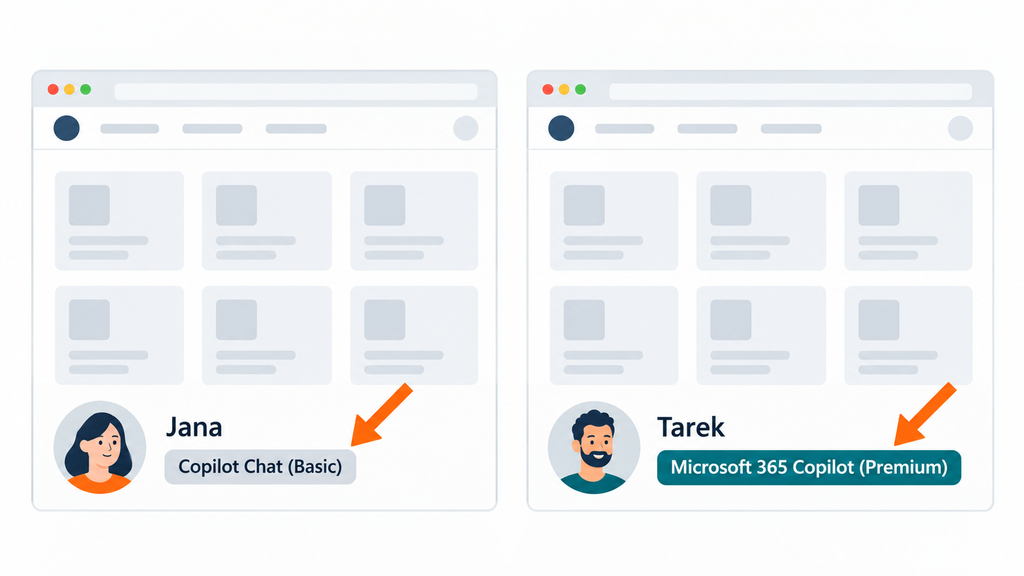
Jana has now understood why Tarek finds more. That does not yet solve her problem.
2. Chat or Copilot in Word, Excel, Outlook: Two Doors, One Assistant
Many people know two entrances and wonder how they fit together: the chat, which opens in the browser at m365.cloud.microsoft/chat, and the Copilot icon in Word, Excel or Outlook.
The chat is the entrance for questions whose answer may lie anywhere. According to Microsoft it bases answers on work and web data. A switch determines what it accesses: if it is on, the chat uses work data and the web. If it is off, the web and attached files remain. This switch only exists with an add-on licence. The same chat is also inside Teams, Outlook and the Edge browser. Its address is currently moving to copilot.cloud.microsoft.
Copilot in the programs is the entrance for working on one thing. Microsoft writes that there it helps with particular goals and tasks, in Word for instance with drafting and with summarising a document. In Outlook it revolves around mailbox and calendar, in Teams around meetings.
The connection: it is the same assistant, with the same licence tiers and the same permissions. What differs is the viewing angle. The chat looks across everything you are allowed to see. Copilot in the program looks at the workpiece in front of you. Anyone who does not yet know where the answer lies asks in the chat. Anyone already sitting in the document or the mail stays there.
3. Where Is the Data Actually Held?
A picture helps here: Teams is the entrance hall, not the warehouse. Anyone who uploads a file into a Teams channel is in truth putting it into SharePoint, Microsoft’s service for shared documents, knowledge pages and lists. Anyone who sends a file in a chat stores it in their own OneDrive, the personal working storage in the company account, and shares it only with the participants in the conversation.
Copilot finds what someone is allowed to see, and that is precisely where both the strength and the risk lie. If folders in SharePoint were shared too generously, that used to go almost unnoticed, because nobody clicked ten levels deep. An assistant that searches everything within reach makes it visible. Experts call this oversharing. So data housekeeping, sharing permissions and Copilot access are one and the same task.
For Jana that means: even the add-on licence would be of no use to her if the right policy sits in a folder she has no access to.
4. What Is Finished, What Is Preview?
Microsoft announces a lot and delivers in waves. Some features are generally available, others run as a preview (not yet for everyone and without commitments) or only in the Frontier programme, Microsoft’s channel for early access. Anyone who sees an article or a video on the subject should look at the date first. Of seven specialist articles from the summer of 2026 that were evaluated for this article, four were out of date on at least one point within weeks. That is why the tables on names, access and prices in this text carry a date.
The Map: Five Floors on One Foundation
You can picture Microsoft’s offering as a building. The work data lies in the foundation, the assistant sits above it. Further up, things are automated, analysed and finally developed. Each floor stands for a different kind of work.
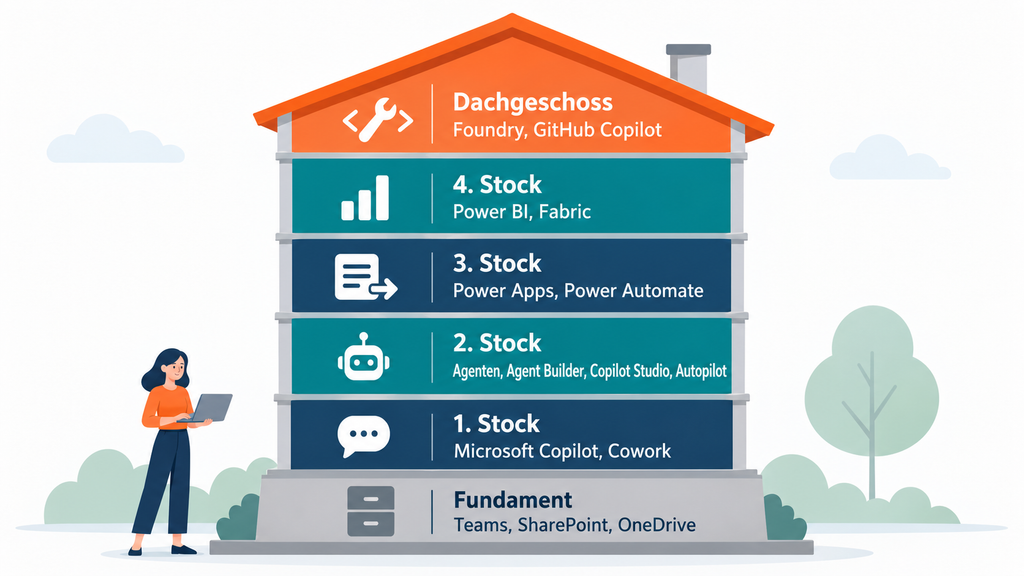
The most important doors are quickly named: copilot.cloud.microsoft for the chat, copilotstudio.microsoft.com for agents, make.powerapps.com and make.powerautomate.com for apps and workflows, app.powerbi.com for reports. The complete list is in the reference section.
Foundation: Where the Work Lies
Teams is the surface, SharePoint the shared warehouse, OneDrive the personal locker. Everything that happens above accesses this level. So anyone who wants to understand the floors must first know what lies down here and who is allowed to access it.
First Floor: Copilot for Your Own Knowledge Work
Microsoft Copilot in the narrower sense is the AI support for questions, texts, research and the work in the Office programs. That is the tool Jana was sitting in front of on Monday.
Copilot Cowork goes one step further. Instead of answering, Cowork completes multi-step tasks in Microsoft 365: producing documents, tidying an inbox, preparing a meeting. The human sets the goal and the limits. Before sensitive actions such as sending a mail, Cowork asks first. It has been generally available since 16 June 2026.
Second Floor: Agents for Recurring Questions and Tasks
Microsoft describes agents as extensions that specialise Copilot for particular tasks. That sounds clear. The product range is less so. Because at Microsoft “agent” is not a single product but a category. Some agents are ready-made, some you build yourself. Some work only on request, others permanently. They are offered in five ways, from the ready-made helper to the long-distance runner:
| Offering | What you get | When it fits |
|---|---|---|
| Ready-made agents such as Researcher and Analyst | Thorough research and data evaluation, without building anything | Demanding one-off task |
| Agent Builder | Your own knowledge agent, by description | Many people ask similar questions |
| Copilot Studio | Agent with tools, workflows and several channels | The agent is to act and serve many people |
| Cowork | Ready-made agent for your own multi-step task | One-off delegated work |
| Autopilot, formerly Scout | Long-distance runner with its own identity | Ongoing tasks |
Who is allowed to use which offering depends on three things: the add-on licence, billing by consumption and clearance from IT. What applies to which offering and how to check your own access is in the reference section.
Ready-made agents sit in the Agent Store. Microsoft calls it the central place where you find and install agents. In the Copilot app it is opened by the entry “All agents” in the “Agents” area. The labels come from the English interface; in the German one they may be translated. The two most important agents there: Researcher, in the German interface Recherche-Agent, turns a question into a report with an outline and sources, and searches the web and the work data for it. It takes longer than the chat; for quick answers the chat remains the better choice. Analyst evaluates raw data and calculates with program code that you can inspect. What else is on the shelf is shown by the reference section.
Copilot Scout, presented by Microsoft as Microsoft Scout, is already history. That was the name, in the summer of 2026, of an agent that was installed on your own computer. Since 25 September the concept has been called Autopilot and describes something different: an agent that keeps working permanently in the cloud, with its own identity, its own memory and its own workspace. Autopilot currently runs only as a Private Preview. What Scout could do on the desktop computer should not be transferred to Autopilot unchecked.
Box for IT and developers: two names that are not agents
Anyone who hears “Microsoft 365 Agent” should ask. It can mean the agents themselves, but also two things that merely sound similar. Agent 365 is a management offering with a register, identities and protection functions for agents. It builds nothing. The Microsoft 365 Agents SDK is a construction kit for developers that transports messages between users and your own logic. Microsoft itself writes that the SDK is not an AI model and not a tool without programming.
Third Floor: Power Platform for Structured Processes
Anyone who wants to build something themselves ends up with three tools. Power Apps supplies the user interface, that is, forms and input screens for structured procedures. Power Automate automates recurring workflows: a trigger starts it, conditions decide, actions run. Copilot Studio from the second floor belongs here as well. It is a graphical low-code studio (building by configuration instead of programming) for agents and for workflows, that is, fixed sequences of trigger, conditions and actions.
Fourth Floor: Power BI and Fabric for Data and Analysis
Power BI turns data into key figures, reports and dashboards, so ideally it turns tables into decisions. Microsoft Fabric is the platform beneath it and beside it: it fetches data from many sources, prepares it and keeps it in a shared store called OneLake. Power BI is a core component of Fabric, but it also works without Fabric capacity of its own, that is, without rented computing power for the platform. An existing reporting system does not have to turn into a data platform project first.
So what does Copilot in Power BI need Fabric for? For the computing power, not for the meaning of the data. According to Microsoft, Copilot in Power BI only runs if the workspace with the reports sits on a paid Fabric capacity from the smallest tier F2 upwards or on Power BI Premium from P1 upwards. A Pro licence alone is not enough.
The meaning is supplied by the semantic model (the layer between raw data and report, in which tables, relationships and key figures sit with their business definitions). It belongs to Power BI, and Copilot answers data questions from exactly these key figures, relationships and definitions. Without preparation, Microsoft warns, Copilot misinterprets data and answers in general or imprecise terms. For the preparation there are three features, so far as a preview: a selection of the fields Copilot should prefer, verified answers to typical questions and instructions in plain language. Fabric supplies the computing power, the semantic model the business sense. Anyone who only buys capacity may get faster answers, but by no means more reliable ones.
Top Floor: Foundry and GitHub Copilot, the Developers’ Workshop
Microsoft Foundry, finally, is the workshop for developers. There you can select AI models, more than 10,000 according to Microsoft, and build, test and operate your own agents and AI applications. GitHub Copilot helps with the programming itself: understanding, writing, changing and reviewing code. Despite the name it is a world of its own with a licence of its own. An Office licence does not unlock it.
Four Ways to Hand Off Work: Power Automate, Copilot Studio, Cowork and Autopilot
These four are confused most often, because all of them sound like “you go ahead”. They differ in who sets the path and who the result is for.
| Power Automate | Copilot Studio | Copilot Cowork | Autopilot, formerly Scout | |
|---|---|---|---|---|
| Who sets the path? | A human, in advance and step by step | A human builds the agent, the agent chooses knowledge and tool per request | The user names the goal, Cowork plans the steps | The agent works continuously on its assignment |
| Who starts it? | Event, click or schedule | A user’s question | The user, per task | Nobody, it runs permanently |
| For whom? | For a process with many cases | For many users | For your own work | For a person or a team, with a named supervisor |
| Do you have to build it? | Yes | Yes | No | No, but commission and supervise it |
| Status on 3 October 2026 | Available | Available | Available since June 2026 | Private Preview |
In practice the choice can be boiled down to four sentences:
- Power Automate, when the process is known, repeats itself and is meant to run traceably. Example: every credit note over 500 euros goes to the team lead for approval.
- Copilot Studio, when many people ask changing questions or want to trigger something through a conversation. The agent can call a workflow as a tool. Studio and Power Automate are therefore rarely competitors and often partners.
- Cowork, when a single person wants to get rid of a one-off, multi-step task. There is nothing to build and nothing to maintain.
- Autopilot, when a task is meant to keep running without a prompt. So far this is a preview and therefore nothing to base a process on today.
Two tools, one look: cloud flow or agent flow? Anyone who builds workflows runs into an oddity. Power Automate and Copilot Studio look almost identical while you build, yet Microsoft calls the results cloud flows and agent flows. The difference lies less in the technology than in the billing. A cloud flow runs on a Power Automate licence. If it contains an AI prompt, it counts as a premium flow. An agent flow needs no such licence; Microsoft bills it by consumption in Copilot Credits. It stays free of extra charge only when an agent calls it and the user has the Copilot add-on licence. The rule of thumb: if the workflow runs on its own and several colleagues are to look after it, Power Automate is the better choice, because agent flows can neither be shared nor co-owned. If the workflow is a tool of an agent, the agent flow fits. Conversion only works in one direction, from cloud flow to agent flow.
Step by Step: Jana’s Complaint from the Chat to the Key Figure
Back to Jana. Her case is suitable because it starts small, with a single complaint, and then shows layer by layer when which tool becomes useful. The example is derived from Microsoft’s documentation and has not been tested in a real environment.
Step 1: The Single Question, with a Source
Tool: Microsoft Copilot.
Approach: Sign in with the work account, attach or link the policy and then ask. For every prompt (the input to the AI) Microsoft recommends four building blocks: goal, context, source, expectation.
Result: An answer that is based on the right document.
Pitfall: Without a source the chat guesses. That is exactly what happened to Jana on Monday morning.
Step 2: The Knowledge Agent for Everyone
When thirty people ask the same questions, an agent is worth it. In Agent Builder, which is built into Copilot, you describe it in plain language, give it instructions and connect knowledge to it: SharePoint pages, websites, files.
Pitfall: There is a trap here that is easily overlooked. If the agent connects a SharePoint folder, the rights of the respective user apply. If, on the other hand, you upload files directly into the agent, then according to Microsoft: whoever has access to the agent has access to the information in the file. Anyone who shares such an agent company-wide shares the content along with it.
Step 3: The App for Data Entry
A complaint is a structured procedure: customer, article, quantity, defect, deadline. A chat is charming for that, but unsuitable. A form is boring, but right. In Power Apps an entry screen is created. The data lands, for example, in Dataverse, Microsoft’s database for business applications.
Pitfall: As soon as Dataverse or a premium connector (a ready-made connection to another system) is involved, the rights included in Microsoft 365 are no longer enough.
Step 4: The Workflow for Approval
By this point at the latest, Jana notices: her real question is no longer “What does the policy say?”, but “Who now has to do what?” Who may approve a credit note, and from what amount upwards? That is a workflow and belongs in Power Automate. Responsibility, status changes and approvals are defined explicitly.
With steps 3 and 4 the process is in place. And that is important: it works without any AI at all.
Step 5: The Agent as a Second Entrance
Only now is an agent from Copilot Studio worth it. In Teams it can give information on the status of a complaint and trigger permitted actions. The form and the fixed workflow remain usable alongside it. Jana can build the workflow the agent triggers as an agent flow in Copilot Studio. If the agent calls it for colleagues with the add-on licence, this costs nothing extra. The approval workflow from step 4, on the other hand, stays in Power Automate, because it also starts without an agent and several colleagues are to look after it.
Pitfall: Identity is what matters. A tool belonging to the agent runs either with the rights of the asking user or with those of the creator. Microsoft recommends the creator variant only for harmless cases such as a weather query. Testing should be done with an account that has normal rights, otherwise the agent passes a test that says nothing about the workforce.
Step 6: The Key Figures
How long does a complaint take on average, and which articles stand out? Power BI shows it. Fabric only comes in once data from several systems has to be brought together and prepared.
Pitfall: A fluently worded answer to a key-figure question is not a data quality check. If key figures and relationships are not cleanly defined in the semantic model, the AI answer based on them is shaky too.
Step 7: Your Own AI Building Block, If Needed
Perhaps the company wants to sort incoming complaints automatically by type of defect, and to do so with its own tested procedure instead of a standard function. Only that would be a case for Foundry, and for the developers behind it a case for GitHub Copilot. For most companies this step remains optional.
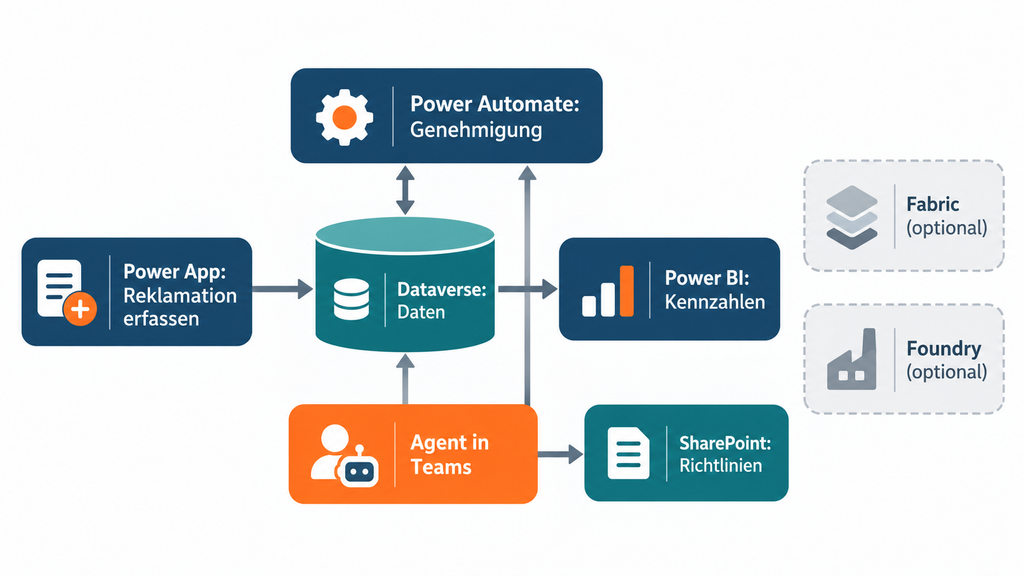
And Cowork? It does not belong in this picture, but beside it. If Jana needs a briefing from mails, delivery notes and the policy for the conversation with the customer, that is a one-off delegated task and therefore a case for Cowork.
What It Costs: A Dated Receipt
Microsoft bills in four separate worlds: user licences, Copilot Credits (a consumption unit for agents and delegated work), separate credits at GitHub and capacity for data platforms. The shared brand is deceptive: this is not one shared package.
| Item | List price excluding VAT, as of 3 October 2026 |
|---|---|
| Copilot Chat | at no extra charge with an eligible Microsoft 365 account |
| Microsoft 365 Copilot | €26.00 per user per month, billed annually |
| Copilot Business (up to 300 users) | €18.20, as a promotion until 31 December 2026 €15.60 |
| Copilot Credit | 0.01 US dollars |
| Power Apps Premium | €17.30 per user per month |
| Power Automate Premium | €13.00 per user per month |
| Power BI Pro | €12.10 per user per month |
| GitHub Copilot Business | 19 US dollars per user per month |
| Agent 365 | 15 US dollars per user per month |
Four footnotes belong on this receipt in spirit.
First: the seat price covers everyday use, not the “do that for me”. Cowork, Autopilot and the newest models run on credits. As a guide figure Microsoft gives 200 to 400 credits for a light Cowork task, 600 to 1,200 for a medium one and 1,500 to over 3,500 for a heavy one. Twenty medium tasks a month therefore cost 120 to 240 dollars, several times the licence. A robust figure therefore only emerges in your own operation, with real tasks, real users and real failed attempts.
Second: “included for licensed users” has conditions. An internal agent from Copilot Studio costs nothing extra if the user has the Copilot licence, the agent works under that user’s identity and runs in Microsoft 365 channels. What counts is the user’s licence, not the creator’s. According to Microsoft, what is always billed includes agents that remotely control screens and agent flows that are not started by an agent, for example scheduled ones or ones triggered by an incoming mail.
Third: a warning is not a block. Budgets and alerts inform, and according to the documentation they stop nothing. Anyone who wants a hard limit has to set up limits with a stop option.
Fourth: capacity does not replace a user licence. Below Fabric tier F64, everyone who looks at a report needs at least a Pro licence of their own. Copilot in Power BI requires a paid capacity, Fabric from F2 or Power BI Premium from P1, and consumes computing power there.
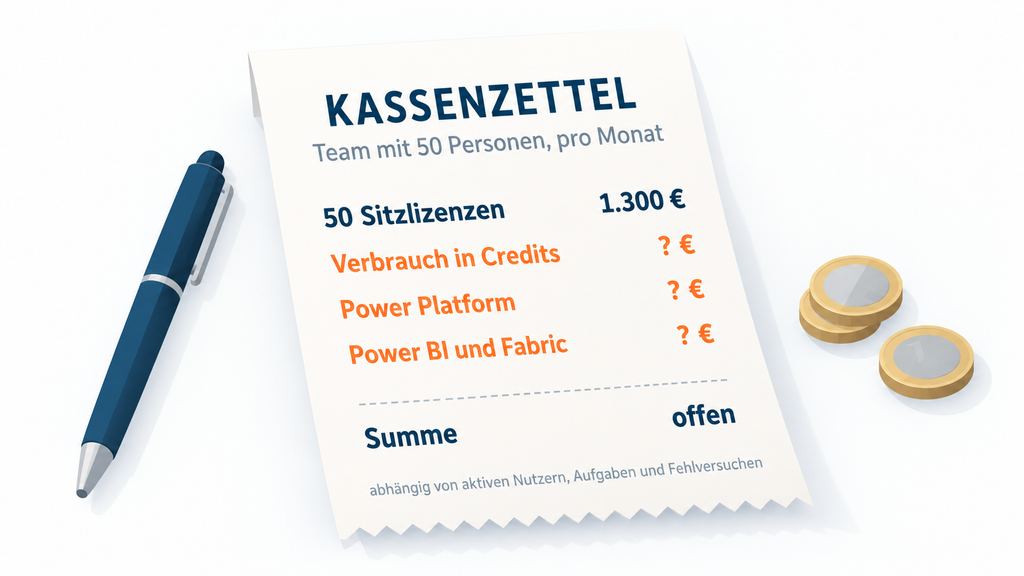
Example calculation for a team of 50 people
- 50 add-on licences at €26.00: €1,300 a month.
- Plus consumption: for one person with twenty medium Cowork tasks, Microsoft’s guide figure would add a further 120 to 240 dollars a month.
- Plus Power Platform licences as soon as premium features such as Dataverse are involved: Power Apps Premium €17.30, Power Automate Premium €13.00 per user.
- Plus Power BI Pro at €12.10 per user and, if needed, Fabric capacity.
So the Copilot licence is not “the AI price”. It is one line on the receipt.
What Copilot Actually Delivers, and What Is Known About It
The British government had 20,000 employees test Copilot. On average they reported 26 minutes of time saved per day. That is self-reported. The largest field experiment, with more than 6,000 employees in 56 companies, measured around twelve per cent shorter time to completion of documents among active users, and no change in meeting time. All four authors work at Microsoft. Another British test found no robust evidence of higher productivity. Its most striking individual findings, however, are based on six people.
The sober answer is: there is an effect, but not as a law of nature. It depends on the task. Anyone who wants to know has to measure on their own tasks, compared with the previous way of working.
Two Things That Are Not on the Packaging
Where the Data Travels
For companies in the EU there are several switches that determine whether data processing stays within Europe or reaches beyond it. Models from the provider Anthropic are switched off by default for EU customers and lie outside Microsoft’s EU Data Boundary. That also affects Cowork, which according to Microsoft can use Anthropic models for the bulk of its work. At peak load the computation may also move to the USA, Canada or Australia. Microsoft calls this Flex Routing, and for customer environments created after 25 March 2026 it is on by default. Web search via Bing runs under its own contractual terms. None of these points is spectacular, but every one of them deserves to be deliberately checked, documented and decided.
That Protective Mechanisms Also Fail
In June 2025 a vulnerability became known under the name EchoLeak. A specially prepared mail could get Copilot to hand company data to the outside, without the recipient having to click anything. This required a chain of four bypasses, which a research paper describes in detail. The hole is closed, so the case does not prove that the attack still works today. It shows the risk class. Between 21 January and mid-February 2026, Copilot also summarised mails marked as confidential from the “Sent” and “Drafts” folders, although protection rules were supposed to prevent that. Neither case argues against deployment. They argue against the comfortable notion that a single protective layer will be enough.
On top of that come two guests who should be missing from no Copilot presentation, but who there tend to turn up a little later: law and employee representation. Since February 2025 the EU’s AI Act has required companies to promote the AI literacy of their employees, according to the EU Commission now without a prescribed level and without a certificate. And because Copilot stores inputs and answers per person, the employee representatives belong at the table early.
Result: Five Questions Instead of a Copilot Strategy
At the end of the week there is above all one thing Jana has not done: ordered licences for everyone. Together with IT she answered five questions, and these work as a checklist for any project around Copilot in the enterprise:
- Which task exactly? A single question, a recurring need, a process or an evaluation call for different tools.
- Which data, and who may see it? The answer lies in SharePoint and OneDrive, not in Copilot.
- Who acts? Under whose identity does an action run, and who approves it?
- What does an accepted result cost? Licence plus consumption plus rework, including the failed attempts.
- Who is responsible when something changes? Models, sources or interfaces change faster than contracts.
For the complaints, her team gets an app and an approval workflow. The knowledge agent for the policies follows as soon as the SharePoint folders have been tidied up. Three people with many customer conversations get the add-on licence and a budget for Cowork, which will be reviewed after two months. That is unspectacular. But that is precisely where the difference lies between “We have Copilot” and “We know what we are using Copilot for”.
Outlook: The Colleague with an Account of Their Own
The most exciting line on the map is, of all things, the one that has not been finished yet. Autopilot describes an agent that keeps working when nobody is watching, with its own identity, its own memory and a human as supervisor. In July Microsoft reported almost 40 million registered agents at its customers. With Agent 365 there is already a management offering of its own for this, with a register and identities, almost like an HR department for software.
Until now a program was a tool, and the person operating it was responsible. The picture of the roles was simple: humans act, software helps. An agent with an account of its own shifts that line. It gets rights like an employee, but it does not resign when its creator leaves the company, and it does not ask when its task no longer fits the situation.
Almost anyone can build something these days. But who is responsible for what an agent has decided in Jana’s name: Jana, IT, the manufacturer? Microsoft has many technical answers to that. The organisational one every company has to find for itself.
For Reference
As of 3 October 2026. At Microsoft, names, addresses and conditions are currently changing within weeks.
The Door Signs: Which Address You Find What At
The addresses are the same for most companies, provided you are signed in with the work account. Two exceptions carry the company name in the address: SharePoint and OneDrive. Whether anything opens behind a door is decided by the licence and by clearance from IT.
| Product | Address in the browser | Note |
|---|---|---|
| Microsoft Copilot, chat | copilot.cloud.microsoft | Becoming the main address of the Copilot app, so far m365.cloud.microsoft |
| Agent Store | In Copilot on the left “Agents”, then “All agents” | |
| Copilot Cowork | In Copilot the “Cowork” toggle next to “Chat” | Also in the desktop app |
| Autopilot, formerly Scout | Area in the new Copilot app | Private preview |
| Copilot Studio | copilotstudio.microsoft.com | |
| Power Automate | make.powerautomate.com | |
| Power Apps | make.powerapps.com | |
| Power BI | app.powerbi.com | |
| Fabric | app.fabric.microsoft.com | Same platform as Power BI, with a toggle |
| Foundry | ai.azure.com | Needs an account with Azure, Microsoft’s cloud platform |
| GitHub Copilot | github.com/copilot | Mostly used directly in the code editor |
| Teams | teams.cloud.microsoft | Replacing teams.microsoft.com |
| SharePoint | companyname.sharepoint.com | Or via the app launcher (nine-dot icon) at m365.cloud.microsoft |
| OneDrive | App launcher at m365.cloud.microsoft | Behind it lies companyname-my.sharepoint.com |
Access to Agents in the Enterprise
| Offering | Access |
|---|---|
| Ready-made agents such as Researcher and Analyst | Add-on licence |
| Agent Builder | Building works even without an add-on licence. Company data as knowledge needs a licence or consumption billing |
| Copilot Studio | Work account. The free trial phase allows building and testing, but no publishing |
| Cowork | Add-on licence, consumption billing and inclusion in a spending policy |
| Autopilot, formerly Scout | Add-on licence, consumption billing and Frontier activation, private preview |
Consumption billing means: the company pays according to use, depending on the service either in addition to the licence or in its place. A spending policy determines who may use such a service and with what limit.
Your own access is shown by the Agent Store. Three indications are enough:
- If an agent says Add, you are allowed to use it. If it says Request approval, IT has to agree.
- If an agent is missing altogether, IT may have blocked it or not cleared it. Administrators determine who may use agents and whether agents from Microsoft, from third-party providers or from in-house appear.
- Agents from the Frontier programme carry the addition “(Frontier)”. The default setting for them is: no access.
Without an add-on licence, agents that work only with instructions and public websites can be used free of charge. Agents with company data are then billed by Microsoft according to consumption, provided the company has set up that billing. More access is only ever available through IT: licence, spending policy, Frontier. In practice that means: for Researcher and Analyst you need the add-on licence. For Cowork, consumption billing and inclusion in a spending policy are added. For Autopilot you need an add-on licence, consumption billing and the Frontier activation. In every case the route starts with a request to IT, as described above under “How to move up”.
Cloud Flow or Agent Flow
| Cloud flow (Power Automate) | Agent flow (Copilot Studio) | |
|---|---|---|
| Billing | Power Automate licence, premium with an AI prompt | Copilot Credits, 13 per 100 actions |
| No extra charge | With standard connectors under the rights included in Microsoft 365 | Only when called by an agent and the user has the add-on licence |
| Sharing, co-owners | Yes | No |
| Desktop flows (RPA) | Yes | No |
From 1 November 2026, new Power Automate licences no longer come with AI Builder credits. Prompts in Power Automate then consume Copilot Credits once any existing AI Builder credits are used up.
What Else Is in the Agent Store
The store is sorted by origin: built by Microsoft, built by your own organisation, built by vetted partners. In a company with an add-on licence these five, for example, are on offer there:
| Agent | When to choose it | What you should know |
|---|---|---|
| Researcher, in German Recherche-Agent | When a question is to become a report: multi-step research in the web and the work data, result with an outline and sources | Takes longer than the chat. For quick answers the chat remains the better choice |
| Analyst | When figures are available: evaluate raw data, find trends, form forecasts | Calculates with program code in the Python language, which you can inspect |
| Prompt Coach | When your own inputs are to get better: it checks prompts, corrects them and shows examples | A learning tool for beginners, not a working agent |
| Planner Agent | When work is organised in Microsoft Planner: create and change tasks, write status reports, work on assigned tasks | Status reports only from ten tasks in the plan upwards |
| Surveys | Design, distribute and evaluate a survey | Being phased out. Since 31 August 2026 no longer available to new users; the successor is Copilot in Microsoft Forms |
According to Microsoft, Researcher, Analyst, Planner Agent and Surveys require the add-on licence. The short rule: a report with sources means Researcher, a file with figures means Analyst, a plan with tasks means Planner Agent. Everything else starts in the normal chat.
Copilot for Private Individuals
Here the tiers have different names, and two of them sound like the label on the work account: in the private sphere “Premium” and “Pro” are subscriptions, not a company’s add-on licence. Which subscription you have is shown by account.microsoft.com/services. Free of charge there are chat, images and file uploads with limits. Microsoft 365 Single (10 euros a month) and Family (13 euros) bring Copilot in Word, Excel, PowerPoint, Outlook and OneNote with a limited quota. Microsoft 365 Premium (22 euros) raises the limits and includes agentic features. Microsoft 365 Pro (110 euros) offers the highest usage. The AI features apply only to the holder of the subscription. The former standalone product Copilot Pro is no longer sold by Microsoft.
For the agents, the private rule is: according to Microsoft, Researcher and Analyst are only in the Premium and Pro subscriptions. Cowork runs for private accounts as a preview, likewise only with Premium or Pro. Copilot Studio requires a work or school account; a private mail address is not enough. On Autopilot for private accounts Microsoft gives no information in the sources checked. The route upwards here is a change of subscription in your own Microsoft account.
FOUNDIC.org is ad-free and has no paywall. If you got something out of this article:  Treat us to a coffee