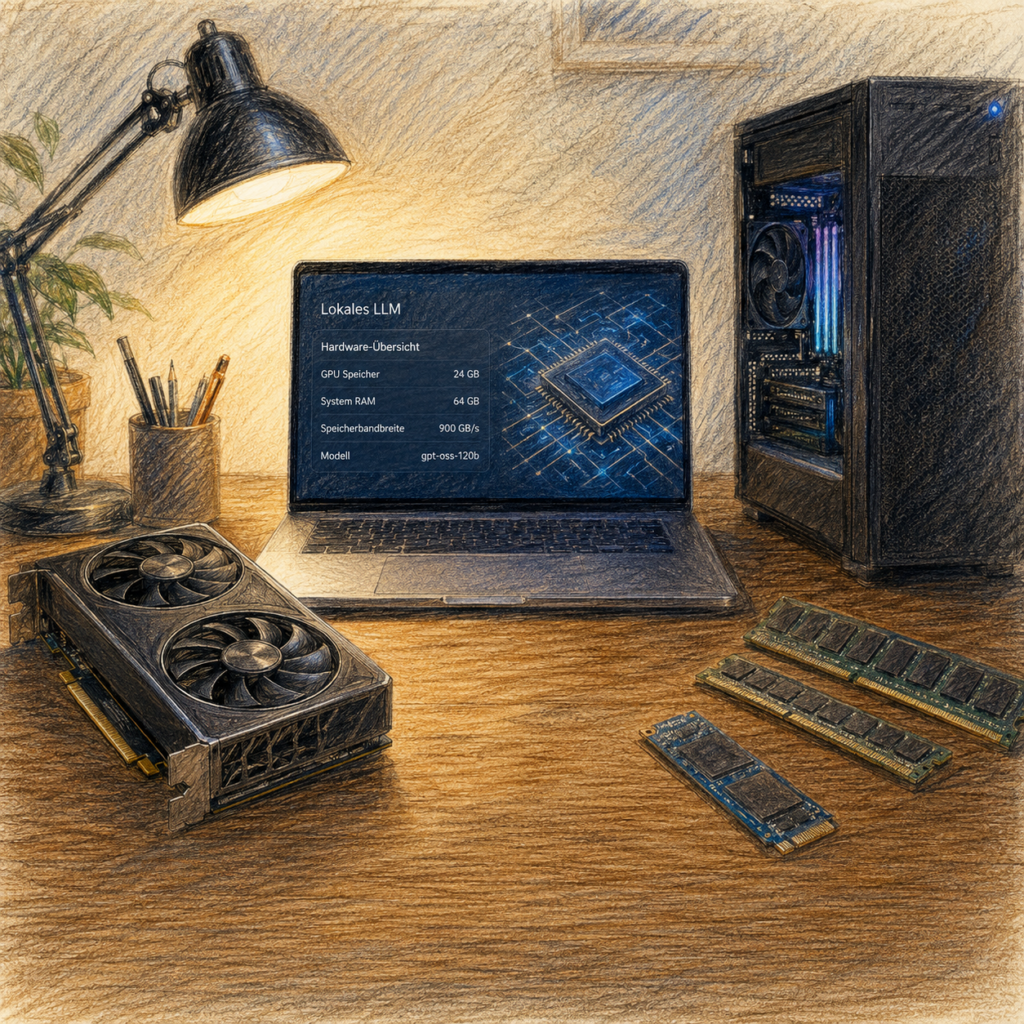
What a Language Model at Home Demands in Terms of Computer, Memory and Patience
It is a Sunday evening in February, and Jonas is sitting in front of a file selection dialog.
On the desk in front of him lies his father’s folder. Doctors’ letters, findings, a four-page medication plan, plus correspondence with the health insurer in a kind of German that was apparently invented for the sole purpose of informing nobody. Jonas is supposed to sort all this out. He has been meaning to do it for three weeks.
He has scanned the pages. Forty PDFs. And now he sits there, cursor hovering over the upload button of an AI service. And does nothing.
It is not a dramatic moment. Nobody would want to film it. But it is a precise one: this hesitation contains a question that millions of people now know without ever having said it out loud. Where does this actually go? Not as a conspiracy thought, but quite soberly: his father’s diagnosis, the list of medications, the doctor’s remark about the prognosis. All of it would travel down a line into a data center that Jonas will never see, operated by a company whose terms and conditions he has not read.
He closes the dialog. And types into the search engine instead: run AI locally.
What he learns over the following weeks makes for a good story about technology. It is about how astonishingly far you get with an ordinary computer – and how precise the wall is that you run into afterwards.
Why Everyone Is Suddenly Interested
There are three reasons to bring your AI home, and only one of them is paranoia.
The first is Jonas’ reason: privacy. Not in the abstract, but concretely. Business figures, client files, patient data, the photos of your child. There are categories of information where the question “who am I entrusting this to?” is not an academic one.
The second is independence. Anyone who spends months building a workflow around one particular cloud model is at the mercy of its provider. Models get shut down, changed, repriced. A model on your own hard drive stays exactly as it is.
The third reason is the most honest one: curiosity. Many people simply want to see what runs on their own metal. That is entirely legitimate and probably the most common reason of all.
The Purchase Decision in Thirty Seconds
Before it gets complicated, the short version. Anyone who stops reading after this table will at least have the right order of magnitude in mind:
| Goal | Typical memory class | Sensible platform |
|---|---|---|
| Trying things out, simple assistance | 12 to 16 GB of graphics memory | existing PC |
| Good document work with RAG | 16 to 32 GB of graphics memory | PC, often NVIDIA |
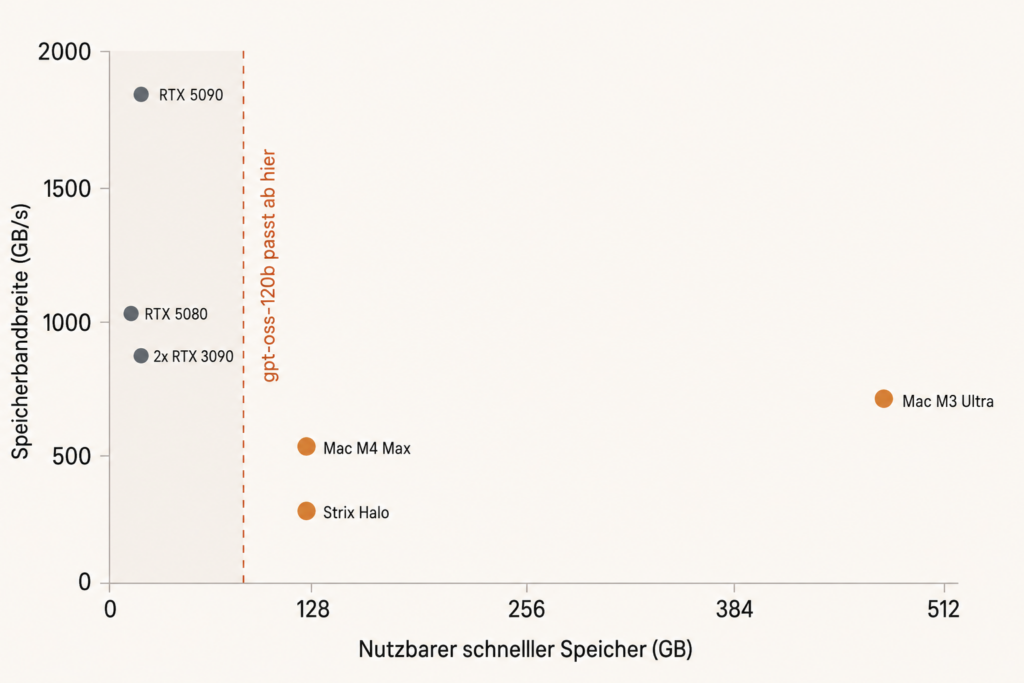
| Large quantized 70B models or gpt-oss-120b | 80 to 128 GB of fast memory | Strix Halo or Mac Studio |
| Image, video, training | ideally from 24 GB of graphics memory | NVIDIA |
| Frugal special tasks in continuous operation | device-specific, often 8 GB | edge NPU, see the box at the end |
The rest of this article explains why this table says memory and not computing power. That is the point at which most buying guides go wrong.
What this table deliberately does not contain is prices. The reason follows further below: they are currently changing faster than an article is allowed to age.
Why Memory Is the First Limit
A language model (a program that generates text by predicting, piece by piece, the most likely next one) consists at its core of a huge table of numbers. These numbers are called parameters. A model with “120B” in its name has 120 billion of them.
To output a single piece of a word, the computer has to fetch large parts of this table from memory. Not once per answer, but once per token. A token is the smallest unit a model works with: sometimes a syllable, sometimes a short word, sometimes a punctuation mark.
From this follows a rough back-of-the-envelope calculation:
Memory bandwidth divided by model size gives you roughly the speed.
Memory bandwidth is the amount of data that can be read from memory per second. On a fast graphics card it is about twenty times as high as on normal working memory. That is the real reason why AI runs on graphics cards. Not the computing power, but the access to fast memory.
This formula is deliberately phrased as an estimate, because it is only approximately correct. With modern MoE models (mixture of experts) all the parts do sit in memory, but only a fraction of them is active per token. An example: the freely available model gpt-oss-120b has around 117 billion parameters, but only about 5.1 billion are active per token.
That considerably lowers the computational effort compared with a dense model of the same total size. A misunderstanding suggests itself here, however: memory requirement and data transport do not drop to the level of a real 5-billion model. All the experts have to be kept available, plus the shared layers and the selection logic. The model still needs its 59 gigabytes.
The Adjusting Screw That Can Replace a Graphics Card
How big a model becomes in memory depends not only on the number of parameters, but on the chosen number format. With quantization the weights are stored with fewer bits. It remains the same model, it just calculates less precisely.
How much difference that makes is shown by a model with 27 billion parameters in four stages: at full precision around 120 gigabytes are realistically required, at half precision about 64, at an intermediate stage around 22, and in a 4-bit format optimized for newer NVIDIA cards only 16 gigabytes. The same model, a factor of seven and a half.
And the loss of quality is smaller than the numbers suggest. In one comparison the 4-bit variant occupied barely half the graphics memory of the 8-bit variant and was not noticeably less accurate or worse for it.
For the purchase decision that means: choosing the right format can have the same effect as a graphics card that costs twice as much. Before you buy hardware, check which formats your target model is even available in.
And What About TOPS?
Every box carries a number for computing power, usually in TOPS (trillions of operations per second). It is not worthless, but it answers a different question than the one most buyers are asking.
Computing power counts when reading in long inputs, for image and video generation, for training and for small models. For the text output of a large model with a single user, the usable memory bandwidth is usually more important. To make matters worse, TOPS figures from different manufacturers are barely comparable, because the data format, the utilization and the software support are missing.
As a rule of thumb:
TOPS advertise. Memory decides what runs at all. Bandwidth often decides how fast it runs.
The Moment Jonas’ Computer Hits the Wall
Jonas has a decent gaming PC. A graphics card with 16 gigabytes of memory, a current processor, 32 gigabytes of working memory. No monster, but solid.
He installs LM Studio, a program with a graphical interface that downloads and starts models without you having to touch a command line. He picks a mid-sized model, around twelve gigabytes. It loads. He types a question.
And then something happens that you have to have experienced: the answer appears faster than he can read. Around 150 tokens per second. Once the program and the model have been downloaded, the actual processing needs neither an internet connection nor an account nor an upload. Jonas could pull out the network cable at this moment and nothing would change.
Then he tries the next model up. And this is where it gets instructive.
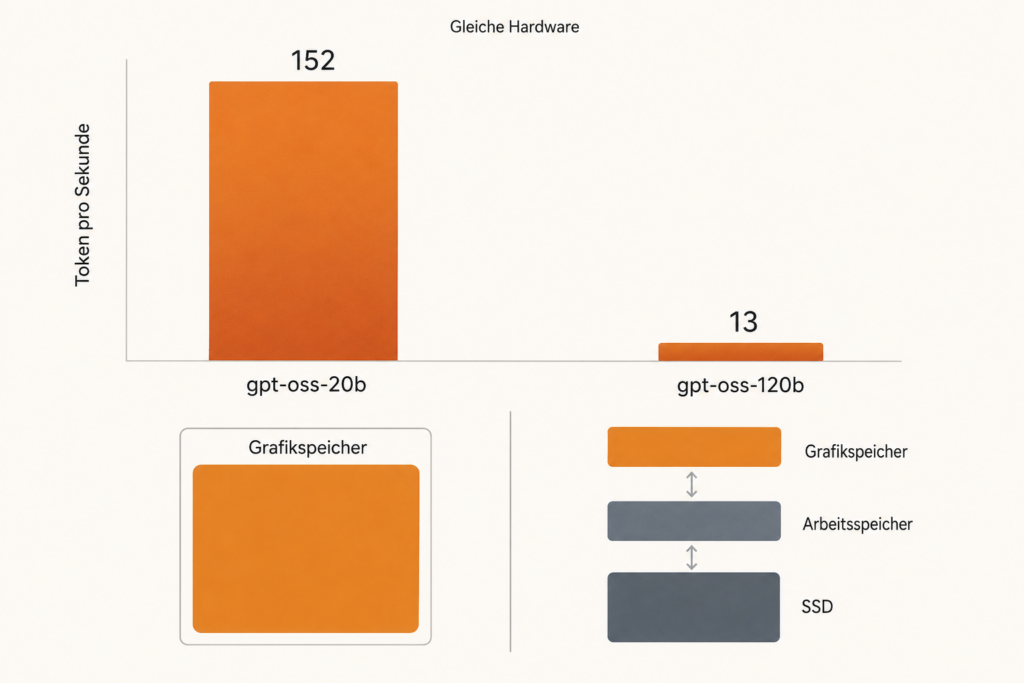
The large model is called gpt-oss-120b and needs around 59 gigabytes. His graphics card has 16. What happens in such a case has been tried out by c’t: after graphics memory and working memory were exhausted and the system fell back on the SSD, the editors aborted the attempt after two hours without any discernible progress.
The Rule That Follows From This Experience
For usable interactive speed the model should sit as completely as possible in fast memory.
How brutal this threshold is, is shown by a single comparison from the same test. The same machine, two models:
| Model | Fits into the graphics card? | Speed |
|---|---|---|
| gpt-oss-20b, around 12 GB | Yes | 152 tokens/s |
| gpt-oss-120b, around 59 GB | No | 13 tokens/s |
A factor of almost twelve, solely because in one case everything sits in the right place.
Between these extremes there are gradations, however, and that matters for the purchase decision. If only a small share, say ten to fifteen percent, is offloaded to normal working memory, it often remains bearable. From a third onwards it gets sluggish. On the SSD it becomes unusable. It is a slide, not a switch.
Price Status: All Figures in This Article Are Snapshots
Before the amounts arrive, a warning that is to be taken literally this time. In August 2026 the hardware market is under a memory shortage that makes all price information obsolete within a short time.
For a sense of scale: the price index from 3DCenter shows an increase of 13.3 percent for graphics cards between July and August 2026 alone; compared with the period before the crisis it is 32 percent. For the most expensive consumer card the surcharge compared with September 2025 is 96 percent. It hits the cheap 16-gigabyte cards particularly hard, of all things, because with them the memory accounts for the largest share of the sale price: at times it cost around 260 euros per card, before the crisis it was about 50.
With working memory it is even more drastic. A 32-gigabyte DDR5-6000 kit stood at around 114 euros in September 2025 and now costs between 475 and 540. For 64-gigabyte kits, four-figure sums are being asked.
All the following prices are as of August 2026 and are to be checked again before buying. Analysts expect falling memory prices in 2028 at the earliest.
Why Money Alone Does Not Help
The most convincing evidence for this rule comes from a c’t test with professional hardware. An NVIDIA RTX 6000 Ada, a workstation graphics card with 48 gigabytes of memory and a price in the high four figures, reached between 20 and 30 tokens per second with gpt-oss-120b. Not because it is slow, but because 48 gigabytes are not enough for a 59-gigabyte model. It had to offload and thereby ended up on the same slide as a gaming PC.
A compact device with 128 gigabytes of shared memory clearly beats this card at precisely this task, and at a fraction of the price. That is the whole point of this article in one sentence: it is not about how much you spend, but about whether the model fits inside.
The Exception You Have to Know About
There is, however, one case in which the rule gives way, and it is now the most important one.
In one comparative test a model of 26 gigabytes, 45 percent of which had to be offloaded to the processor, ran faster than a model of only 9 gigabytes that sat entirely in graphics memory. On the faster of the two cards tested, the lead came to as much as 13 tokens per second.
The reason is the MoE architecture. In the larger model, only three of 35 billion parameters were active per token. So a lot was offloaded, but little was read.
For the purchase decision an important qualification follows from this: the hard memory limit applies above all to dense models. With MoE models, offloading can work astonishingly well, and practically all the interesting new models are MoE models. That softens the rule, but does not repeal it. The drop from 152 to 13 tokens per second above also concerned an MoE model, just one in which the offloaded share was much larger.
The Second Speed Nobody Talks About
A language model has two speeds, and marketing material almost always names only one of them.
The first is called decode: how quickly the answer appears word by word. That is the number everyone quotes. It depends above all on memory bandwidth.
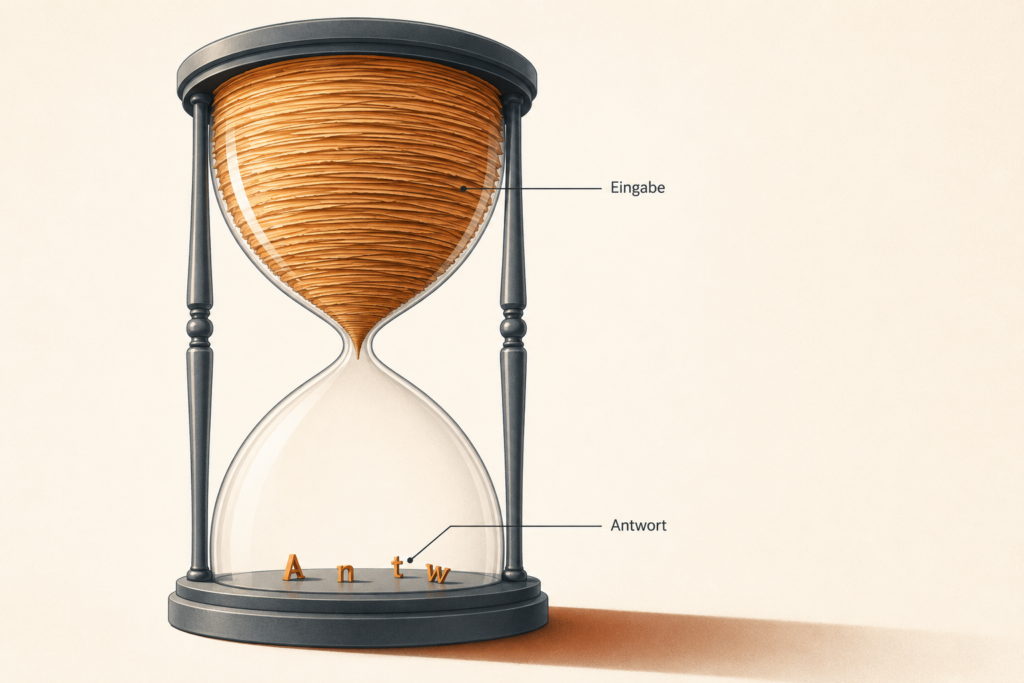
The second is called prefill: how long it takes for the model to start at all after it has read the input. It depends on computing power.
With a short question you do not notice prefill. With a hundred-page document you sit there and wait before the first word appears. With every single request. That is the point at which local AI tips over for document work and programming: not the writing speed, but the silence before it.
Incidentally, a well-built document system would not pass all forty PDFs through in full with every question. It would first search for the relevant passages. We will come back to that at the end. But even a single long document can put a noticeable load on prefill and memory.
The Third Time Factor: How Much the Model Thinks
There is another time eater that has nothing to do with hardware at all. Modern models visibly think before answering, and how extensively they do so differs dramatically.
In one comparative test the same model, with the same prompt, ended its thinking process once after 800 and once after 1,300 tokens. Between different models the difference was even bigger: one invested a great many tokens in thinking, another made do with considerably fewer and wrote the answer faster on top of that.
The practical consequence: a frugally thinking model on slow hardware can feel nimbler than a brooding one on fast hardware. Anyone who only compares tokens per second when testing is measuring past the experience.
How far this can get out of hand is shown by a documented case: with the highest thinking level, a 27-billion model blew through a context window of a good 32,000 tokens on a programming task before it was even finished. One level lower, the same window was enough. So the thinking effort is not a law of nature but a setting.
As a point of reference: without an extended thinking process, 30 tokens per second already feels brisk – several times faster than a human reads.
And Something Else Eats Memory
There is one item that almost every buying guide leaves out: the KV cache. The model has to remember what has been said in the conversation so far, and these intermediate results end up in memory as well. The cache grows with the length of the context.
The practical consequence: a model with 59 gigabytes of weights can indeed be loaded on a 64-gigabyte system. But it is not a 64-gigabyte model. It just about fits and leaves hardly any reserve for the KV cache, working data and longer contexts.
As a rule of thumb: at least ten to twenty percent reserve beyond the model size for short conversations, twenty to forty percent for document work. Those are safety buffers, not a calculation. The actual requirement depends on the architecture of the particular model. It is not without reason that OpenAI names an 80-gigabyte card as a suitable platform for a model with 59 gigabytes of weights.
How real this surcharge is, is shown by a documented case. A larger model called Qwen3-235B wanted to occupy around 110 gigabytes. It was tested on a machine with four graphics cards and 128 gigabytes of memory in total, so nominally considerably more than the model needs. It still was not enough: model layers and KV cache did not fit in at the same time. It ran best when 84 of 96 layers sat on the graphics cards and the rest on the processor. The result was barely 15 tokens per second.
So 128 gigabytes for a 110-gigabyte model is too little. Anyone who, when buying, only sets the model size against the memory size will reliably miscalculate.
The Turbo That Costs Nothing
So far this has been about how to get around the memory bandwidth bottleneck by buying suitable hardware. There is a second way, and it does not cost a cent.
It is called multi token prediction, MTP for short. The idea: the model is given a small additional module that very quickly produces drafts for the next tokens. Taken on their own, these drafts are less accurate, but the main model can check several of them in a single pass instead of working out every token individually. If the drafts are right, several tokens drop out at once.
The decisive point, and the reason why this is not a lazy compromise: no precision is lost in the process. The main model keeps the last word, it simply works more efficiently.
What That Means in Numbers
One comparative test measured several models with and without MTP:
| Model | Graphics card | without MTP | with MTP |
|---|---|---|---|
| Gemma 4 (12B, dense) | RTX 3090 | 47 t/s | 171 t/s |
| Gemma 4 (12B, dense) | RX 9060 XT (16 GB) | 21 t/s | 74 t/s |
| Qwen3.5 (9B, dense) | RX 9060 XT (16 GB) | 32 t/s | 69 t/s |
| Qwen3.8 (27B, dense) | RTX 3090 | 34 t/s | 58 t/s |
| Qwen3.6 (35B, MoE) | RX 9060 XT (16 GB) | 33 t/s | 55 t/s |
The testers’ conclusion: at least 25 percent gain in all attempts, and for some models a tripling.
For the purchase decision that is considerable. With MTP, a 16-gigabyte card for a good 400 euros reaches figures that this article has so far attributed to far more expensive devices.
Two Limitations
First, MTP works above all with dense models. They read all parameters per token, so the leverage is large here. MoE models move less data anyway, so the gain turns out correspondingly smaller. That is the same mechanism as with the exception further above, just seen from the other side.
Second, MTP only accelerates the output, not the reading in. With prefill, the speed even dropped slightly in the measurements. So anyone who mainly processes long documents benefits less than someone who is having a conversation.
What You Have to Do for It
Not much. You need software that supports it, llama.cpp for instance, and a model for which an MTP variant is available. With some models the additional module is built in; with others you download a second file of a few hundred megabytes alongside.
Then a single parameter is left to set: how many tokens the additional module should propose per pass. Depending on the model, the optimum is two, four or seven. You increase the value step by step until the speed no longer rises.
The practical consequence for buying: check whether your target model supports MTP before you order hardware. It can have the same effect as the next graphics card up.
Five Questions That Sound Like One
Anyone who writes “does model X run on hardware Y?” into a forum gets five different answers from five people who are all right. Because they are five different questions:
- Does it fit in principle? Just the model file.
- Does it fit together with the context? Plus KV cache.
- Does it run fast enough for me? Plus bandwidth.
- Can it serve several people at once? Plus reserve per user.
- Can I adapt it? Depending on the method, an entirely different order of magnitude.
Almost every disappointment with local AI arises between stage one and stage two: the model loads, and then the context is not enough.
Four Routes, Four Characters
The Sensible One: A Normal PC, Now From About 2,500 Euros
A current processor, 32 gigabytes of working memory, a graphics card with 16 gigabytes. c’t measured exactly such a system.
What works: models up to about twelve gigabytes, briskly, at around 150 tokens per second. Image generation. Short videos. On top of that it is a fully fledged work and gaming computer.
What does not work: the large models.
On the question of AMD or NVIDIA there are two measurements that appear to contradict each other and are in truth both correct.
With a model that did not fit into the graphics memory, the AMD card cost around 750 euros and the NVIDIA counterpart around 1,300. The surcharge of 73 percent brought just 13 percent more speed. With models that fit in completely, on the other hand, an NVIDIA card was 39 to 63 percent ahead of the AMD card in another test, at a surcharge of about 30 percent.
The resolution is the same rule as throughout this article: as soon as offloading is required, both cards hang on the same bottleneck, and the lead of the faster chip evaporates. If the model fits in, that lead can unfold. So anyone who wants to run models up to about twelve gigabytes really does get value for the NVIDIA surcharge. Anyone working beyond the memory limit does not.
With image generation the ratio tips completely in NVIDIA’s favor anyway.
The Memory Giant: AMD Strix Halo With 128 GB, Around 3,800 Euros
A compact computer with a chip called Ryzen AI Max+ 395, which has up to 128 gigabytes of unified memory, that is, shared memory that processor and graphics unit access alike. This does away with the classic shuffling of a model between separate working and graphics memory. Operating system, processor and graphics unit still have to share the capacity, however, so the full 128 gigabytes are never available to the model alone.
Ready-made devices with this configuration currently cost about 3,750 to 3,810 euros in German retail; AMD’s own reference box starts at 3,999 US dollars. Variants with 64 gigabytes are available from around 2,200 euros, but they are not enough for gpt-oss-120b.
So this is no longer the inexpensive solution it was before the memory crisis, but it remains one of the few ways to keep a model of the 60- to 90-gigabyte class entirely in memory. For gpt-oss-120b the published figures lie between around 30 and 42 tokens per second, depending on software and context length. AMD itself demonstrated the model on a 128-gigabyte system at around 30 tokens per second; optimized measurements with llama.cpp reached a good 42 with a short context and fell to about 35 at 32,000 tokens. Even at the lower end that is faster than most people read.
The catch lies in the software. Setting it up can require considerably more manual work than on a Mac. Under Linux in particular, performance and model compatibility depend on drivers, library versions and the chosen software. Anyone who buys a ready-made device with a preconfigured system and works with LM Studio or Ollama has a considerably easier time.
The Underestimated One: Apple
Apple is often overlooked when it comes to local AI, because the company does not offer graphics cards with CUDA, NVIDIA’s programming interface, which has been the standard in this field for years. For large language models, however, Apple Silicon has one decisive advantage: fast shared memory, up to 546 gigabytes per second on the M4 Max and 819 on the M3 Ultra.
In a c’t test a Mac Studio with M4 Max and 128 gigabytes reached around 82 tokens per second with gpt-oss-120b, and did so at 120 watts of power draw. A desktop PC with an RTX 4090 delivered fourteen times fewer tokens per watt in the same series of measurements.
In terms of price the Mac Studio range starts at around 2,900 euros; the configuration of interest here, with 128 gigabytes, lies considerably above that. Only the configurator names exact amounts, and those are currently moving as well.
Two limitations, for the sake of honesty. First, the figure of 82 tokens/s is a single measurement under good conditions; realistically you should plan for 50 to 80. And with long documents the lead quickly comes to nothing: one comparative test recorded a Mac Studio collapsing from 34 to 6 tokens per second as the context grew, and a user of a 128-gigabyte MacBook reports that from about 10,000 tokens onwards practically everything starts to stall. Memory decides whether the model runs. How long it stays fast is decided by the context.
Second, and this is decisive when buying: what is meant is not just any Mac Studio, but explicitly the configuration with 128 gigabytes of shared memory. The entry-level variants with 36 or 64 gigabytes precisely do not solve the task described here. Apple documents the M4 Max with up to 128 gigabytes of shared memory. For the larger M3 Ultra, up to 512 gigabytes were announced at launch. Which configuration can actually be ordered in the German store should be checked immediately before buying.
The Versatile One: NVIDIA
NVIDIA is the broadest AI platform of all. The CUDA ecosystem, consistent support from common development tools, training and adapting your own models, server software for several simultaneous users, image and video: in all these areas NVIDIA is the safest choice. And as long as a model fits into the graphics memory, the prefill is very fast too.
How clear the lead is with images is shown by these figures:
| System | One image with Flux-Dev |
|---|---|
| RTX 4090 | 12 seconds |
| Mac Studio M3 Ultra | 65 seconds |
| Mac Studio M4 Max | 110 seconds |
The reason lies in the software: practically all image models are optimized for CUDA, and many are available in a data format that Apple hardware struggles with.
The disadvantage for running large language models privately is a different one: too little graphics memory per euro. That is precisely where NVIDIA fails in the discipline this article is about.
Why Several Graphics Cards Are the Wrong Answer for Individual Users
An obvious thought: if one card has too little memory, just take four. Arithmetically that is correct; in practice it is misleading.
A c’t test with four graphics cards shows why. With a single request the four chips sat at eleven to fifteen percent utilization and under 70 watts per card. They were bored. Only when the system had to serve many simultaneous requests did it reach over 2,000 output tokens per second – and it went to its thermal limit in the process.
The testers’ conclusion is the most important information in the whole report for private buyers: single requests underchallenge such a system. The advantage of several cards arises exclusively in parallel operation, that is, when a department or a working group accesses it.
For one person searching through their documents in the evening, that is the wrong form factor. Not too weak, but built for the wrong task – and loud, thirsty and expensive with it. Anyone working alone is better off with a device that offers its memory in one piece instead of spreading it over four cards.
Rough Size Classes, Not a Ranking of Intelligence
Tokens per second say how fast a model writes, not how well it works. Roughly, it can be sorted like this:
- 3 to 8 billion parameters: simple summaries, sorting, short answers. Noticeably often makes things up.
- 12 to 20 billion: usable everyday texts, pulling information out of documents, simple programming help.
- 24 to 35 billion: currently the most exciting class, see below.
- 60 billion and more: often more stable German and better reasoning.
This list is explicitly not a ranking. Model generation, training data, post-training, active parameters and specialization can matter more than the sheer number of parameters. A modern, well-trained 30-billion model regularly beats a two-year-old 70-billion model.
The Class That Is Currently Shifting Everything
In August 2026 Alibaba published the weights of a model with 27 billion parameters. The benchmarks presented by the manufacturer itself put it level with or ahead of a commercial top model released in February of the same year at programming and agent tasks. Manufacturer benchmarks are to be treated with caution, but an independent practical test turned out similarly: in twelve minutes and without asking any questions, the model developed a complete programming interface including user management, the code compiled on the first attempt, and the testers considered the result indistinguishable from that of a commercial top model.
What is remarkable about it is that this is a dense model, not an MoE model. So all 27 billion parameters are at work per token. That costs bandwidth, but it also makes the model particularly receptive to the acceleration trick from the chapter about the turbo.
The decisive thing for this article is the memory requirement. In the Q5_K_M quantization this model occupies around 22 gigabytes and thus fits into a good gaming graphics card. In a 4-bit format optimized for current NVIDIA cards it even runs with 16 gigabytes.
That shifts the purchase decision noticeably. Anyone who wanted top-level programming help a year ago needed a subscription with a cloud provider. Today a card for 420 euros may be enough. The class between 24 and 35 billion parameters is therefore no longer the workhorse for in between, but for many the actual destination.
The testers do name one limitation, however: the model tends to think through simple tasks too thoroughly and to lose itself in details in the process. That costs time and matches what we said above about the third time factor.
The Sore Point: German
Many open models are strongly shaped by English in their training data, post-training and benchmarks. Depending on the tokenizer, German is broken up less efficiently, so processing takes longer. How much the quality suffers as a result, however, depends considerably on the model family; modern multilingual models can master very good German.
With small models it is severe. c’t tested summaries and PDF analyses internally with heavily shrunk models on weak hardware. The result: it simply did not work well. Asked about a shrunken model that runs well for a particular purpose, the specialist editor consulted had no recommendation. She knew of no convincing example.
Not Forty PDFs Into the Prompt: RAG
Back to Jonas’ actual problem. His first reflex was to present all forty documents at once. That is the most demanding method imaginable and usually the wrong one.
The usual solution is called RAG (retrieval augmented generation). The system first searches through your own documents and presents the model with only the relevant passages. Instead of forty PDFs, three paragraphs go into the request.
That considerably lowers the hardware requirement, because both prefill and context turn out much smaller. A 14- to 30-billion model on a card with 24 gigabytes can get astonishingly far with it.
You should not take RAG for a miracle cure, however. It does not shrink the model and does not turn a weak one into a strong one. It reduces the amount of information presented at any one time, no more. The quality additionally depends on the text recognition of scanned pages, on the division of the documents into sections, on the search model, on the reranking of the hits and on a comprehensible display of sources. Every one of these steps can ruin the result, even if the language model itself is good.
The Runbook: Test First, Then Buy
Step 1: Buy Nothing
The most valuable piece of advice from the entire research material costs zero euros. Anyone with a reasonably current PC and a graphics card from twelve, better sixteen gigabytes can start right away.
And if there is no suitable card in the machine: getting started remains the cheapest route, even though it has become more expensive. Cards with 16 gigabytes stood at about 420 euros (AMD) and 550 euros (NVIDIA) at the beginning of August; this class in particular is badly affected by the memory crisis, and in Asia individual models became almost half as expensive again within a week. In a practical test they reached a good 30 to over 60 tokens per second with three different models, which the testers rated as usable for numerous AI tasks.
A used card with 24 gigabytes, long the insider tip for local AI, now costs about 1,700 euros. Anyone switching to the second-hand market does not escape the price development. It arrived there long ago.
This is not the machine for 120-billion models. But it is the entry ticket for finding out whether you need such a machine at all, and it costs a quarter of one.
Step 2: Install LM Studio
Leave the “Staff Picks” option switched on. It restricts the selection to models from vetted publishers and thereby lowers the risk, but it does not replace checking for yourself. A green check mark indicates that a model fits entirely onto the graphics card. Watch out for exactly that.
A word on security: models are downloads from the internet. Pure weight files in formats such as GGUF or safetensors are considerably less risky than executable program code, because they essentially contain numbers. More critical are installation scripts, models that bring along their own code and want to execute it, unknown containers and extensions for image generation software. Only load from trustworthy sources and isolate foreign executable code as far as possible, for instance via a separate user account or a container (a restricted runtime environment whose protective effect, however, depends on the specific configuration). A container is not an automatic wall: it shares the system kernel with the host and can gain far-reaching access via shared folders or extended rights. It makes sense with as few rights as possible and only the shares actually needed.
Step 2b: Look for MTP Variants
Before you think about hardware, check whether your target model exists in an MTP version. The speed gain is free and can make a purchase decision unnecessary. In LM Studio this is not always visible; anyone who wants to make the most of the effect works directly with llama.cpp.
One detail on the side that easily costs performance there: if you start the server without further specification, it automatically sets itself up for four simultaneous requests. For single use that is unnecessary and slows things down slightly. A parameter for “one user” fixes it.
Step 3: Test With Real Tasks
Not “write me a poem”, but exactly what the machine is meant for. Pay attention to two things that appear in no benchmark: how long does it take until the first word when the input is long? And does the answer get worse as the conversation gets longer?
Step 4: Only Now Decide
| If the goal is | then |
|---|---|
| Large language models, text, documents | Strix Halo or Mac Studio with 128 GB |
| Images, video, programming, training | NVIDIA, from 24 GB of graphics memory |
| Trying everything out first | A used graphics card in the existing PC |
The Calculation Hardly Anyone Draws Up
At four hours of daily use and 35 cents per kilowatt hour:
| System | Example average load draw | Electricity costs per year |
|---|---|---|
| Mac Studio M4 Max in the test mentioned | around 120 W | around €61 |
| Strix Halo system | depending on the device, about 80 to 140 W | around €41 to €72 |
| PC with RTX 4090 | depending on the configuration, 350 to 550 W | around €179 to €281 |
| PC with two graphics cards | often 600 W and more | from around €307 |
This calculation assumes an average power draw during four daily hours under load. Load fluctuations and the question of whether measurements were taken at the chip or at the socket are not taken into account. The 450 watts are a plausible value, not a universal one.
Over three years the difference adds up to several hundred euros. Two items are still missing from this table, however, and both hit precisely those devices you want to leave running permanently.
The Idle Draw Nobody Factors In
A workstation system with four graphics cards tested by c’t drew 226 watts from the socket at idle. The cards alone came to over 30 watts each, without a monitor attached and without any computing load at all.
For a computer that is meant to stand by around the clock as a home server, that is the decisive figure. 226 watts permanently make almost 2,000 kilowatt hours a year, so at 35 cents about 690 euros, without the machine doing anything. A frugal device with shared memory sits at a fraction of that at idle. Anyone comparing only the load draw overlooks the bigger item.
And the Noise, With Figures
In the same test, 0.6 sone was measured at idle, 2.5 sone at partial load and 6.8 sone at full load. The testers’ recommendation was unambiguous: run such a system in a separate, well-cooled room if at all possible.
That is not a side issue but, for many, the actual deciding line. A device you cannot stand next to you in your study will not get used.
And then the most uncomfortable calculation of all: for the 2,500 to 4,500 euros of a local machine you can alternatively get access to a top model via an API (an interface through which software communicates directly with a service). With occasional private use, that amount funds many years. With long documents, automated workflows or intensive use, however, the calculation can turn considerably faster. As pure cost optimization it rarely works out with typical private use. As a privacy decision, as an independence decision or out of sheer enjoyment, it very much does. You should just know which of these decisions you are making.
The Third Way: Rent Instead of Buy
Between buying and a cloud subscription lies an option that is rarely considered: renting a server with a graphics card. The data then does not run in your own house, but at a provider of your own choosing, if need be with a location in Germany.
A German provider charges around 278 euros a month for a server with a workstation card with 20 gigabytes of graphics memory and 64 gigabytes of working memory, plus a one-off 135 euros for setup. The test works it out: the components installed are worth about 6,000 euros, and after around 21 months of continuous operation you would have paid that amount in rent. If you factor in the electricity costs of running it yourself, the break-even point shifts to about 26 months.
The comparison with a large international cloud provider is interesting: there the same card class costs barely one euro per hour in converted terms, so over 720 euros a month, and data traffic is charged on top.
Who it pays off for: anyone who wants to try out whether local AI fits their workflow at all without paying a four-figure sum up front. Anyone who only needs the server temporarily and can pay by the hour. And anyone who would rather sit out the current memory crisis than buy at peak prices.
Who it does not pay off for: for private continuous use, barely 300 euros a month is too much, and anyone interested in local AI for privacy reasons then has the data somewhere else after all, just with a different provider.
Where the Limit Really Runs
Current top models can require several hundred gigabytes to over a terabyte even when quantized. They therefore lie outside any realistic home hardware – and not by a couple of graphics cards, but by server racks.
A misunderstanding easily arises here that ought to be cleared up. Several of these models are now available under open licenses and can be downloaded by anyone, without registration, without a fee. In the summer of 2026 there was, for instance, a freely licensed model with around 750 billion parameters whose weights occupy over a terabyte at full precision. For running it, the providers themselves point to workstations with a great deal of graphics memory or to computing time rented by the hour.
Openly available and executable are two different things. The license costs nothing, the hardware does. Anyone reading in an announcement that a top model is now freely usable should read that sentence along with it.
The twist in between is interesting: the tester who compared Macs with 128 and with 512 gigabytes found no models beyond the 63-gigabyte class for which the additional memory would have been worthwhile. The next better ones blew through 512 gigabytes as well.
For a single private user, 128 gigabytes currently often marks the economically sensible upper range. More memory usually only pays off with a specifically named model, very long contexts, several simultaneous users or your own model adaptation.
What Jonas Did in the End
He bought nothing. Not yet.
He installed LM Studio on his gaming PC and tested a 14-billion model with three real doctors’ letters. The result was decent. Not brilliant, but decent: the structure was right, the list of medications had been carried over correctly, two technical terms were off.
And this is exactly where a note is needed that this article must not leave out. With medical documents, a language model may help with sorting, searching and summarizing, no more. Diagnoses, drug names, dosages and deadlines have to be checked against the original without exception. A model can reproduce connections incorrectly, mix up active ingredients or let dosages slip, and it does so in the same confident tone as with everything else. “Local” protects against the data traveling to a cloud provider. It does not make the answer medically reliable. And privacy does not end with forgoing the upload either: the operating system, extensions, backups and network access belong to the same question.
For Jonas, a different insight was more important anyway. He did not need a summary of all forty documents at once at all. He needed the ability to search through them in a targeted way. For that task, considerably smaller hardware is enough than he first thought.
That is perhaps the real lesson. The question is almost never “which hardware is the best?”. It is “what exactly do I actually want to do?”. And that question cannot be answered by reading, only by trying it out.
What About Cheap AI Accelerators?
While searching you stumble across USB sticks and plug-in cards for 70 to 200 euros advertised as AI accelerators. Older representatives such as Google’s Coral and the first AI HATs for the Raspberry Pi are intended for image recognition, camera analysis and other tightly defined tasks. They cannot run language models, because they lack memory of their own.
Newer accelerators with their own working memory, such as the Hailo-10H in the Raspberry Pi AI HAT+ 2 with 8 gigabytes, do run small language models as well. They do not replace a computer for large models. Their strength is frugal continuous operation at 2.5 watts instead of several hundred: classification, search indexes, camera monitoring, voice commands.
In detail in a separate article: AI Accelerators: The Overlooked Market Between Hobby Board and Graphics Card. Its core message: these devices are not a cheap shortcut to what is described in this article, but a different category of tool. An accelerator draws 2.5 watts, a PC with a powerful graphics card around 450. The one you start up for a task, the other runs all year round. The decisive question before buying is therefore not how many computing operations you get for your money, but whether the device is meant to compute something big occasionally or to handle something small constantly.
And Now?
We are currently experiencing something odd. Technology that three years ago existed exclusively in data centers with their own power supply today runs on a device that is quieter than a fridge and uses less than a kettle.
At the same time the gap at the top is growing. At the leading edge, model and computing requirements continue to rise faster than typical home hardware grows with them. At the same time, smaller models are becoming surprisingly capable. Both are happening side by side: democratization and distancing.
It is not yet settled which movement will prevail. Will models become so efficient that the quality gap between local and cloud shrinks? The trend towards smaller, more cleverly trained models speaks for it. Or will the top class pull away, and local AI remain permanently the second choice for everything you do not want to entrust to anyone?
Perhaps that is the wrong question, though. Perhaps the right one is: how much quality am I willing to trade for the possibility of analyzing my father’s diagnosis without sending it to an outside service?
Although this possibility involves work too. It only holds if the whole system plays along: operating system, additional programs, backups, text recognition. Forgoing the upload is the first step, not the last.
Jonas has no answer to that yet. But he now has a well-founded opinion about what the question is worth to him. That is more than most people can say about their data.
FOUNDIC.org is ad-free and has no paywall. If you got something out of this article:  Treat us to a coffee